Voice-activated medical alert systems can make it easier to call for help when reaching a button is difficult, but the products in this roundup vary in how they handle voice commands, two-way calls, and professional monitoring. My best overall pick is the Medical Guardian MGMini for its compact mobile design and 24/7 monitoring; the JoneR Wi-Fi Caregiver Call Button is a standout for in-home voice and two-way calls, while the SecuLife SOS Wristband adds GPS and geofencing for people who go out alone. The main tradeoff is between hands-free convenience and the connectivity, monitoring, and setup each device requires. Read on for the full breakdown of how these 11 options differ and which type of user each one suits.

Turn quiet afternoons into listening time
- Thousands of audiobooks, podcasts and originals
- Listen on your phone, tablet or Echo — also offline
- Cancel anytime
Complete the kit


Key Takeaways
- Voice calling is not the same as voice activation: check whether a device can start an alert by voice or only lets you speak after pressing a button.
- The JoneR Wi-Fi call button is the clearest home-focused option for voice and two-way calls, while most other picks emphasize wearable mobile alerts.
- Medical Guardian’s MGMini appears in three finishes—Rose Gold, Pearl, and Silver—so choose by appearance only after confirming that its service and operating requirements fit.
- SecuLife offers several distinct wearable formats; its SOS wristband adds geofencing, while the pendant and smartband pair fall detection with GPS and two-way calling.
- Monitoring arrangements separate the lineup: products with 24/7 professional monitoring differ from a direct-to-911 device or a caregiver call button, so confirm who receives an alert before buying.
| Medical Guardian MGMini Medical Alert Device for Seniors, Rose Gold |  | Best for Longer Battery Life | Brand: Medical Guardian | Color: Rose Gold | Connectivity: Cellular with Wi-Fi backup | VIEW LATEST PRICE | See Our Full Breakdown |
| Seculife Medical Alert Smartband for Seniors with Fall Detection, GPS Tracking, and Two-Way Calling |  | Best for Automatic Fall Alerts to Family | Operating system: iOS and Android | Features: Fall alerts, GPS, geofencing, phone calls, SOS calling | Sensors: Heart rate, blood oxygen, body temperature | VIEW LATEST PRICE | See Our Full Breakdown |
| 911 Help Now Medical Alert Pendant with Direct 911 Calling |  | Best for Direct 911 Calls Without a Subscription | Cellular connectivity: 4G LTE | Emergency calling: Direct call to 911 | Activation: Press and hold SOS button for 3 seconds | VIEW LATEST PRICE | See Our Full Breakdown |
| JoneR Wi-Fi Caregiver Call Button with Voice and Two-Way Calls |  | Best for Voice-Activated Alerts at Home | Compatible devices: Smartphones and tablets | Control methods: App, push button, remote, voice | Mounting types: Wall mount and tabletop mount | VIEW LATEST PRICE | See Our Full Breakdown |
| Medical Guardian MGMini Medical Alert Device for Seniors, Pearl |  | Best for Flexible Monitoring Terms | Brand: Medical Guardian | Color: Pearl | Connectivity: Cellular with Wi-Fi backup | VIEW LATEST PRICE | See Our Full Breakdown |
| Family First Alert MG Mini Medical Alert Pendant with GPS and 24/7 Monitoring | 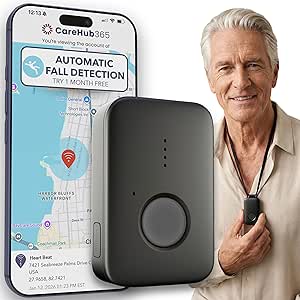 | Best for Extended Wear Between Charges | Connectivity: 4G LTE cellular; AT&T and Verizon networks | Monitoring: 24/7 monitoring subscription required | Emergency features: SOS button and GPS location | VIEW LATEST PRICE | See Our Full Breakdown |
| SecuLife SOS Medical Alert Wristband with Fall Detection, GPS Tracking, Geofencing, and Two-Way Calling |  | Best Screen-Free Wristband for Caregiver Tracking | Connectivity: Cellular | Emergency alerts: One-button SOS to preset emergency contacts; automatic fall alerts | Calling: Two-way voice calling with hands-free auto-answer | VIEW LATEST PRICE | See Our Full Breakdown |
| Medical Guardian MGMini Medical Alert Device for Seniors, Silver |  | Best for Familiar Operator Monitoring | Connectivity: Cellular with Wi-Fi backup | Monitoring: 24/7 monitoring; subscription required | Emergency features: SOS button, two-way speaker, and GPS location assistance | VIEW LATEST PRICE | See Our Full Breakdown |
| Safety+ 4G Medical Alert System with Fall Detection and GPS |  | Best for Included Fall Detection and Long Battery Life | Connectivity: Nationwide 4G | Monitoring: 24/7 emergency monitoring | Fall detection: Included | VIEW LATEST PRICE | See Our Full Breakdown |
| SecuLife Medical Alert Pendant for Seniors with Fall Detection, GPS Tracking, and Two-Way Calling |  | Best for Contact-Based Alerts and Geofencing | Connectivity: 4G LTE cellular | Emergency features: Fall detection and SOS alerts to preselected contacts | Calling: Two-way calling with hands-free auto-answer | VIEW LATEST PRICE | See Our Full Breakdown |
| Bay Alarm Medical SOS Mobile GPS Medical Alert System |  | Best for Independent Cellular Coverage | Connectivity: Verizon 4G LTE cellular | Location: GPS tracking | Fall detection: Optional | VIEW LATEST PRICE | See Our Full Breakdown |
| voice activated medical alert system | Connectivity | Battery life | Water resistance |
|---|---|---|---|
| Medical Guardian MGMini Medica | Cellular with Wi-Fi backup | Up to 72 hours | — |
| Seculife Medical Alert Smartba | GPRS, GPS, satellite | 1 day | IP67; listed depth of 1 meter |
| 911 Help Now Medical Alert Pen | — | — | — |
| JoneR Wi-Fi Caregiver Call But | — | — | — |
| Medical Guardian MGMini Medica | Cellular with Wi-Fi backup | Up to 3 days (120 hours, as listed) | — |
| Family First Alert MG Mini Med | 4G LTE cellular; AT&T and Verizon networks | Up to 5 days per charge | Water-resistant; suitable for shower use |
| SecuLife SOS Medical Alert Wri | Cellular | — | IP67; splash-resistant |
| Medical Guardian MGMini Medica | Cellular with Wi-Fi backup | Up to 3 days (120 hours) | — |
| Safety+ 4G Medical Alert Syste | Nationwide 4G | Up to 6 days | Suitable for showers and rain |
| SecuLife Medical Alert Pendant | 4G LTE cellular | Up to 6 days in description; 5 days average listed | IP67 |
| Bay Alarm Medical SOS Mobile G | Verizon 4G LTE cellular | Up to 144 hours | Water-resistant |
More Details on Our Top Picks
Medical Guardian MGMini Medical Alert Device for Seniors, Rose Gold
The Rose Gold MGMini suits people who want a wearable alert device for errands and home use, with two-way communication to a 24/7 monitoring team and GPS assistance for responders. Its up-to-72-hour battery life means less frequent charging than the Seculife Smartband, which lists one day of battery life. That difference can matter to someone who may forget a nightly charging routine. This is not voice activated: the wearer must use the SOS button to start an alert, then speak through the device. Location updates and step counting add useful context, but monitoring requires a paid subscription, and fall detection costs extra. Compared with the JoneR Wi-Fi Caregiver Call Button, the MGMini is better suited to going out, while JoneR offers voice activation at home.
Pros:- Two-way speaker connects the wearer with a 24/7 monitoring team after an SOS alert.
- GPS location assistance and hourly location updates support use away from home.
- Up to 72 hours of battery life reduces charging frequency.
- Includes both a clip and lanyard for different wearing preferences.
Cons:- Requires an active paid monitoring subscription before use.
- Fall detection is an optional paid add-on.
- The wearer must press the SOS button; it does not activate by voice.
Best for: Older adults who leave home regularly and want GPS assistance, two-way monitoring, and fewer charging sessions than a daily-charge wearable.
Not ideal for: People specifically seeking voice-activated emergency calling or a system without recurring monitoring costs.
- Brand:Medical Guardian
- Color:Rose Gold
- Connectivity:Cellular with Wi-Fi backup
- Battery life:Up to 72 hours
- Charging time:4 hours
- Monitoring:24/7 monitoring subscription required
- Features:SOS button, two-way speaker, GPS location assistance, hourly location updates, step counting
- Fall detection:Optional paid add-on
Our verdict“Choose the Rose Gold MGMini if you want a portable, monitored alert device with longer battery life, but not hands-free voice activation.”
Seculife Medical Alert Smartband for Seniors with Fall Detection, GPS Tracking, and Two-Way Calling
The Seculife Smartband is the closest fit here for someone who wants an alert to reach family without first pressing a button: it can call preselected contacts after a detected fall, and it also supports SOS calling. GPS tracking and geofencing add location context, while automatic call answering and two-way calling support communication through the band. Unlike the Medical Guardian MGMini, which connects to a 24/7 monitoring team, this model is described as calling chosen contacts and requires a subscription for its safety services. Its touchscreen and health sensors add functions, but they do not replace a clear emergency-response plan. The key tradeoff is daily charging: its listed one-day battery life is much shorter than either MGMini. It also does not specify voice-activated emergency alerts, so hands-free voice is not its defining advantage.
Pros:- Can automatically call preselected contacts after a detected fall.
- GPS tracking and geofencing provide location features for family.
- Supports SOS calling, two-way calls, and automatic call answering.
- IP67 water-resistance rating suits everyday wear around water.
Cons:- Listed battery life is one day, making frequent charging part of use.
- Safety services require a monthly subscription.
- The product information does not establish voice activation as an emergency trigger.
Best for: Seniors and families who want fall-triggered calls to selected contacts, location sharing, and a wearable with two-way calling.
Not ideal for: People who need multi-day battery life, a clearly described 24/7 monitoring center, or voice-activated emergency calling.
- Operating system:iOS and Android
- Features:Fall alerts, GPS, geofencing, phone calls, SOS calling
- Sensors:Heart rate, blood oxygen, body temperature
- Water resistance:IP67; listed depth of 1 meter
- Display size:2 inches
- Battery capacity:680 mAh
- Battery life:1 day
- Connectivity:GPRS, GPS, satellite
- Subscription:Required for safety services; plans listed from $25 per month
Our verdict“Pick the Seculife Smartband if fall-triggered contact calls and family location features matter more than long battery life or a monitoring-center model.”
911 Help Now Medical Alert Pendant with Direct 911 Calling
The 911 Help Now pendant takes a simpler route than the Medical Guardian MGMini: holding its SOS button for three seconds calls 911 directly, rather than routing the alert through a monitoring center. Its built-in microphone and speaker let the wearer speak with a dispatcher, and the lack of a subscription may appeal to someone who prefers direct emergency services over ongoing monitored support. That also defines the tradeoff: the device does not add a monitoring team to assess the call, and cellular service availability may vary. It is not voice activated, despite its two-way audio; the user must press and hold the button. Compared with the JoneR call button, it is intended for direct emergency calls, while JoneR sends alerts to family through an app.
Pros:- Calls 911 directly after the SOS button is held for three seconds.
- Built-in microphone and speaker allow conversation with a dispatcher.
- No monthly subscription or monitoring fee is required.
- Includes a lanyard, clothing clip, protective cover, and batteries.
Cons:- Does not connect through a monitoring center.
- Requires compatible cellular service, which may not be available everywhere.
- Emergency activation requires holding the SOS button rather than speaking.
Best for: People who can press and hold a button and want a direct 911 call with two-way dispatcher audio and no monitoring subscription.
Not ideal for: People who want hands-free voice activation, a monitoring team to relay calls, or a device whose operation does not depend on compatible cellular coverage.
- Cellular connectivity:4G LTE
- Emergency calling:Direct call to 911
- Activation:Press and hold SOS button for 3 seconds
- Audio:Built-in microphone and speaker
- Power source:3 AAA alkaline batteries, included
- Dimensions:2.8 × 1.75 × 0.6 inches
- Weight:2.4 oz
- Fees:No monthly fees or subscription
Our verdict“Choose this pendant if direct 911 access and no subscription matter more than voice activation or monitored call handling.”
JoneR Wi-Fi Caregiver Call Button with Voice and Two-Way Calls
JoneR is the lineup’s clearest match for voice-activated alerts: at home, it can notify linked family members when activated by voice, tapping, knocking, its button, or the pull cord. App-based two-way calls give relatives a way to respond, and up to four family members can receive alerts. Unlike the Medical Guardian MGMini, which uses a paid monitoring service and GPS for mobile use, JoneR has no subscription but depends on 2.4 GHz Wi-Fi and a linked family account. It is a home caregiver call system, not a cellular wearable for outings. Alerts also rely on app notifications, and a family member must call back, so it is less self-contained than a device connected to a monitoring team. Its camera-free design may suit households that want a simpler, privacy-conscious room alert.
Pros:- Voice activation joins tapping, knocking, a button, and pull-cord triggers.
- Two-way calls through the app let family members respond to an alert.
- No subscription is required.
- Supports alerts to up to four family members and uses no camera.
Cons:- Requires 2.4 GHz Wi-Fi and a linked family account.
- Alerts depend on app notifications and a family member calling back.
- Designed for home use rather than GPS-supported outings.
Best for: Older adults who spend most of their time at home and want voice or other simple triggers to notify several family members by app.
Not ideal for: People who need GPS away from home, a cellular connection, or automatic routing to a 24/7 monitoring team.
- Compatible devices:Smartphones and tablets
- Control methods:App, push button, remote, voice
- Mounting types:Wall mount and tabletop mount
- Sensor technology:Tapping sound and voice detection
- Wi-Fi:2.4 GHz only
- Alert recipients:Up to 4 family members
- Subscription:Not required
- Warranty:2 years
Our verdict“Pick JoneR for voice-triggered, family-managed alerts at home, but choose a cellular monitored device for independent coverage outside the house.”
Medical Guardian MGMini Medical Alert Device for Seniors, Pearl
The Pearl MGMini is a portable, button-activated alert device for people who want 24/7 monitoring and GPS assistance without committing to a long-term contract. It includes a lanyard and belt clip, so the wearer can choose a familiar way to keep the device close, and its listed battery life of up to three days helps reduce charging frequency. Like the Rose Gold MGMini, it offers two-way communication and requires monitoring to be activated separately; the color is not the main buying difference. The Pearl listing specifically notes that the subscription can be canceled anytime, which may suit someone who values flexible service terms. Compared with JoneR, it is better for mobile, monitored coverage, but it does not activate by voice. Fall detection is an optional add-on, not a built-in feature.
Pros:- Supports two-way communication with 24/7 emergency monitoring.
- GPS location assistance makes it more suitable for outings than a Wi-Fi-only home call button.
- Up to three days of listed battery life between charges.
- Includes both a lanyard and belt clip, with no long-term contract listed.
Cons:- Monitoring must be activated separately and requires a subscription.
- Fall detection is an optional add-on.
- The SOS button, rather than voice, starts an alert.
Best for: People who want a wearable with GPS assistance and monitored two-way communication, while avoiding a long-term contract.
Not ideal for: People seeking a voice-triggered alert, no recurring monitoring commitment, or included fall detection.
- Brand:Medical Guardian
- Color:Pearl
- Connectivity:Cellular with Wi-Fi backup
- Battery life:Up to 3 days (120 hours, as listed)
- Recharge time:4 hours
- Dimensions:15.7 × 1.45 × 0.6 inches, as listed
- Material:Plastic
- Monitoring:24/7 subscription required; no long-term contract; cancel anytime
- Fall detection:Optional add-on
Our verdict“Choose the Pearl MGMini if flexible monitoring terms and portable GPS assistance matter more than hands-free voice activation.”
Family First Alert MG Mini Medical Alert Pendant with GPS and 24/7 Monitoring
The Family First Alert MG Mini suits someone who wants a wearable cellular alert with 24/7 operator monitoring and GPS location support. Its stated battery life of up to five days gives it an advantage over the Medical Guardian MGMini Silver, which lists up to three days, though the Family First Alert description still recommends daily charging. Dual AT&T and Verizon 4G LTE connectivity is intended to support use beyond the home, while its water resistance allows shower wear—a practical way to keep the alert nearby during a common fall-risk activity. The main tradeoff is that fall detection costs extra, so it is not included as standard. A monitoring subscription is also required, and the 30-day warranty is shorter than the one-year warranty listed for the SecuLife wristband.
Pros:- Connects to trained emergency operators through 24/7 monitoring
- GPS and AT&T/Verizon 4G LTE support use away from home
- Water-resistant design is suitable for shower wear
- Battery life is listed as up to five days per charge
Cons:- Fall detection is an optional add-on rather than a standard feature
- Requires a monthly monitoring subscription
- The 30-day warranty is short compared with the SecuLife wristband’s listed one-year warranty
Best for: People who want 24/7 operator monitoring, GPS support, and a pendant that can be worn in the shower, with less frequent charging than the Medical Guardian MGMini Silver.
Not ideal for: Buyers who want included automatic fall detection, a longer stated warranty, or service without a recurring monitoring subscription.
- Connectivity:4G LTE cellular; AT&T and Verizon networks
- Monitoring:24/7 monitoring subscription required
- Emergency features:SOS button and GPS location
- Fall detection:Optional add-on
- Water resistance:Water-resistant; suitable for shower use
- Battery life:Up to 5 days per charge
- Included accessories:Charging dock, two lanyards, belt clip, charging brick, and cord
- Warranty:30 days
Our verdict“Choose this pendant if shower-safe wear and a longer listed battery life matter more than included fall detection or a longer warranty.”
SecuLife SOS Medical Alert Wristband with Fall Detection, GPS Tracking, Geofencing, and Two-Way Calling
The SecuLife SOS wristband is the lineup’s strongest fit for families who want automatic fall alerts and location tools in a screen-free wrist format. GPS, geofencing, and location history give caregivers more ways to keep tabs on someone than the Family First Alert MG Mini, whose listed features focus on monitored SOS calls and GPS assistance. Two-way calling and hands-free auto-answer can also help a wearer speak with contacts without handling a phone. This is not described as a connection to a 24/7 professional monitoring team: its one-button alerts go to preset emergency contacts, a different arrangement from the operator monitoring offered by the MG Mini. The biggest everyday drawback is one-day battery life, which calls for a dependable charging routine. It is also splash-resistant, not specified for shower use.
Pros:- Automatic fall alerts and one-button SOS contact preset emergency contacts
- GPS tracking, geofencing, and location history support caregiver awareness
- Two-way calling with hands-free auto-answer
- Screen-free design with IP67 splash resistance
Cons:- Listed battery life is only one day
- Requires a monthly subscription for service
- Alerts are directed to preset contacts rather than a listed 24/7 professional monitoring team
Best for: Caregivers who want a screen-free wristband with fall alerts, two-way calls, and GPS geofencing tied to preset contacts.
Not ideal for: People who need longer stretches between charges, shower-ready wear, or a clearly listed 24/7 professional monitoring team.
- Connectivity:Cellular
- Emergency alerts:One-button SOS to preset emergency contacts; automatic fall alerts
- Calling:Two-way voice calling with hands-free auto-answer
- Location features:GPS tracking, geofencing, and location history
- Water resistance:IP67; splash-resistant
- Battery:680 mAh; listed life of 1 day
- Subscription:Monthly subscription required
- Warranty:1 year
Our verdict“Pick this wristband if caregiver location features and automatic fall alerts matter more than long battery life or professional operator monitoring.”
Medical Guardian MGMini Medical Alert Device for Seniors, Silver
The Medical Guardian MGMini Silver makes sense for someone who values a two-way speaker and 24/7 monitoring more than extra caregiver-tracking features. Pressing the SOS button connects the wearer with the monitoring team, while GPS location assistance can help when an alert happens away from home. It also includes a lanyard and belt clip, giving the wearer a choice of how to carry it. Compared with the Family First Alert MG Mini, its listed battery life is shorter—up to three days rather than five—but this version adds Wi-Fi backup and step counting. Neither the included data nor the product description identifies voice activation: the emergency action is button-based. Monitoring requires a subscription, and optional fall detection is an added cost, so buyers seeking automatic fall alerts included with the device should compare it with the Safety+ 4G.
Pros:- Two-way speaker connects the wearer with a 24/7 monitoring team
- GPS location assistance supports alerts away from home
- Includes a lanyard, belt clip, and charging cradle
- Adds Wi-Fi backup and step counting
Cons:- Monitoring requires an activated paid subscription
- Optional fall detection costs extra
- Battery life is listed as up to three days, shorter than the Family First Alert MG Mini’s stated five days
Best for: Seniors who want a wearable SOS device with a two-way speaker, 24/7 monitoring, GPS assistance, and both lanyard and clip wear options.
Not ideal for: Buyers who need included fall detection, a longer listed battery life, or an alert system activated by voice rather than a button.
- Connectivity:Cellular with Wi-Fi backup
- Monitoring:24/7 monitoring; subscription required
- Emergency features:SOS button, two-way speaker, and GPS location assistance
- Battery life:Up to 3 days (120 hours)
- Recharge time:4 hours
- Additional features:Step counting and hourly location updates
- Included accessories:Charging cradle, power cord, clip, lanyard, EMT card, owner’s manual, quick start guide, and service agreement
- Enclosure material:Plastic
Our verdict“Choose the MGMini Silver if 24/7 operator access and flexible wear options take priority over included fall detection or longer battery life.”
Safety+ 4G Medical Alert System with Fall Detection and GPS
The Safety+ 4G is the clearest choice here for buyers who want fall detection included rather than sold as an add-on. It pairs that feature with GPS, 24/7 emergency monitoring, and caregiver-app updates for location, activity, steps, battery status, and emergency notifications. Its stated battery life of up to six days is longer than the Medical Guardian MGMini Silver’s listed three days and the SecuLife SOS wristband’s one day, which may reduce charging interruptions. The tradeoff is a required activation call before use and a service subscription after the included first month. The product is water-resistant for showers and rain and comes with both a lanyard and belt clip. As with the other button-led devices here, the supplied information does not describe voice activation.
Pros:- Fall detection and GPS are included
- 24/7 monitoring and caregiver emergency notifications
- Battery life is listed as up to six days
- Lanyard and belt clip allow two ways to wear it
Cons:- Ongoing service subscription is required after the included first month
- A call is required to activate the device
- The supplied information describes button-led emergency use, not voice activation
Best for: People who want fall detection included, 24/7 emergency monitoring, and caregiver-app updates in a wearable with a long stated battery life.
Not ideal for: Buyers who want service without a subscription, prefer setup that does not require an activation call, or specifically need voice-triggered alerts.
- Connectivity:Nationwide 4G
- Monitoring:24/7 emergency monitoring
- Fall detection:Included
- Location services:GPS
- Battery life:Up to 6 days
- Water resistance:Suitable for showers and rain
- Wear options:Lanyard with magnetic clasp or belt clip
- Caregiver app:Location, activity and step tracking, battery status, and emergency notifications
- Activation and service:Call required before use; first month included, then monthly service
Our verdict“Choose Safety+ 4G if included fall detection, caregiver app tools, and longer listed battery life outweigh the setup call and continuing subscription.”
SecuLife Medical Alert Pendant for Seniors with Fall Detection, GPS Tracking, and Two-Way Calling
The SecuLife medical alert pendant suits buyers who want an SOS device that can alert preselected contacts while adding two-way calling, GPS tracking, and geofencing. Its large SOS button and display for time and battery status make the controls and charge level visible, unlike the screen-free SecuLife SOS wristband. Both SecuLife options offer location tools and two-way calling, but this pendant lists a longer battery life and an IP67 water-resistance rating. There is a discrepancy to account for: the description claims up to six days, while the specifications list a five-day average. Fall detection is included in the feature description, yet the service still requires a monthly subscription. Unlike the Safety+ 4G, the provided information does not specify 24/7 professional monitoring, so check who receives alerts before choosing it.
Pros:- Fall detection and SOS alerts to preselected contacts
- Two-way cellular calling with hands-free auto-answer
- GPS tracking, geofencing, and location history
- IP67 water resistance and a display for time and battery status
Cons:- Requires a monthly subscription for service
- Battery-life figures differ between the description and specifications
- The supplied information does not specify 24/7 professional operator monitoring
Best for: People who prefer a pendant with a large SOS button, visible time and battery status, GPS geofencing, and calls to preselected contacts.
Not ideal for: Buyers who require confirmed 24/7 professional operator monitoring, do not want a monthly subscription, or need a clearly consistent battery-life figure.
- Connectivity:4G LTE cellular
- Emergency features:Fall detection and SOS alerts to preselected contacts
- Calling:Two-way calling with hands-free auto-answer
- Location features:GPS tracking, geofencing, and location history
- Water resistance:IP67
- Battery life:Up to 6 days in description; 5 days average listed
- Battery capacity:1000 mAh
- Included items:Charging cable, SIM card, and user manual
- Subscription:Monthly subscription required
Our verdict“Choose this pendant if visible controls and contact-based GPS alerts suit your needs, but verify monitoring arrangements and battery expectations before subscribing.”
Bay Alarm Medical SOS Mobile GPS Medical Alert System
The Bay Alarm Medical SOS Mobile GPS is a strong fit for someone who wants a wearable alert device that connects directly to a trained operator, without relying on a smartphone. Its one-button call and two-way audio let the user speak with help through the device, while GPS and caregiver app access can help family members check location. Compared with the JoneR Wi-Fi Caregiver Call Button, this pick is designed for use away from home through Verizon 4G LTE rather than a home Wi-Fi setup. It is also lighter and more compact than many wearable devices, and the included lanyard and belt clip give the wearer options. The tradeoffs are an ongoing subscription and fall detection that costs extra; buyers who want automatic fall alerts included should compare options such as the SecuLife SOS wristband.
Pros:- One-button access to a trained operator with two-way audio
- GPS tracking and caregiver app access support location checks
- Works independently without a smartphone
- Includes a lanyard and belt clip for different wearing preferences
Cons:- Ongoing service subscription is required
- Fall detection is optional rather than included
- Button-based activation is not voice-activated hands-free calling
Best for: Older adults who leave home independently and want cellular access to a trained operator, with family members who value GPS location sharing.
Not ideal for: Buyers seeking a one-time purchase, included automatic fall detection, or a voice-activated hands-free alert; this device requires a subscription and uses a button to place calls.
- Connectivity:Verizon 4G LTE cellular
- Location:GPS tracking
- Fall detection:Optional
- Battery life:Up to 144 hours
- Battery capacity:420 mAh
- Weight:Under 2 oz
- Dimensions:2.72 x 1.38 x 0.57 inches
- Water resistance:Water-resistant
- Included items:SOS Mobile GPS device, charging dock with power adapter, magnetic-clasp lanyard, belt clip, caregiver tracking app access
Our verdict“Choose this for independent outings and cellular access to a live operator, but skip it if voice activation or included fall detection is a requirement.”

How We Picked
I ranked these 11 options by how well their stated features match the needs behind a voice-activated medical alert search: initiating help with minimal effort, communicating clearly, and reaching an appropriate responder. I gave weight to voice-trigger capability, two-way calling, fall detection, GPS, and monitoring arrangements, while distinguishing mobile systems from home-only caregiver buttons and direct-911 devices. A feature only counted as a strength when its likely use was clear; for example, GPS matters most to someone who leaves home, while geofencing can help caregivers monitor a defined area.
The ranking favors options with a clearer combination of accessible calling, mobile coverage, and a defined response path, rather than treating a long feature list as proof of a better fit. I also considered wearing style, setup demands, and what a buyer may need to verify, including cellular or Wi-Fi requirements, subscription terms, battery routines, and how fall detection works. Several listings describe calling or two-way communication without making clear whether an alert can be started by voice, so I treat that distinction as a verification point, not an assumed feature. Similar MGMini color variants are grouped closely because their core device role is the same.
| voice activated medical alert system | Water resistance |
|---|---|
| Medical Guardian MGMini Medica | — |
| Seculife Medical Alert Smartba | IP67; listed depth of 1 meter |
| 911 Help Now Medical Alert Pen | — |
| JoneR Wi-Fi Caregiver Call But | — |
| Medical Guardian MGMini Medica | — |
| Family First Alert MG Mini Med | Water-resistant; suitable for shower use |
| SecuLife SOS Medical Alert Wri | IP67; splash-resistant |
| Medical Guardian MGMini Medica | — |
| Safety+ 4G Medical Alert Syste | Suitable for showers and rain |
| SecuLife Medical Alert Pendant | IP67 |
| Bay Alarm Medical SOS Mobile G | Water-resistant |
Factors to Consider When Choosing Voice Activated Medical Alert Systems
Before choosing a device, separate the ability to speak through an alert system from the ability to activate an alert by voice. Those functions are not interchangeable, and product listings may describe one without confirming the other. These broader checks can help you avoid buying a device that communicates well once activated but is hard to trigger when help is needed.
Confirm What “Voice Activated” Means
Ask the provider or seller exactly what starts the call: a spoken command, a wearable button, a base-station button, or another action. A system with two-way calling lets the user speak to a responder after a connection is made, but that does not prove it can detect a voice command to place the call. If the user may be unable to press a button after a fall, this distinction can matter more than the number of listed features. Check whether voice activation works from the wearable itself or only through a home speaker or base unit. If the information is unclear, treat voice activation as unconfirmed and choose a device with a reliable activation method the user can operate.
Match the Response Path to the Household
Find out who receives an alert and what happens next: a monitoring center, a caregiver, or emergency services. A direct-911 device may suit someone who wants to call emergency dispatch without an intermediary, but it may not provide the same support as professional monitoring or a caregiver contact chain. A home caregiver button can be useful when someone is nearby and able to respond, yet it may not be a substitute for around-the-clock monitoring. Ask whether contacts are called in sequence, whether the system can share location, and how an unanswered call is handled. The right response path depends on caregiver availability, not just the device’s advertised call feature.
Choose Home Coverage or Mobile Coverage
Think about where the wearer spends time during a typical week, including yards, shops, appointments, and travel beyond the home. A Wi-Fi-based call button may suit a person who stays indoors, but it depends on the home network and may not provide the same reach as a mobile GPS device. A wearable with GPS can help locate a person away from home, though coverage and location accuracy can depend on network access and surroundings. Ask which cellular service the system uses and whether it works in the places the wearer visits. Buying mobile features for someone who rarely leaves home may add setup and charging duties without much benefit.
Decide Whether Fall Detection Fits the Risk
Automatic fall detection may help when a person cannot press an alert button, but it can miss some falls and may also trigger alerts when no emergency occurred. It should be treated as a backup, not a replacement for a device the wearer can activate. Check whether fall detection is included or offered separately, how the system confirms an alert, and whether a user can cancel a false alarm. Consider the wearer’s balance, daily movement, and comfort with a device before making this feature a priority. A simpler call button may be easier to wear consistently if automatic detection is not needed.
Plan for Charging, Wearing, and Everyday Use
A medical alert device only helps if it is worn, charged, and within connection range when needed. Pendants, wristbands, and compact mobile units suit different habits, so ask the wearer which format they are most likely to keep on throughout the day. Check battery life claims alongside charging time, low-battery alerts, and whether the device can be worn in the shower. A device with GPS or two-way calling may need more frequent charging than a basic home button. Before purchase, set a charging routine that does not leave the user without coverage during a regular outing or overnight period.
Compare Service Terms Before Paying for Features
Monthly service, activation requirements, replacement policies, and cancellation terms can shape the long-term fit as much as hardware. Ask whether professional monitoring is included, whether GPS or fall detection changes the service plan, and what happens if the wearer moves or changes cellular providers. For a device with no monitoring subscription, confirm who is expected to answer calls and whether the system can reach the intended contacts reliably. Avoid comparing devices by feature count alone; a feature that requires a service the household will not maintain has little practical value. Write down the recurring obligations and caregiver tasks before choosing.
Frequently Asked Questions
Does two-way calling mean a medical alert device is voice activated?
No. Two-way calling usually means the wearer can speak with a responder after an alert connects. The alert may still need to be started by pressing a button, and some listings do not clearly state whether spoken commands can initiate a call. Ask the seller to explain the activation process step by step, including what happens if the wearer cannot reach the device. If hands-free activation is the main requirement, get that capability confirmed for the exact model and service plan before buying.
Should I choose a caregiver call button or a professionally monitored system?
Choose based on who can respond and when. A caregiver call button can work well when a trusted person is nearby, reachable, and willing to answer alerts, while professional monitoring may suit households that need a response path at all hours. A direct-911 device follows a different route and may not provide caregiver coordination or an intermediary to assess the call. Ask about unanswered alerts, backup contacts, and whether the system can reach help if the first person does not respond. The device’s advertised calling feature matters less than a response plan the household can depend on.
Is GPS worth choosing if the wearer mostly stays at home?
GPS is most useful when the wearer regularly goes out alone or caregivers need help locating them away from home. For someone who stays indoors, a home-focused call button may be simpler and avoid some of the charging and cellular requirements tied to a mobile device. Still, routines can change, so think about appointments, walks, and time spent in the yard rather than only overnight use. Confirm whether GPS is available wherever the wearer travels and whether location sharing requires a paid service. Choose it for a real mobility need, not just because it appears on a feature list.
Can I rely on fall detection instead of asking the wearer to press a button?
No fall detection feature should be treated as a guaranteed substitute for manual activation. Automatic detection can provide another route to help when a wearer cannot press a button, but it may not recognize every fall and may generate false alerts. Ask how alerts are handled, whether the wearer can cancel them, and what happens if the device has lost its connection or battery power. A wearable should still be easy for the person to activate themselves. Consider fall detection as added support alongside a clear response plan.
What should I verify before buying a device for someone who lives alone?
Confirm who answers the alert, whether help is available around the clock, and what the system does when the wearer cannot speak or a call goes unanswered. Check voice activation separately from two-way calling, then confirm cellular or Wi-Fi coverage in the home and places the person visits. Ask about charging reminders, water resistance, fall detection, and whether the device must be worn continuously. Review recurring service terms and emergency contacts with the wearer and caregivers. A short practice call can reveal whether the controls and response process make sense before an emergency.
Conclusion
For a broad mix of mobility and monitored support, my best overall choice is the Medical Guardian MGMini; its three color listings share the same basic role, so pick the finish the wearer will be comfortable wearing. The best value for a home-focused setup is the JoneR Wi-Fi Caregiver Call Button when caregiver response and Wi-Fi calling fit the household, while the best premium-feature fit is the SecuLife SOS Wristband for buyers who specifically want GPS, geofencing, fall detection, and two-way calling. For beginners, I would start with the simplest device whose activation method and responder are clearly understood, then confirm whether the wearer can manage its charging and setup. For a specific need, choose 911 Help Now for direct 911 calling, Bay Alarm Medical or Family First Alert for shoppers prioritizing a mobile system with monitoring, and a SecuLife pendant or smartband when its wearable format better matches daily habits. Before ordering any option, verify whether it truly starts an alert by voice; that detail is central to the search, yet it is not established equally clearly across these listings.
Halloween Picks
halloween
As an affiliate, we earn on qualifying purchases.