

This guide provides step-by-step instructions to help you choose, adjust, and use an ergonomic recliner chair effectively. It is designed for individuals seeking better back support and comfort during prolonged sitting. Whether you are upgrading your current chair or buying a new one, this guide ensures you can achieve proper ergonomic setup to reduce strain and improve posture.

Turn quiet afternoons into listening time
- Thousands of audiobooks, podcasts and originals
- Listen on your phone, tablet or Echo — also offline
- Cancel anytime

Massage Gaming Recliner Chair with Cup Holder & Side Pockets
- ✔ Recline Function: Manual recline
- ✔ Footrest: Extendable
- ✔ Lumbar Support: Vibrating massage
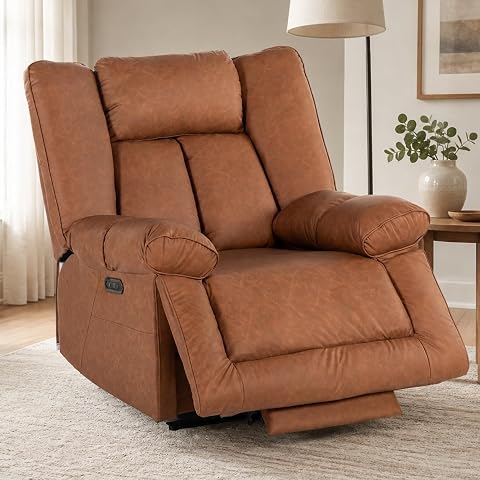
400” Big and Tall Power Recliner, Dual Motor, USB-C, Oversized Chair
- ✔ Capacity: 400 lbs
- ✔ Motor: Dual motor
- ✔ Charging ports: USB-C and USB
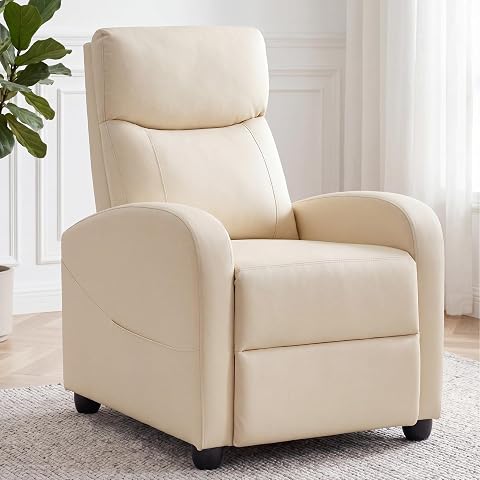
Recliner Chair, Fabric Reclining Sofa for Adults, Home Theater Seating with Lumbar Support, Beige
- ✔ Reclining Range: 90° to 160°
- ✔ Material: Breathable fabric, high-resilience sponge
- ✔ Frame: Solid hardwood
Difficulty: Intermediate | Time: 30-45 minutes
What You’ll Need
Tools & Materials:
- Measuring tape
- None (if purchasing a new chair)
Knowledge:
- Basic understanding of ergonomic principles
- Ability to follow adjustment instructions
If purchasing a new chair, test different models in person if possible. For existing chairs, identify adjustable features such as tilt, height, and lumbar support.
Massage Gaming Recliner Chair with Cup Holder & Side Pockets
<p>This ergonomic gaming recliner stands out for its <strong>adjustable features and built-in vibrating lumbar massage</strong>, making it ideal for long gaming or work sessions. Compared with the fabric recliner, it offers more personalized support but relies on manual recline, which can be less effortless. The PU leather upholstery adds style and ease of cleaning but may compromise breathability. Its side pockets and cup holder enhance convenience, catering to users who want a fully featured, ergonomic chair with massage capabilities. However, the manual recline mechanism requires effort, and limited color options could restrict aesthetic flexibility.</p>
Pros:
- Ergonomic design with adjustable features
- Built-in vibrating lumbar massage for back relief
- Convenient cup holder and side pockets
Cons:
- Manual recline may require effort to adjust
- PU leather may be less breathable
- Limited color options
Best for: Gamers, remote workers, or anyone seeking massage support during extended sitting
Not ideal for: Users preferring fully powered recline or fabric upholstery for breathability
Bottom line: Ideal for those who prioritize massage features and adjustable comfort, but less suitable for effortless recline or breathability.
“Ideal for those who prioritize massage features and adjustable comfort, but less suitable for effortless recline or breathability.”
400” Big and Tall Power Recliner, Dual Motor, USB-C, Oversized Chair
<p>This oversized power recliner is designed for <strong>big and tall adults, supporting up to 400 lbs</strong>. Its dual motors allow independent adjustment of the backrest and headrest, providing customized comfort tailored to larger users. The extra-wide footrest ensures full-body support, and built-in USB-C and USB ports add modern convenience. Compared to the manual recline options, this model offers effortless adjustment at the push of a button, but its assembly can be time-consuming, and delivery in two packages might delay setup. The cushion firmness isn’t specified, which could be a concern for those seeking softer padding.</p>
Pros:
- Supports up to 400 lbs
- Dual motors for independent adjustment
- Built-in USB-C and USB ports
Cons:
- Requires assembly and time to set up
- Delivery in two packages may cause delays
- Limited info on cushion softness
Best for: Large users or those needing heavy-duty support with electronic adjustability
Not ideal for: Those with limited space or seeking a lightweight, easy-to-move chair
Bottom line: Best suited for large, heavy users seeking effortless electronic adjustments and charging features, but less ideal for compact spaces or quick setup.
“Best suited for large, heavy users seeking effortless electronic adjustments and charging features, but less ideal for compact spaces or quick setup.”
Recliner Chair, Fabric Reclining Sofa for Adults, Home Theater Seating with Lumbar Support, Beige
<p>This fabric recliner offers <strong>adjustable reclining from 90° to 160°</strong>, making it a flexible choice for reading, watching, or relaxing. Its breathable fabric and high-resilience sponge ensure comfort during extended use, while the solid hardwood frame guarantees durability. Unlike the previous two options, it doesn’t include massage or electronic features, but its simplicity makes it easier to maintain and operate. Compared to powered recliners, this model may require some effort to adjust, and the fabric might not be preferred by everyone. It’s perfect for those who value traditional comfort and straightforward operation.</p>
Pros:
- Adjustable reclining from 90° to 160°
- Durable, solid hardwood frame
- Easy to assemble
Cons:
- No massage or electronic features
- Limited to fabric material, which may not suit all preferences
- Reclining mechanism may require effort
Best for: Users seeking a durable, adjustable recliner without electronic features
Not ideal for: Those wanting massage or electronic adjustments
Bottom line: Ideal for traditionalists or those prioritizing durability and simple functionality over electronic features.
“Ideal for traditionalists or those prioritizing durability and simple functionality over electronic features.”
As an Amazon Associate we earn from qualifying purchases.
Before You Start
Ensure your current seating area is clear and has enough space for the chair adjustments. If buying a new chair, confirm it has adjustable features like height, tilt, lumbar support, and armrests. Be aware of your height and preferred sitting posture to guide adjustments effectively.
Step-by-Step Instructions
Step 1: Assess Your Body Dimensions
Measure your height, sit-to-hip distance, and lumbar curve to understand your ergonomic needs. Use a measuring tape to record your height and seated measurements. Note any specific areas where you experience discomfort, such as lower back or neck.
Tip: Use these measurements to select a chair with adjustable features that match your body size and shape.
Check: You have a clear understanding of your body dimensions and ergonomic needs.
Step 2: Choose an Appropriate Ergonomic Recliner
Select a recliner that offers adjustable height, lumbar support, tilt mechanism, and armrest positioning. Test multiple chairs if possible, ensuring the seat height suits your leg length and your feet rest flat on the floor.
Tip: Look for a chair with a tilt lock and adjustable lumbar support for personalized comfort.
Check: You have selected a chair that fits your body dimensions and offers necessary ergonomic adjustments.
Step 3: Adjust Seat Height
Raise or lower the chair so that your feet are flat on the floor, knees are at approximately 90 degrees, and thighs are parallel to the ground. Use the height adjustment lever typically located under the seat.
Tip: Ensure your hips are slightly higher than your knees to promote good circulation and posture.
Check: Your feet are flat on the floor with knees bent at approximately 90 degrees, and thighs are parallel to the ground.
Step 4: Set Lumbar Support
Adjust the lumbar support to fit the natural curve of your lower back. Move the support up or down using the adjustment knob or slider until it presses gently into your lumbar region, providing firm but comfortable support.
Tip: The lumbar support should fill the curve of your lower back without causing pressure or discomfort.
Check: Your lower back is supported with a gentle curve, reducing strain and maintaining proper posture.
Step 5: Adjust Recline and Tilt Tension
Use the recline lever or button to tilt the chair back to a comfortable angle, typically between 100-135 degrees. Adjust the tilt tension knob to match your body weight, ensuring the chair reclines smoothly and stays in position when leaned back.
Tip: Start with a slight recline and gradually increase until you find a comfortable angle that supports your back without causing strain.
Check: The chair reclines smoothly to your preferred position and stays in place without excessive effort.
Step 6: Position Armrests
Adjust armrest height so that your shoulders are relaxed and elbows rest comfortably at about 90 degrees. If adjustable, move armrests inward or outward for proper forearm support.
Tip: Your arms should be supported without elevating or depressing your shoulders.
Check: Your arms rest comfortably on the armrests with relaxed shoulders and elbows at a natural angle.
Step 7: Verify Overall Posture
Sit back in the chair and check your posture. Your back should be fully supported with a slight recline, feet flat on the floor, and arms supported. Adjust any features further if necessary.
Tip: Use a mirror or ask for feedback to confirm proper alignment and comfort.
Check: You feel supported, balanced, and able to sit comfortably for extended periods without strain.
Common Mistakes to Avoid
- Adjusting only one feature without considering overall posture. — Adjust all ergonomic features in combination, ensuring the entire sitting position supports your body naturally.
- Using the chair without properly adjusting lumbar support. — Make sure lumbar support fills the curve of your lower back and supports it evenly.
- Ignoring the foot placement and seat height. — Always set seat height so your feet are flat on the floor with knees at 90 degrees.
Troubleshooting
Problem: The chair reclines too easily or doesn’t stay in position.
Solution: Tighten the tilt tension knob gradually until the recline stays in place comfortably.
Problem: Lumbar support causes discomfort or pressure.
Solution: Adjust the support upward or downward and reduce firmness if adjustable, or add a cushion if needed.
Problem: Armrests feel too high or too low.
Solution: Adjust armrest height or remove if they can’t be set at a comfortable level.
Problem: Persistent back pain after adjustments.
Solution: Consult a healthcare professional to rule out underlying issues and consider consulting an ergonomic specialist.
What Success Looks Like
The final setup provides full back support with a slight recline, feet flat on the floor, knees at 90 degrees, and arms resting comfortably on armrests. You can sit for extended periods without discomfort or strain, and your posture remains natural and supported.
Next Steps
Maintain your ergonomic setup by periodically checking adjustments, especially if your body changes or you notice discomfort. Consider adding lumbar support cushions or footrests if needed. Revisit your setup after long periods of use or if experiencing discomfort, and seek professional ergonomic assessment if persistent issues occur.
Frequently Asked Questions
How often should I adjust my ergonomic chair?
Adjust your chair whenever you notice discomfort or after significant changes in your body or work habits. Regularly review your setup every few months to maintain optimal support.
Can I use any recliner as an ergonomic chair?
Not all recliners are ergonomic. Choose one with adjustable features like seat height, lumbar support, tilt, and armrests to ensure proper ergonomic benefits.
What if my chair doesn’t have adjustable lumbar support?
You can add a separate lumbar cushion or pillow designed for ergonomic support. Ensure it fits comfortably and supports your lower back properly.
How do I know if my setup is ergonomic enough?
If you can sit comfortably for long periods, with supported back, relaxed shoulders, feet flat, and arms resting naturally, your setup is likely ergonomic. Seek professional advice if unsure or if discomfort persists.
Halloween Picks
halloween
As an affiliate, we earn on qualifying purchases.