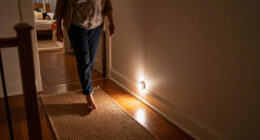
For indoor security cameras for elder monitoring, I would start with the SYMYNELEC Elderly Monitoring Camera for its screen and one-touch video calling, features aimed directly at keeping seniors and caregivers in touch. The eufy Security 4K Indoor Camera E30 stands out for buyers who prioritize detailed video and no subscription, while the Tapo 2K Pan Tilt 2-Pack offers a practical route to covering more than one room. The main tradeoffs are direct video calling versus ordinary two-way audio, single-camera simplicity versus multi-room coverage, and sharper video versus setup and privacy needs. A camera can support check-ins, but it is not a substitute for emergency response or in-person care. Read on for the full breakdown and guidance on matching a camera to a senior’s routines.

Turn quiet afternoons into listening time
- Thousands of audiobooks, podcasts and originals
- Listen on your phone, tablet or Echo — also offline
- Cancel anytime
Complete the kit


Key Takeaways
- The SYMYNELEC is the most elder-focused pick: its screen and one-touch video calling address communication more directly than cameras built mainly for general home security.
- Video calling and two-way audio are not interchangeable: a talk-back speaker lets a caregiver speak through an app, while a screen-based calling setup may make a check-in more accessible for a senior.
- Multi-camera bundles suit room coverage, not every household: the Anona and LaView four-camera kits and the GALAYOU four-pack can cover several spaces, but each extra camera adds placement, setup, and privacy decisions.
- Pan-and-tilt models can reduce blind spots: options such as the Kasa EC71 and Tapo 2K Pan Tilt 2-Pack offer movable views, while fixed cameras can be simpler when one area is all that needs monitoring.
- Resolution is only one part of a useful check-in: the lineup ranges from 1080p models to 2K and 4K options, but camera access, audio clarity, connectivity, and the senior’s comfort with the device also shape day-to-day usefulness.







| indoor security cameras for elder monitoring | Resolution | Storage | Audio | Night vision |
|---|---|---|---|---|
| Anona 4K UHD Indoor Security C | 4K UHD | Cloud with AES-128 encryption or microSD up to 512 GB | — | — |
| GNCC 2K Indoor Security Camera | 2K Ultra HD | Cloud with 14-day free trial or SD card, 16–128 GB | Two-way | — |
| eufy Security 4K Indoor Camera | 4K UHD | SD card, sold separately | — | Color and infrared |
| GNCC 2K Cameras for Home Secur | 2K Ultra HD | Cloud with 14-day free trial or SD card, 16–128 GB | Two-way | Up to 10 meters |
| GBIUT Indoor Camera 5G & 2.4G | 2K | TF card, 8–256 GB, or cloud storage with subscription | Two-way talk | Color and infrared |
| Aosu 2K Indoor Camera Baby Mon | 3 MP | — | Two-way | — |
| SYMYNELEC Elderly Monitoring C | — | Up to 128 GB microSD card; card not included | Two-way | — |
| Roku Indoor Camera 2-Pack | 1080p HD | — | Two-way | Yes |
| Tapo 1080P Indoor Security Cam | 1080p | — | Two-way | Full-color, up to 30 feet |
| Kasa 1080p Indoor Pan/Tilt Wir | 1080p Full HD | — | — | Up to 30 feet |
| Tapo 2K Pan Tilt Security Came | 2K HD | Up to 512 GB microSD (card not included); cloud storage supported | Two-way audio | Yes |
| 2K Indoor/Outdoor Home Securit | 2K HD | MicroSD up to 128 GB; cloud storage available | — | Color night vision |
| LaView Security Camera Kit | 1080p | MicroSD up to 128 GB; 30-day free US cloud trial | Two-way audio with noise cancellation | — |
| GALAYOU 5G & 2.4G Dual-Band In | 3 MP | MicroSD up to 128 GB; cloud storage supported | — | — |
| Two-Way Video Camera | — | — | — | — |
More Details on Our Top Picks
Anona 4K UHD Indoor Security Camera (4 Pack)
For families checking several rooms or wanting to read more detail in a live view, the four-camera set pairs 4K video and 8x zoom with 360° pan, 110° tilt, and auto-tracking. That combination can help a remote caregiver check where a senior is in a room without relying on a fixed camera angle. Person detection is relevant to elder monitoring, though the listed AI categories also include pets and crying babies rather than a specific fall-detection feature.
Compared with the eufy Security E30, Anona provides four cameras rather than one, making it a better fit for broad room coverage; eufy, by contrast, lists color night vision and local storage without subscription fees. Anona supports cloud or microSD storage, but the card is not included, and app setup plus a dependable Wi-Fi connection are required. I’d choose it for detail and coverage, not as a dedicated medical-alert system.
Pros:- Four cameras can cover multiple rooms from one set.
- 4K video and 8x zoom provide detailed remote views.
- 360° pan, 110° tilt, and auto-tracking follow movement around a room.
- Cloud and microSD storage offer two recording approaches.
Cons:- MicroSD cards are not included.
- App setup and Wi-Fi are required for monitoring.
- The listed detection features do not include fall detection or medical alerts.
Best for: Families monitoring a senior across several indoor rooms who value zoomable 4K video and person detection.
Not ideal for: Caregivers seeking fall detection, a battery-powered camera, or a simple standalone monitor that does not depend on app and Wi-Fi setup.
- Resolution:4K UHD
- Zoom:8x
- Pan:360°
- Tilt:110°
- Wi-Fi:Dual-band Wi-Fi 6 (2.4 GHz and 5 GHz)
- Storage:Cloud with AES-128 encryption or microSD up to 512 GB
Our verdict“Choose Anona if you want four zoom-capable 4K cameras for checking a senior across multiple rooms, but not if you need dedicated fall alerts.”
GNCC 2K Indoor Security Camera with 5G WiFi, Night Vision, AI Motion Tracking, Two-Way Audio, Compatible with Alexa
The GNCC’s strongest fit for elder monitoring is two-way audio: a caregiver can speak through the camera during a check-in, while AI motion tracking and customizable zones help focus alerts on chosen parts of a room. Its 340° horizontal view can follow movement across much of the space, and 10-meter night vision supports monitoring in low light. These functions help with routine reassurance, but the product data does not specify fall detection or emergency response.
Compared with the two-camera GNCC 2K Cameras for Home Security set, this listing is a single camera, so it suits one main room rather than coverage across a home. It records at 10 fps and has 80° vertical movement, tradeoffs worth noting if you want smoother footage or broader up-and-down coverage. Cloud storage has a 14-day free trial, while local SD storage requires a separately purchased card; setup may also take more effort than a basic plug-in monitor.
Pros:- Two-way audio supports remote verbal check-ins.
- Customizable motion zones can limit alerts to selected areas.
- 340° horizontal coverage and AI tracking follow movement around the room.
- Night vision is specified for distances up to 10 meters.
Cons:- The 10 fps video rate may look less fluid than higher-frame-rate footage.
- SD card is not included, and cloud storage requires a subscription after the trial.
- Setup may be complex for caregivers wanting a simple monitor.
Best for: Caregivers who want a single-room camera with two-way talk, motion tracking, and customizable alert zones for routine senior check-ins.
Not ideal for: Families needing multi-room coverage in one purchase, high frame-rate video, or a camera with documented fall detection.
- Resolution:2K Ultra HD
- Night vision range:10 meters
- Wi-Fi:Dual-band 2.4 GHz and 5 GHz
- Pan and tilt:340° horizontal, 80° vertical
- Audio:Two-way
- Storage:Cloud with 14-day free trial or SD card, 16–128 GB
- Video frame rate:10 fps
- Dimensions:2.95 x 2.95 x 4.77 inches
Our verdict“Pick this GNCC for two-way check-ins in one room, but choose the two-camera GNCC set if you need coverage in more than one space.”
eufy Security 4K Indoor Camera E30, No Subscription, Pet Camera
The eufy Security E30 is a strong single-room choice for caregivers who want detailed viewing without an ongoing cloud-storage plan. Its 4K resolution, 360° panoramic view, and smart auto-tracking help keep a moving senior in view, while color and infrared night vision offer options for different lighting conditions. AI detection covers humans, pets, and sounds, and two-way audio supports brief remote conversations. These are monitoring conveniences, not a replacement for a personal emergency-response device.
Compared with the Anona 4K UHD 4 Pack, the E30 gives you one camera rather than multi-room coverage, but its listed local-storage approach avoids subscription fees once you provide an SD card. The card is sold separately, and the E30 is corded and indoor-only. It also supports HomeKit, Alexa, and Google Assistant, a broader smart-home compatibility list than the GNCC single-camera option. I’d favor it for a senior’s main living area when local recording matters more than covering several rooms.
Pros:- 4K resolution and 360° viewing support detailed room monitoring.
- Color and infrared night vision provide two low-light viewing modes.
- Local SD-card storage is offered without subscription fees.
- Compatibility includes HomeKit, Alexa, and Google Assistant.
Cons:- SD card is sold separately.
- Corded power limits placement flexibility.
- Indoor-only design does not suit outdoor monitoring.
Best for: Caregivers monitoring a senior in one main room who want 4K tracking, night-vision choices, and local recording without subscription fees.
Not ideal for: Families needing a multi-camera set, battery operation, or monitoring beyond indoor spaces.
- Resolution:4K UHD
- Panoramic view:360°
- Night vision:Color and infrared
- AI detection:Humans, pets, and sounds
- Storage:SD card, sold separately
- Connectivity:Wi-Fi
- Smart-home compatibility:HomeKit, Alexa, and Google Assistant
- Power:Corded electric
Our verdict“Choose the E30 for subscription-free local recording and detailed monitoring in a senior’s main room, provided one corded camera is enough.”
GNCC 2K Cameras for Home Security, 360° Pan/Tilt Indoor Camera with App, 2-Pack
This two-camera set makes sense when a senior spends time in two separate rooms, such as a bedroom and living area. Both cameras offer 2K video, two-way audio, AI motion tracking, and customizable zones, so caregivers can check each space and tune alerts rather than relying on one camera to cover the whole home. Night vision is specified to 10 meters, and Bluetooth pairing is listed as part of setup.
Unlike the single-camera GNCC 2K Indoor Security Camera, this set provides a second viewing point; the single-camera model is the simpler choice if only one room needs monitoring. Both share a 340° horizontal and 80° vertical pan/tilt range, SD-card storage that requires a separate purchase, and cloud storage that moves to a subscription after its 14-day trial. The 2K image and motion alerts can support routine checks, but the listed features do not include fall detection. I’d choose this set for room-to-room visibility, not emergency response.
Pros:- Two cameras provide separate views of different rooms.
- 2K video and 10-meter night vision support day and low-light checks.
- Two-way audio enables remote conversation through either camera.
- Motion tracking and customizable zones help tailor alerts.
Cons:- SD cards are not included.
- Cloud storage requires a subscription after the 14-day trial.
- The 80° vertical movement range may limit coverage of tall spaces.
Best for: Families who want to monitor a senior in two indoor rooms with matching cameras and two-way audio.
Not ideal for: Caregivers who need one especially simple camera, subscription-free cloud recording, or fall-detection alerts.
- Camera count:2
- Resolution:2K Ultra HD
- Night vision:Up to 10 meters
- Wi-Fi:Dual-band 2.4 GHz and 5 GHz
- Pan and tilt:340° horizontal, 80° vertical
- Audio:Two-way
- Storage:Cloud with 14-day free trial or SD card, 16–128 GB
- Compatibility:Alexa and Google Assistant
Our verdict“Choose this two-pack when a senior needs monitoring in two rooms, but pick the single GNCC camera if you only need one viewpoint.”
GBIUT Indoor Camera 5G & 2.4G WiFi Security Cameras 2-Pack
For caregivers who check in after dark, the GBIUT set stands out for 2K color and infrared night vision across two cameras. Each unit has 360° pan/tilt coverage, AI motion detection, and two-way talk, giving a family options for monitoring two rooms and speaking remotely during a routine check. Dual-band Wi-Fi supports either 2.4 GHz or 5 GHz networks, which may help when the household network setup varies.
Compared with the GNCC 2K Cameras for Home Security two-pack, GBIUT specifies color night vision and emergency alert capabilities, while GNCC lists a 10-meter night-vision range and customizable motion zones. GBIUT’s description does not specify the alert types or night-vision distance, so those details are less clear. It requires continuous corded power, and cloud storage requires a subscription; local storage needs a TF card that is also not included. This is a practical two-room option for visual check-ins, but its listed alerts should not be treated as a medical alarm.
Pros:- Two cameras can monitor separate indoor rooms.
- Color and infrared night vision offer different low-light views.
- 360° pan/tilt and AI motion detection support room-wide monitoring.
- Two-way talk allows remote verbal check-ins.
Cons:- Continuous corded power is required; there is no battery option.
- Cloud storage requires a subscription.
- TF card is not included, and the listed emergency-alert details are limited.
Best for: Families monitoring a senior in two rooms who prioritize color night viewing and remote two-way conversations.
Not ideal for: Caregivers seeking battery-powered placement, clearly specified alert behavior, or included local storage media.
- Camera count:2
- Resolution:2K
- Wi-Fi bands:2.4 GHz and 5 GHz
- Night vision:Color and infrared
- Pan/tilt:360°
- Audio:Two-way talk
- Storage:TF card, 8–256 GB, or cloud storage with subscription
- Power:Corded electric
Our verdict“Pick GBIUT if two-room coverage and color night views matter most, but skip it if you need battery placement or clearly defined medical alerts.”
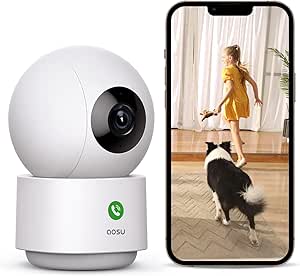
Aosu 2K Indoor Camera Baby Monitor for Home Security with 2.4GHz WiFi
For a senior living alone, the Aosu 2K Indoor Camera makes sense when a caregiver needs to scan more than one part of a room from a single mounting point. Its 360° horizontal rotation and 155° vertical tilt, paired with motion tracking, can follow movement across a broad area; 2K video gives a clearer view than the Roku or Kasa 1080p models. Two-way audio also gives family members a way to check in without placing a separate call. The tradeoff is that this is a general-purpose monitoring camera, not the SYMYNELEC’s senior-focused calling device: the Aosu listing does not specify one-touch video calling or fall alerts. It also needs 2.4GHz Wi-Fi, and reports of occasional connectivity issues may matter when dependable remote access is a priority.
Pros:- 2K, 3 MP video provides more detail than the lineup’s 1080p cameras.
- 360° horizontal rotation and 155° vertical tilt cover a broad area from one position.
- Motion tracking and two-way audio support remote check-ins.
- Compatible with Alexa and Google Assistant.
Cons:- Supports 2.4GHz Wi-Fi only, with no 5GHz support.
- Occasional connectivity issues are reported, which can disrupt remote monitoring.
- No listed dedicated fall alerts or senior-oriented one-touch video calling.
Best for: Families who want a single camera to cover a large senior’s room and already have reliable 2.4GHz Wi-Fi.
Not ideal for: Caregivers who need dedicated fall alerts or an easy, screen-based calling system for a senior; the SYMYNELEC is better tailored to those needs.
- Resolution:3 MP
- Night vision range:33 feet
- Pan and tilt:360° horizontal, 155° vertical
- Wi-Fi:2.4 GHz
- Storage capacity:Up to 128 GB
- Audio:Two-way
- Mount:Wall mount
Our verdict“Choose the Aosu for broad, detailed room coverage, but choose the SYMYNELEC if senior-specific alerts and easy video calling matter more.”
SYMYNELEC Elderly Monitoring Camera with Screen and One-Touch Video Calling
The SYMYNELEC Elderly Monitoring Camera is the most directly senior-focused option here: its 2.8-inch screen and one-touch video calling are designed to make a check-in simpler for the person at home, rather than relying only on a caregiver opening an app. Listed fall and distress alerts, privacy mode, and scheduled auto-off also speak to caregiving needs that the more general Aosu and Kasa cameras do not specifically list. Local recording is available with a microSD card, though the card is sold separately. Its 1080p video and 26-foot night vision range are less ambitious than the Aosu’s 2K image and 33-foot range, and the unit needs constant plug-in power. I’d favor this model when accessible communication and privacy controls matter more than maximum image detail or flexible placement.
Pros:- 2.8-inch screen and one-touch video calling are tailored to easier senior check-ins.
- Listed fall and distress alerts address caregiving needs beyond basic motion detection.
- Privacy mode and scheduled auto-off give the person at home control over monitoring.
- Supports local recording with a microSD card up to 128 GB.
Cons:- Requires constant plug-in power, limiting placement options.
- MicroSD card is not included.
- 1080p video and 26-foot night vision range are more limited than the Aosu’s listed 2K video and 33-foot range.
Best for: Families supporting a senior who would benefit from a simple on-device video calling screen, alerts, and scheduled privacy controls.
Not ideal for: Caregivers who need battery-powered placement, higher-resolution video, or a camera that works without buying a separate microSD card for local recording.
- Screen:2.8 inches
- Video resolution:1080p
- Night vision range:26 feet
- Storage:Up to 128 GB microSD card; card not included
- Wi-Fi:2.4 GHz
- Audio:Two-way
- Installation:Freestanding
Our verdict“Pick the SYMYNELEC when easy senior-operated video calls and privacy controls outweigh the need for higher resolution or flexible placement.”
Roku Indoor Camera 2-Pack
The Roku Indoor Camera 2-Pack is a practical pick when a senior’s routine spans multiple rooms and one camera would leave gaps. Two cameras let family members monitor separate areas, while motion and sound detection can flag activity and two-way audio supports a quick verbal check-in. The viewing and controls work through the Roku Smart Home app or a Roku TV, a straightforward fit for households already using that system. Compared with the single-camera Aosu, Roku gives you two viewpoints but drops to 1080p and does not list pan-and-tilt tracking. Its Roku-centered controls are also less flexible for families who use other smart-home platforms, and the product data does not specify local recording or senior-specific fall alerts. This is a multi-room coverage choice, not a dedicated caregiving interface like SYMYNELEC.
Pros:- Two cameras can cover separate rooms without relying on a single viewpoint.
- Motion and sound detection provide more ways to notice activity.
- Two-way audio allows remote verbal check-ins.
- Live feeds and controls are available through the Roku app or Roku TV.
Cons:- 1080p resolution is lower than the Aosu’s listed 2K video.
- Control is centered on the Roku app and Roku TV ecosystem.
- Product data does not list local recording or senior-specific fall alerts.
Best for: Families who want to monitor two indoor areas, such as a senior’s bedroom and living room, and already use Roku.
Not ideal for: Caregivers who need one-touch video calling, listed fall alerts, camera movement tracking, or controls outside the Roku ecosystem.
- Number of cameras:2
- Resolution:1080p HD
- Night vision:Yes
- Detection:Motion and sound
- Audio:Two-way
- Connectivity:Wi-Fi
- Compatibility:Roku TV and Roku Smart Home app
Our verdict“Choose Roku for two-room coverage in a Roku household, but look to SYMYNELEC for senior-focused calling and alerts.”
Tapo 1080P Indoor Security Camera, Baby Monitor, Dog Camera, Wired, C100
The Tapo C100 suits families who want a straightforward indoor camera with a choice of recording methods, rather than senior-specific hardware. Its microSD support up to 512 GB gives caregivers a substantial local-storage option, while cloud storage is also listed. Motion detection, customizable alarms, and two-way audio can help a family notice activity and speak through the camera. Compared with the Kasa EC71, the Tapo data does not list pan-and-tilt coverage or motion tracking, so it is better suited to watching a fixed area than following movement around a room. The listing also describes full-color night vision up to 30 feet, but its wired setup means placement depends on access to power. Voice control works with Alexa and Google Assistant, although Google Assistant streaming is limited to Chromecast and Nest devices.
Pros:- Supports microSD cards up to 512 GB as well as cloud storage.
- Two-way audio and customizable alarms support remote check-ins and notifications.
- Full-color night vision is listed up to 30 feet.
- Compatible with Amazon Alexa and Google Assistant voice control.
Cons:- Wired power limits placement to locations near an outlet.
- Product data does not list pan-and-tilt movement or motion tracking.
- Google Assistant streaming is limited to Chromecast and Nest devices.
Best for: Caregivers who want a fixed-view camera with substantial local storage and the option of cloud recording.
Not ideal for: Families who need a camera to follow a senior around a room or who want broad pan-and-tilt coverage; the Kasa EC71 lists both.
- Resolution:1080p
- Power:Wired
- Connectivity:Wi-Fi
- Local storage:MicroSD up to 512 GB
- Cloud storage:Supported
- Night vision:Full-color, up to 30 feet
- Audio:Two-way
Our verdict“Choose the Tapo C100 for flexible recording and fixed-area monitoring, but choose the Kasa EC71 if room-wide camera movement is a priority.”
Kasa 1080p Indoor Pan/Tilt Wired Security Camera, Baby & Pet Monitor, EC71
For a senior who moves between parts of one room, the Kasa EC71 offers a useful middle ground: 360° horizontal pan, 113° vertical tilt, and motion tracking let the camera follow activity instead of leaving a fixed-view gap. Two-way audio and real-time alerts add practical ways to check in, and local microSD storage avoids making cloud recording the only listed option. Compared with the Tapo C100, the EC71 emphasizes moving coverage rather than a larger stated microSD capacity; the Tapo supports cards up to 512 GB, while Kasa lists up to 256 GB. The SYMYNELEC remains a closer fit for a senior who needs an on-device calling screen or listed fall alerts. The Kasa is wired, needs 2.4GHz Wi-Fi for full functionality, and cloud storage costs extra.
Pros:- 360° horizontal pan and 113° vertical tilt cover a broad area.
- Motion tracking can follow activity across the room.
- Two-way audio and real-time alerts support remote check-ins.
- Offers local microSD storage as well as cloud storage.
Cons:- Requires wired power and 2.4GHz Wi-Fi for full functionality.
- MicroSD card is not included.
- Cloud storage costs extra, and local card capacity is listed up to 256 GB.
Best for: Caregivers who want a camera to follow a senior’s movement within one room and send real-time activity alerts.
Not ideal for: Families who need senior-specific fall alerts or one-touch video calls, or who want higher-capacity listed local storage than 256 GB.
- Resolution:1080p Full HD
- Pan and tilt:360° horizontal, 113° vertical
- Night vision:Up to 30 feet
- Local storage:MicroSD up to 256 GB
- Cloud storage:Available by subscription
- Connectivity:2.4GHz Wi-Fi
- Compatibility:Alexa and Google Home
Our verdict“Choose the Kasa EC71 when movement tracking matters more than senior-specific calling features or the Tapo C100’s larger listed card capacity.”
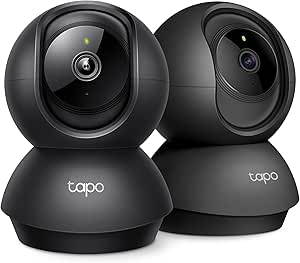
Tapo 2K Pan Tilt Security Camera for Baby Monitor, Dog Camera (2-Pack)
The Tapo C211 two-pack is a strong fit for families who need to check more than one room or want to scan a larger space remotely. Its 360° horizontal and 114° vertical pan-and-tilt gives it a coverage advantage over the fixed-view LaView kit, which may require more cameras to watch the same area. For elder monitoring, that movement can help a caregiver check a room from an app, while two-way audio offers a way to speak without going in. Motion and person detection, night vision, and local microSD or cloud storage round out the essentials. The tradeoffs are that the microSD card is not included and the cameras rely on Wi-Fi for full functionality. Unlike the dedicated screen-and-calling approach of the SYMYNELEC camera, this Tapo is best for app-based check-ins, not a direct video-call setup.
Pros:- Two cameras can cover separate rooms
- Pan and tilt let caregivers inspect a wider area remotely
- 2K video, night vision, and person detection support day and night checks
- Local microSD and cloud storage options provide a choice of recording methods
Cons:- MicroSD cards are not included
- Full functionality depends on a Wi-Fi connection
- App-based monitoring may be less straightforward for seniors than a camera with a dedicated calling screen
Best for: Families wanting app-controlled coverage of multiple rooms, with pan-and-tilt views and two-way audio for routine check-ins with a senior
Not ideal for: Caregivers who need a camera with a built-in screen or direct video calling, or households without reliable 2.4 GHz Wi-Fi
- Resolution:2K HD
- Pan/Tilt Range:360° horizontal, 114° vertical
- Connectivity:2.4 GHz Wi-Fi
- Storage:Up to 512 GB microSD (card not included); cloud storage supported
- Night Vision:Yes
- Audio:Two-way audio
- Alarm:Built-in siren and light alarm
- Compatibility:Alexa, Google Assistant, RTSP/ONVIF
Our verdict“Choose this two-pack if you want app-based, room-to-room coverage and remote camera movement rather than direct video calling.”
2K Indoor/Outdoor Home Security Cameras with Color Night Vision and Two-Way Audio
This camera suits households that want one model for an indoor check-in point and a weather-exposed area, rather than a system designed only for rooms. Color night vision may make low-light footage easier to interpret than the standard night vision listed for the GALAYOU four-pack, while 2K resolution and two-way audio support visual checks and brief conversations. Its fixed 105-degree view is simpler than the Tapo C211’s remotely controlled pan and tilt, so caregivers should position it carefully rather than expect to scan a room from the app. Plug-in power and ceiling, wall, or tabletop mounting offer placement flexibility, but the camera still needs Wi-Fi and its microSD capacity tops out at 128 GB. It makes more sense for a fixed check-in location than for following activity across a large room.
Pros:- 2K video with color night vision for low-light viewing
- Weatherproof design supports indoor and outdoor placement
- Mounts on a ceiling, wall, or tabletop
- Two-way audio supports remote check-ins
Cons:- Fixed 105-degree view cannot scan a room like the Tapo C211
- MicroSD capacity is limited to 128 GB and the card is not included
- Requires plug-in power and a 2.4 GHz Wi-Fi connection
Best for: Caregivers who want a plug-in camera that can serve an indoor room and a weather-exposed entry or covered area
Not ideal for: Families needing remote pan-and-tilt coverage, broad local recording capacity, or monitoring in a location without Wi-Fi
- Resolution:2K HD
- Camera Angle:105 degrees
- Night Vision:Color night vision
- Optical Zoom:8x
- Frame Rate:15 fps
- Connectivity:2.4 GHz Wi-Fi
- Storage:MicroSD up to 128 GB; cloud storage available
- Power and Mounting:Plug-in; ceiling, wall, or tabletop
Our verdict“Pick this model for a fixed check-in point that may also need weatherproof outdoor placement, not for remotely scanning a senior’s room.”
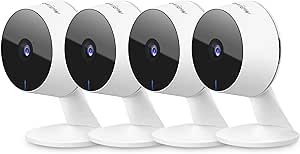
LaView Security Camera Kit – 4 Indoor Wi-Fi Wired Cameras, 1080P HD, Night Vision, Motion Detection, Two-Way Audio, Alexa Compatible
The LaView kit prioritizes four-camera coverage and shared access over higher resolution or remote camera movement. That can help a family keep an eye on several rooms from one app, and access for up to 20 users is useful when siblings or other caregivers divide check-ins. Compared with the Tapo C211 two-pack, LaView offers more fixed viewpoints but no listed pan-and-tilt; each camera needs a deliberate placement to cover its area. The 1080p video, night vision up to 33 feet, and noise-canceling two-way audio support basic visual checks and conversation, though the lower resolution gives less detail than the 2K Tapo or GALAYOU options. Wired power means outlets and cable routing matter, and Wi-Fi is limited to 2.4 GHz. This is a practical choice for broad household coverage, not a direct video-calling system for a senior.
Pros:- Four cameras provide fixed views across multiple rooms
- Up to 20 users can share access
- Night vision reaches up to 33 feet
- Two-way audio includes noise cancellation, with cloud and microSD storage options
Cons:- 1080p resolution offers less detail than the 2K Tapo C211 and GALAYOU cameras
- Fixed cameras lack the remote pan-and-tilt available on the Tapo C211
- Wired power and 2.4 GHz-only Wi-Fi can limit placement and network compatibility
Best for: Families coordinating care across several rooms who want multiple fixed cameras and shared app access for a larger caregiver group
Not ideal for: Caregivers who need pan-and-tilt, 2K detail, a built-in calling screen, or cameras that work without wired power
- Number of Cameras:4
- Resolution:1080p
- Field of View:84°
- Night Vision Range:Up to 33 ft
- Audio:Two-way audio with noise cancellation
- Connectivity:2.4 GHz Wi-Fi; wired power
- Storage:MicroSD up to 128 GB; 30-day free US cloud trial
- Access and Compatibility:Up to 20 users; Alexa, iOS, Android, and web browsers
Our verdict“Choose LaView when caregiver sharing and four fixed room views matter more than 2K detail or remote camera movement.”
GALAYOU 5G & 2.4G Dual-Band Indoor Cameras for Home Security (4 Pack) 2K
For caregivers who want several viewpoints without giving up sharper-than-1080p video, this four-camera GALAYOU set combines 3 MP resolution with a 95-degree view per camera. That makes it a more detail-focused alternative to the four-camera LaView kit, though LaView lists a longer night-vision range and support for up to 20 shared users. GALAYOU adds motion alerts, two-way audio, and a built-in siren, giving caregivers ways to check activity and speak through the camera; the siren may be less useful for routine senior care than quiet notifications. The listed connectivity is 2.4 GHz Wi-Fi, despite “5G” in the product title, so buyers should not assume 5 GHz Wi-Fi support. All four cameras need corded power, and SD cards are sold separately.
Pros:- Four cameras provide coverage across multiple rooms
- 3 MP video offers more detail than LaView’s 1080p cameras
- 95-degree viewing angle and night vision up to 32 feet
- Two-way audio, motion alerts, and a built-in siren
Cons:- Listed connectivity supports 2.4 GHz Wi-Fi only, despite the 5G wording in the title
- Corded power restricts camera placement and requires continuous power
- MicroSD cards are sold separately
Best for: Households that want four fixed indoor viewpoints with 2K-class detail and app-based motion alerts
Not ideal for: Caregivers who need battery-powered placement, confirmed 5 GHz Wi-Fi support, or a built-in screen for direct video calls
- Number of Cameras:4
- Resolution:3 MP
- Viewing Angle:95 degrees
- Night Vision Range:Up to 32 ft
- Connectivity:2.4 GHz Wi-Fi
- Storage:MicroSD up to 128 GB; cloud storage supported
- Power:Corded
- Control and Compatibility:App control; iPhone, Android, and PC
Our verdict“Choose GALAYOU for several fixed indoor views with 2K-class detail, provided 2.4 GHz Wi-Fi and corded power suit your home.”
Two-Way Video Camera, Dual-Band (5G/2.4G) Indoor Home Security Camera with Phone App, Motion Detection, Night Vision, and Audio Calling
Unlike the Tapo C211, which relies on app viewing and remote camera movement, this camera’s standout feature is device-initiated audio and video calling. Its 4.3-inch screen and sharing for up to 10 family members may suit a senior who can use a simple call prompt, giving relatives a more conversational way to check in than one-way alerts. Full HD video, night vision, motion detection, and two-way audio cover basic monitoring needs, and dual-band Wi-Fi offers more network flexibility than the 2.4 GHz-only LaView kit. The supplied details do not describe pan-and-tilt or the screen’s calling controls, so buyers should not assume it provides camera movement or a fully hands-free experience. It is also indoor-only and requires a stable connection; setup may take more effort than a basic app camera.
Pros:- 4.3-inch screen supports a more direct check-in experience
- Device-initiated video and audio calls can make family contact more conversational
- Up to 10 family members can share access
- Dual-band Wi-Fi supports both 5 GHz and 2.4 GHz networks
Cons:- Indoor-only design does not suit outdoor monitoring
- Setup may be complex for some households
- No pan-and-tilt capability is listed, unlike the Tapo C211
Best for: Families whose senior can use a screen-based call prompt and who value direct video conversations over multi-room camera coverage
Not ideal for: Caregivers seeking a multi-camera kit, remote pan-and-tilt, or a camera that can cover outdoor areas
- Display:4.3-inch screen
- Wi-Fi Bands:5 GHz and 2.4 GHz
- Video Resolution:Full HD
- Features:Motion detection, night vision, two-way audio, and alarm function
- Calling:Device-initiated audio and video calls
- Sharing:Up to 10 family members
- Compatibility:Phone app
- Use:Indoor
Our verdict“Pick this camera if the senior can use its screen-based calling and direct family conversations matter more than multi-room coverage.”

How We Picked
I ranked these cameras for the specific job of supporting remote check-ins with an older adult, rather than treating general home security features as the whole story. The main criteria were how naturally a senior could communicate through the device, whether caregivers could view and speak through it, how well the camera design could cover a room, and whether the listed resolution, night vision, connectivity, or included camera count matched common household needs. I also considered setup demands, ongoing service requirements where stated, and privacy tradeoffs.
The SYMYNELEC leads because its screen and one-touch video calling are directly relevant to senior communication. The eufy E30 ranks highly for buyers seeking detailed video without a subscription, while multi-camera and pan-tilt options follow when they solve a defined coverage need. Models with overlapping basic features rank lower when the supplied product information gives less reason to favor them for elder monitoring. Product names and listed features do not confirm medical alerts, fall detection, emergency dispatch, or guaranteed compatibility with every network or device, so I treat those as separate needs to verify.
| indoor security cameras for elder monitoring | Audio | Night vision |
|---|---|---|
| Anona 4K UHD Indoor Security C | — | — |
| GNCC 2K Indoor Security Camera | Two-way | — |
| eufy Security 4K Indoor Camera | — | Color and infrared |
| GNCC 2K Cameras for Home Secur | Two-way | Up to 10 meters |
| GBIUT Indoor Camera 5G & 2.4G | Two-way talk | Color and infrared |
| Aosu 2K Indoor Camera Baby Mon | Two-way | — |
| SYMYNELEC Elderly Monitoring C | Two-way | — |
| Roku Indoor Camera 2-Pack | Two-way | Yes |
| Tapo 1080P Indoor Security Cam | Two-way | Full-color, up to 30 feet |
| Kasa 1080p Indoor Pan/Tilt Wir | — | Up to 30 feet |
| Tapo 2K Pan Tilt Security Came | Two-way audio | Yes |
| 2K Indoor/Outdoor Home Securit | — | Color night vision |
| LaView Security Camera Kit | Two-way audio with noise cancellation | — |
| GALAYOU 5G & 2.4G Dual-Band In | — | — |
| Two-Way Video Camera | — | — |
Factors to Consider When Choosing Indoor Security Cameras For Elder Monitoring
Choosing a camera for an older adult is partly a technology decision and partly a household agreement about communication and privacy. I would begin with the senior’s preferences and the caregiver’s actual check-in routine, then match camera placement and features to those needs.
Choose a communication style the senior will use
A camera that caregivers can speak through may help when the older adult is comfortable hearing a voice from a phone-controlled device. A screen-based calling feature can feel more like a familiar video call, but it may require the senior to understand when and how to answer. Do not assume that two-way audio means the camera supports a call initiated or answered by the person in the room. Before buying, check who can start a call, whether the senior must tap a screen, and how the device signals an incoming call. If hearing or vision is a concern, test the proposed location and interaction with the senior rather than relying on the feature list alone.
Match coverage to routines, not just room count
Start by naming the specific areas where a check-in would help, such as a shared living space or a frequently used route through the home. A pan-and-tilt camera can look across a larger room, but it cannot watch two separate spaces at once. A multi-camera kit can cover separate rooms, yet it creates more setup work and more places where cameras may feel intrusive. Avoid placing cameras in bathrooms, bedrooms, or other private spaces unless the resident has clearly agreed and there is a compelling reason. For movement or safety concerns across a home, a camera view alone may leave gaps that require a different care plan.
Treat connectivity and access as part of the care plan
A camera is only useful for remote check-ins when the home network, power, and caregiver access are dependable. Some listed models specify 2.4GHz Wi-Fi, while others advertise dual-band or 5G Wi-Fi; confirm the exact network bands supported by both the camera and the home router before ordering. Wired cameras need a practical outlet and a cable route that will not create a trip hazard. Decide which family members can access the app, how access will be shared if the primary caregiver is unavailable, and what happens during an internet or power outage. A camera should not be the sole plan for urgent help, since ordinary monitoring features may not detect or respond to emergencies.
Balance image detail against the job the camera must do
Higher resolution can make it easier to distinguish what is happening in a room, but it does not automatically make a camera better for every check-in. Night vision, camera placement, lighting, and the ability to hear conversation can matter more than moving from 1080p to 2K or 4K. If the goal is simply confirming that someone is in a common area, a clear, stable view may be enough. If caregivers need to identify details at a distance, sharper video may be more useful, provided the network and app handle it well. Compare the quality of the intended view rather than choosing by resolution label alone.
Set privacy rules before installation
Monitoring can affect a senior’s sense of independence, so discuss what the camera will record or stream, who can view it, and when it will be switched off. Agree on camera locations and access permissions before mounting devices, especially when several relatives will use the app. Check the product’s current app, storage, subscription, and account-sharing terms; a statement such as no subscription does not answer every question about local or cloud storage. Use strong account credentials and remove access when a caregiver no longer needs it. A camera that the resident accepts is more likely to become part of a sustainable check-in routine than one installed without their involvement.
Pay for functions that solve a real problem
Spend more only when a feature changes how the household will use the camera: a video-call screen, broader pan-and-tilt coverage, or higher detail for a particular viewing distance. A multi-pack makes sense when the household has several agreed-upon monitoring locations, but buying extra cameras before deciding on placement can add cost and privacy friction without improving care. Subscription terms deserve attention because storage or advanced alerts may depend on a service plan, even when live viewing is available. Compare the ongoing setup and maintenance effort as well as the initial feature list. If a senior prefers phone calls and does not want an always-on camera, a simpler check-in method may be the better choice.
Frequently Asked Questions
Is a camera with two-way audio enough for checking in on a senior?
It can be enough when the older adult is comfortable speaking toward the camera and the caregiver mainly needs to check in or offer a reminder. Two-way audio does not necessarily provide a screen or a familiar call-answering process, so it may be less intuitive for someone who is not comfortable with app-controlled devices. Confirm whether the caregiver can initiate communication and whether the senior needs to take any action. If seeing the caller matters, compare a screen-based video-calling device with standard talk-back cameras. Neither type should be treated as an emergency response system unless the product explicitly provides that service.
Should I choose one pan-and-tilt camera or a multi-camera kit?
Choose based on whether you need to monitor one broad room or separate locations. Pan-and-tilt can adjust the view within a room, but it cannot show multiple rooms at the same time. A multi-camera kit can provide simultaneous views in different spaces, with added setup, power, app management, and privacy decisions. Make a placement plan with the senior before purchasing a bundle. If you only need occasional check-ins in one shared area, a single camera may be easier to manage.
Can an indoor security camera detect a fall or summon help?
Do not assume that motion detection, AI tracking, or two-way audio includes fall detection or emergency dispatch. The listed features for these cameras focus on video monitoring and communication, and they do not establish that a device can reliably identify a medical event. Check the manufacturer’s current feature details if fall alerts or emergency response are required. A camera view may help a caregiver notice a situation, but it depends on someone watching or receiving an alert and responding. For safety needs, pair any camera with a suitable care or emergency plan.
What should I check before choosing a camera for an older adult who is not comfortable with apps?
Focus on how the person will interact with the camera, not only on how the caregiver will use the phone app. Find out whether calls appear on a screen, whether the senior must answer, and how the device indicates that someone is speaking. Keep the setup in a familiar shared room and avoid making the person learn several controls at once. If the household chooses a standard camera, agree on a simple check-in routine and explain how audio and viewing work. A device the senior dislikes or cannot comfortably use may be less helpful than a simpler communication option.
Do I need a subscription, and what happens if the internet goes down?
Subscription needs vary by model and by feature, so check current terms for cloud recording, alerts, and storage rather than assuming every function is included. The eufy E30 is listed as no subscription, but buyers should still verify which storage and app features are available for their setup. Many remote-viewing features rely on an internet connection, so an outage can interrupt caregiver access. Confirm whether local recording or other offline functions are available if continuity matters. Keep another way to reach the senior in the care plan rather than relying on camera access alone.
Conclusion
For the best overall elder-focused choice, I would start with the SYMYNELEC because its screen and one-touch video calling speak directly to senior-care communication. The best value for multi-room coverage depends on how many agreed-upon locations need a view; compare the Anona or LaView four-camera kits and the GALAYOU four-pack against simpler two-camera options before adding devices. For a best premium-style feature set, the eufy Security 4K Indoor Camera E30 is the standout for buyers who prioritize 4K video and a no-subscription approach. For beginners, a single fixed camera such as the Tapo C100 may be easier to place and manage than a multi-camera system, though it offers less coverage flexibility. If you need a movable view, look to the pan-and-tilt Kasa EC71 or Tapo 2K 2-Pack; if direct screen-based communication matters most, choose around the SYMYNELEC’s calling format. Before deciding, confirm network compatibility, privacy preferences, and whether the camera’s communication style suits the senior who will live with it.