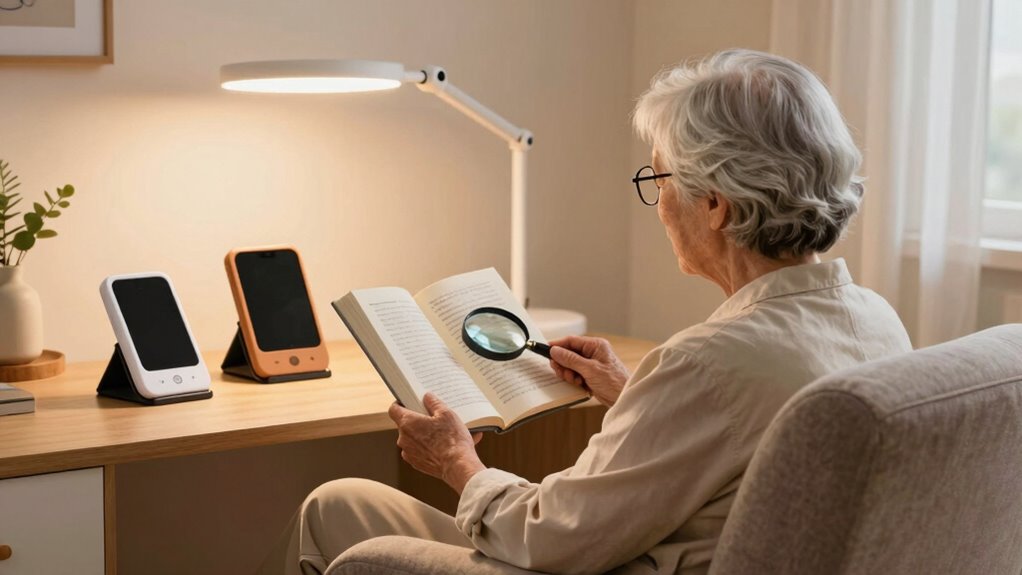

Electronic reading aids for seniors range from simple illuminated magnifiers to screen-based devices with adjustable zoom and contrast. My best overall pick is the VEVOR 5-inch, 2X–48X model, which pairs a broad magnification range with multiple display modes and video outputs. The 8-inch electronic magnifier is a stronger fit for readers who value a larger viewing area, while the JMH LED handheld magnifier keeps things simple for quick checks and short labels. The main tradeoff is between a bigger, easier-to-view screen and a lighter device that is easier to carry and position. Read on for the full breakdown, selection criteria, and advice for matching an aid to everyday reading habits.

Turn quiet afternoons into listening time
- Thousands of audiobooks, podcasts and originals
- Listen on your phone, tablet or Echo — also offline
- Cancel anytime
Complete the kit


Key Takeaways
- The 5-inch VEVOR 2X–48X model stands out on stated magnification range and connection options, but a broad zoom range alone does not guarantee comfortable reading.
- The 8-inch electronic magnifier is the largest-screen option in this group; readers should weigh its viewing comfort against the extra bulk compared with 3.5- and 4.3-inch models.
- Freeze-frame and adjustable color modes may matter more for reading labels or inspecting small details than maximum zoom, since a still image can be easier to position and examine.
- The lineup includes compact 3.5-inch models and larger 5-inch devices, showing a clear tradeoff between portability and screen space rather than one size that suits everyone.
- The JMH LED magnifier is the simplest choice for brief, close-up tasks, while electronic video magnifiers offer more control for longer reading sessions.




| electronic reading aids for senior | Magnification | Weight | Screen size | Dimensions |
|---|---|---|---|---|
| Digital Magnifier 5 Inch | 2X–32X | — | 5 inches | 5.7 × 3.3 inches |
| Eyoyo 4.3" Portable Digital Vi | 6X–14X | 8 ounces | 4.3 inches | 6 × 3.4 inches |
| 3.5-inch Portable Digital Magn | 2X–25X | 5.28 ounces | — | 5 × 3 inches |
| VEVOR Portable Digital Magnifi | 4X–32X | 10.24 ounces | 5 inches | — |
| VEVOR Portable Digital Magnifi | 2X–48X | 14.08 ounces | 5 inches | — |
| Harayaa Electronic Digital Por | 2x–25x | 7 ounces | — | 5.04 x 3.07 x 1.34 inches |
| JMH Magnifying Glass with Ligh | 3x | 9.8 ounces | — | 8.07 inches long x 4.17 inches wide |
| Portable Digital Video Magnifi | 2x–32x | 1.6 pounds | 5.0 inches | 5.7 x 3.3 inches |
| Electronic Low Vision Reading | — | — | — | — |
| 5 Inch Low Vision Aids Electro | 2x–32x | 270g | 5 inches | 5.7 x 3.3 inches |
| 4.3-Inch Portable Digital Vide | 4X-32X | 6.4 ounces | 4.3 inches | 6 x 3 inches |
| Eyoyo 3.5" Portable Digital Vi | 2X-25X | — | — | — |
| 5.0 Inch Digital Magnifier wit | 3X-48X | — | 5.0 inches | — |
| 8-inch Electronic Digital Magn | — | 1.2 pounds | — | — |
| 5.0 Inch Portable Digital Magn | 4X-32X | — | 5 inches | 3.3 x 6.1 inches |
More Details on Our Top Picks
Digital Magnifier 5 Inch, Electronic Auto Focus Reading Aid with 26 Color Modes
I’d put this model first for readers who want wide magnification range without moving up to a more feature-heavy device. Its 2X–32X zoom can help with ordinary print as well as small labels, while the 5-inch screen gives more room to follow a line than the 3.5-inch model in this group. The 26 color modes offer substantial contrast adjustment for users whose preferred settings vary by lighting or material. Simplified controls and a memory function also suit readers who want to return to familiar settings rather than reset them each time. The tradeoff is that battery life and durability details are not provided, and reported usability concerns suggest the controls may not feel simple to everyone. Compared with the VEVOR 5-inch 4X–32X magnifier, this one starts at lower magnification but has fewer documented connection and capture features.
Pros:- 2X–32X range covers both larger text and very small print
- 5-inch screen provides more reading area than the 3.5-inch models
- 26 color modes allow extensive contrast customization
- Simplified buttons and memory function can reduce repeated setup
Cons:- Battery life and durability are not specified
- Some reported usability concerns make the control experience less certain
- No storage or external display connection is listed
Best for: Seniors who want a roomy screen, strong magnification flexibility, and saved viewing preferences for regular reading at home
Not ideal for: Buyers who need confirmed long battery life or dependable, clearly documented controls before choosing a portable device
- Magnification:2X–32X
- Screen size:5 inches
- Resolution:800 × 480
- Color modes:26
- Power source:Battery or AC adapter
- Dimensions:5.7 × 3.3 inches
Our verdict“Choose this if you want a large-screen reader with broad zoom and saved settings, and can accept uncertainty about battery life and ease of operation.”
Eyoyo 4.3″ Portable Digital Video Magnifier, Reading Aid for Low Vision
The Eyoyo is the most travel-minded choice here: at 8 ounces, it is lighter than either VEVOR 5-inch model, and its foldable design is suited to carrying between home, appointments, and errands. The flip-to-power-on feature may also make quick checks of menus or labels less fiddly than a device that requires several button presses. Its 6X–14X range is narrower than the 2X–32X and 2X–48X options in this roundup, so it is better matched to enlarging already readable text than to users who need very high magnification. A 32GB TF card supports image saving, a useful extra when a passage or label needs a second look. The main compromise is runtime: up to two hours is limited beside a device used for long reading sessions, and the smaller screen offers less viewing area than the 5-inch picks.
Pros:- Light 8-ounce body and foldable design suit carrying on outings
- Flip-to-power-on supports quick, straightforward use
- Image saving is supported with a 32GB TF card
- 12 color modes offer contrast choices for different print
Cons:- Up to two hours of battery life may not cover long reading sessions
- 6X–14X range is narrower than the higher-zoom options in this roundup
- 4.3-inch screen is smaller than the 5-inch models
Best for: Seniors who want a lightweight magnifier for short reading tasks away from home and value quick power-on and image saving
Not ideal for: Readers who need high magnification, a larger screen, or extended use between charges
- Magnification:6X–14X
- Screen size:4.3 inches
- Color modes:12
- Storage support:32GB TF card
- Battery life:Up to 2 hours
- Weight:8 ounces
- Dimensions:6 × 3.4 inches
- Lens material:Glass
Our verdict“Pick the Eyoyo for portable, short-duration reading tasks, but choose a 5-inch model if you need more screen space or stronger zoom.”
3.5-inch Portable Digital Magnifier with 2X-25X Zoom for Low Vision
For someone who prioritizes a small, light device over a generous display, this 5.28-ounce magnifier is the most compact option among these five. Its 2X–25X zoom is more flexible at the low end than the Eyoyo’s 6X–14X range, which can help when enlarging ordinary book print as well as smaller details. A foldable stand can keep the screen supported during reading, while snapshot, screen freeze, and AV output add ways to pause or share what is on display. Those extras give it more utility than its size suggests, but the 3.5-inch screen leaves less room for text than the 5-inch Digital Magnifier or either VEVOR. It runs on batteries, and a TF card for image saving is not included, so ongoing use and saved captures may call for separate supplies.
Pros:- Lightweight 5.28-ounce design is easy to carry
- 2X–25X zoom includes lower magnification than the Eyoyo
- Foldable stand supports hands-free viewing
- Snapshot, screen freeze, and AV output add practical viewing options
Cons:- 3.5-inch display gives less room for text than the 5-inch models
- Battery-powered operation may require replacement batteries
- TF card is not included for image saving
Best for: Seniors who want a lightweight magnifier for travel, occasional book reading, and checking labels or maps
Not ideal for: Readers who need a broad screen for long passages, rechargeable power, or included storage for captured images
- Magnification:2X–25X
- Display size:3.5 inches
- Power source:Battery
- Lens material:Glass
- Weight:5.28 ounces
- Dimensions:5 × 3 inches
- Output:AV
Our verdict“Choose this compact model for portable, occasional use; opt for a 5-inch magnifier if reading comfort and screen area matter more than weight.”
VEVOR Portable Digital Magnifier, 5-inch HD Electronic Video Magnifier with 4X-32X Zoom, 17 Color Modes, AV Output, Foldable Handle, Brightness Control
I’d choose this VEVOR when connecting the magnifier to a larger screen matters as much as handheld reading. Its AV output can move enlarged text to a compatible display, which may make longer reading sessions easier for someone who finds a small portable screen restrictive. The 5-inch, 800 × 480 display, 4X–32X zoom, and five brightness levels cover common close-reading adjustments; the 30MP camera resolution is also listed for capture. Compared with the 26-mode Digital Magnifier, this VEVOR has fewer color modes and starts at 4X rather than 2X, but it adds documented AV output and a rechargeable 2500mAh battery. Its interface may feel complex to some users, and no battery runtime is given, so it is not the clearest choice for someone who wants simple controls or predictable time between charges.
Pros:- AV output supports viewing on a compatible larger display
- 5-inch HD screen offers more room than the 3.5-inch compact model
- Five brightness levels and 17 color modes allow viewing adjustments
- Rechargeable 2500mAh battery avoids reliance on disposable batteries
Cons:- Battery runtime is not specified
- Some users may find the interface or controls complex
- 4X minimum magnification is higher than the 2X starting point on two alternatives
Best for: Seniors who want a portable magnifier that can connect to a compatible larger screen for reading or viewing
Not ideal for: Buyers who need a very low starting zoom, many contrast presets, or stated battery runtime before purchase
- Screen size:5 inches
- Resolution:800 × 480
- Magnification:4X–32X
- Camera resolution:30 MP
- Color modes:17
- Brightness levels:5
- Battery capacity:2500mAh
- Output:AV
- Weight:10.24 ounces
Our verdict“Pick this VEVOR if AV-connected viewing and rechargeable power matter more than a very low zoom setting or a simple interface.”
VEVOR Portable Digital Magnifier, 5-inch HD Electronic Video Magnifier for Low Vision, 2X – 48X, 13MP Dual Lens, 26 Color Modes, AV/HDMI Output, Foldable Handle
This VEVOR is the pick for readers who need the widest magnification range in this group: 2X–48X covers ordinary print at the low end and distant or very small details at the high end. Its near-and-far dual lens separates it from the 4X–32X VEVOR, whose listed zoom is less extensive and whose output is AV only. Here, AV and HDMI connections give more options for viewing on a compatible external screen, while 26 color modes and five brightness levels allow adjustments to contrast and illumination. That flexibility comes with added weight: at 14.08 ounces, it is heavier than the other listed portable models, including the 10.24-ounce VEVOR. Buyers should also be ready for a potentially complex interface; limited warranty information makes this a less reassuring choice for anyone prioritizing clear support details.
Pros:- 2X–48X range is the broadest among these five products
- Near-and-far dual lens supports different viewing distances
- AV and HDMI outputs provide two external display connection options
- 26 color modes and five brightness levels allow viewing adjustments
Cons:- At 14.08 ounces, it is heavier than the other models in this batch
- Interface may feel complex for users seeking straightforward controls
- Warranty information is limited
Best for: Seniors with varied near and distance viewing needs who want broad zoom and the option to connect to a compatible AV or HDMI display
Not ideal for: Readers seeking the lightest handheld magnifier, very simple controls, or clearly documented warranty support
- Magnification:2X–48X
- Screen size:5 inches
- Resolution:800 × 480 LCD
- Lens type:Dual: near and far
- Camera resolution:13 MP
- Color modes:26
- Brightness levels:5
- Outputs:AV and HDMI
- Weight:14.08 ounces
Our verdict“Choose this VEVOR for maximum zoom range and dual-lens flexibility, but favor a lighter model if you will carry it often.”
Harayaa Electronic Digital Portable Video Visual Aid with 2X to 25x Magnification, 3.5 Inch Display, 8 Color Modes, Freeze Frame, TV Output, Pocket Size for Seniors, Students, Travel, Home Reading
The Harayaa suits readers who want digital contrast controls and magnification in a compact device they can carry between rooms or take on errands. Its 2x–25x zoom covers ordinary print through small labels, while eight color modes let users try different text-background combinations. Freeze-frame can hold a view still when positioning the device is tiring, and TV output offers a way to enlarge content beyond the built-in screen. Compared with the larger-screen Portable Digital Video Magnifier, Harayaa is lighter and smaller, but its 3.5-inch display gives less viewing area for sustained reading. The stated 3–4 hours of battery use also makes it a less suitable choice for long reading sessions away from a charger. Choose it for portability, not screen size.
Pros:- Compact 7-ounce design is easier to carry than larger handheld video magnifiers.
- 2x–25x magnification handles a range of print sizes and small details.
- Eight color modes provide options for adjusting text and background contrast.
- Freeze-frame and TV output add viewing flexibility beyond live magnification.
Cons:- The 3.5-inch display may feel cramped for extended reading.
- Stated battery life is only 3–4 hours, limiting longer outings without recharging.
- High magnification on a small display can require frequent repositioning to follow text.
Best for: Seniors who need a lightweight digital magnifier for short reading tasks at home or while traveling and value adjustable contrast.
Not ideal for: Readers who plan long sessions, need a larger on-device image, or cannot manage regular recharging.
- Display:3.5 inches
- Magnification:2x–25x
- Color modes:8
- Battery capacity:1500mAh
- Stated battery life:3–4 hours
- Weight:7 ounces
- Dimensions:5.04 x 3.07 x 1.34 inches
- Memory support:Up to 32GB
Our verdict“Choose Harayaa if portability and digital viewing options matter more than a roomy screen or extended battery use.”
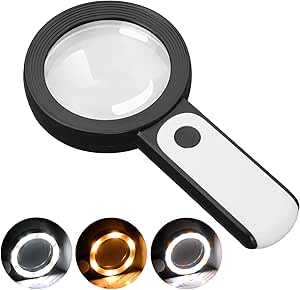
JMH Magnifying Glass with Light, Handheld Large Magnifier with 18 LED, 3 Modes, for Seniors Reading, Coins, Jewelry
The JMH magnifying glass is the straightforward pick for someone who wants to inspect a page without navigating digital controls, menus, or charging routines. Its 3x glass lens and 18 LEDs make it useful for short passages, labels, coins, and other close-up tasks, with three light tones for adjusting the illumination. Compared with the Harayaa Electronic Digital Portable Video Visual Aid, JMH has no screen, freeze-frame, or electronic zoom; that simplicity also means no small display to stare at and no stated battery runtime to plan around. The tradeoff is limited magnification and a need to hold the lens over the target. At 9.8 ounces, it is also heavier than its uncomplicated design might suggest, and it needs three AAA batteries that are not included.
Pros:- Simple handheld operation avoids digital menus and screen settings.
- Large 3.15-inch glass lens provides a broad viewing area for an optical magnifier.
- 18 LEDs with cold, warm, and mixed modes help illuminate dim pages.
- Useful beyond reading for coins, jewelry, and other close inspection.
Cons:- Fixed 3x magnification may not be enough for very small print or substantial vision loss.
- Must be held and positioned over the material, which can tire hands during longer sessions.
- Requires three AAA batteries, which are not included.
Best for: Seniors who prefer a familiar handheld magnifier for brief reading, inspecting labels, or close-up hobbies and can comfortably hold it over the page.
Not ideal for: Readers who need strong magnification, hands-free reading, or adjustable electronic contrast for low-vision text.
- Magnification:3x
- Lens diameter:3.15 inches
- Lighting:18 LEDs; cold, warm, and mixed modes
- Power source:3 AAA batteries, not included
- Lens material:Glass
- Weight:9.8 ounces
- Dimensions:8.07 inches long x 4.17 inches wide
Our verdict“Pick JMH for simple, illuminated close-up viewing, but choose a digital aid if you need stronger magnification or hands-free reading.”
Portable Digital Video Magnifier for Visually Impaired – 5.0 Inch LCD Screen, 2X-32X Zoom, 26 Color Modes, Foldable Handle
This portable magnifier stands out for readers who need more ways to tune the image than a basic zoom device provides. Its 5-inch, 800 x 480 screen offers more room than the 3.5-inch Harayaa, and the 26 color modes give users a wider selection of high-contrast views. The foldable handle supports different viewing angles, while TV connectivity can move the image to a larger screen when the built-in display is not enough. The tradeoff is portability: at 1.6 pounds, it is substantially heavier than Harayaa, so frequent carrying or holding it for long periods may be uncomfortable. Battery life and charging details are not provided, which makes it harder to judge its suitability for outings. It is a better fit for feature-rich reading at a table than for pocketable use.
Pros:- 26 color modes allow more contrast combinations than the Harayaa’s eight.
- 5-inch screen provides more viewing area than compact 3.5-inch models.
- Foldable handle supports varied viewing angles.
- TV connection can make text easier to view on a larger display.
Cons:- At 1.6 pounds, it is heavy for a portable device and prolonged handheld use.
- The 5-inch display may still be too small for readers who need a large page view.
- Battery life and charging details are not specified.
Best for: Seniors who want extensive contrast choices and a larger viewing area for home reading, especially when they can rest the device on a table.
Not ideal for: Readers seeking a light travel aid or buyers who need clear battery and charging information before choosing a portable device.
- Screen size:5.0 inches
- Resolution:800 x 480
- Magnification:2x–32x
- Color modes:26
- Handle:Foldable
- TV connection:Supported
- Weight:1.6 pounds
- Dimensions:5.7 x 3.3 inches
Our verdict“Choose this model for adjustable contrast and a foldable handle at home, rather than for lightweight travel.”
Electronic Low Vision Reading Aid – Portable Digital Magnifier with 10 Color Modes and Image Freeze
This aid makes the most sense for a reader who already has a compatible TV or monitor and wants magnified text displayed there instead of on a handheld screen. Its 20x–70x digital magnification—listed as reaching up to 80x depending on display size—can produce a much larger image than the Harayaa’s 2x–25x range when connected to a suitable display. Scroll and freeze functions support controlled viewing, and USB power avoids relying on an unspecified battery. That screen-dependent magnification is also the main tradeoff: the device is not a standalone reading aid, and its actual enlargement varies with the display. Unlike the 5-inch Portable Digital Video Magnifier, it does not provide its own screen or foldable handle. Choose it for a fixed reading setup, not for independent use around the house.
Pros:- Can display magnified material on a compatible TV or monitor rather than a small built-in screen.
- Digital magnification is listed from 20x to 70x, with up to 80x depending on display size.
- Scroll and image-freeze functions support controlled viewing.
- USB-powered design avoids dependence on a built-in battery.
Cons:- Requires a TV or monitor connection, so it cannot serve as a standalone viewer.
- Actual magnification varies with the connected display.
- Color accuracy may vary with lighting conditions.
Best for: Seniors who have a compatible TV or monitor nearby and want to view magnified material on a larger display.
Not ideal for: Readers who need a self-contained portable magnifier, do not have a compatible video input, or want predictable magnification without relying on screen size.
- Digital magnification:20x–70x; up to 80x depending on display size
- Display modes:Full color, high-contrast positive, high-contrast negative
- Color options:Yellow and black
- Power:USB-powered
- Size:130 x 69 x 64mm
- Effective diameter:25mm
- Connection:TV or monitor video input
Our verdict“Choose this aid if you want magnified reading on an existing screen; skip it if you need a self-contained handheld device.”
5 Inch Low Vision Aids Electronic Auto Focus Reading Aid Digital Video Magnifier for the Visually Impaired
The 5-inch Low Vision Aid is a practical middle ground for seniors who want an electronic magnifier with its own screen and simple controls. Its 2x–32x zoom covers ordinary reading through smaller print, and simplified buttons may be easier to learn than a device built around many settings. The 800 x 480 display matches the resolution listed for the Portable Digital Video Magnifier, while this model weighs 270 grams rather than 1.6 pounds, making it the lighter of the two to carry. Its listed battery and AC-adapter power options also offer flexibility, though battery runtime is not supplied. The tradeoff is that the 5-inch screen remains limited for readers who need a page-sized view, and durability details are sparse. It is a sensible basic digital reader, not a large-screen substitute.
Pros:- 2x–32x magnification covers a broad range of common reading tasks.
- Simplified buttons and ergonomic design may suit users who prefer fewer controls.
- At 270 grams, it is lighter than the 1.6-pound Portable Digital Video Magnifier.
- Battery and AC-adapter power options support use away from or near an outlet.
Cons:- The 5-inch display may be restrictive for long passages or users needing a broad view.
- Battery life is not specified, making unplugged use difficult to plan.
- Long-term durability details are limited.
Best for: Seniors who want a self-contained 5-inch electronic magnifier with simplified controls for reading books, menus, and magazines.
Not ideal for: Readers who need a large viewing surface, known battery runtime, or detailed durability information before buying.
- Magnification:2x–32x
- Screen size:5 inches
- Resolution:800 x 480
- Weight:270g
- Dimensions:5.7 x 3.3 inches
- Power source:Battery or AC adapter
- Lens material:Plastic or acrylic
Our verdict“Choose this model for a relatively light, straightforward digital reading aid with its own screen, but not if you need a large display or documented runtime.”
4.3-Inch Portable Digital Video Magnifier with 4X-32X Zoom
This is a practical pick for seniors who want a portable magnifier that can also send a larger image to a television. Its 4X-32X zoom covers everyday tasks such as checking labels or reading short notices, while adjustable color modes let readers try different contrast combinations. The AV output is its clearest distinction from the Eyoyo 3.5-inch model, which also offers AV output but adds a foldable stand and specified color modes. At 6.4 ounces, this unit is easy to carry, though its 4.3-inch screen gives less room for text than the 5-inch models in this group. Snapshot and screen-lock functions can help with brief details, but battery life is unspecified and image storage requires a TF card that is not included.
Pros:- 4X-32X zoom supports both modest enlargement and close inspection of small details.
- AV output allows viewing on a compatible television.
- Lightweight 6.4-ounce design is convenient to carry.
- Adjustable color modes, snapshots, and screen lock support different brief-reading needs.
Cons:- The 4.3-inch display offers less viewing area than the 5-inch and 8-inch options.
- Battery runtime is not specified.
- TF card for saving images is not included.
Best for: Seniors who want a lightweight magnifier for short reading tasks and the option to view text on a TV.
Not ideal for: Readers who need a wide on-device view for longer passages or want clearly stated battery runtime and included image storage.
- Screen size:4.3 inches
- Magnification:4X-32X
- Weight:6.4 ounces
- Dimensions:6 x 3 inches
- Power source:Battery
- Display features:Adjustable color modes, snapshot, and screen lock
- Connectivity:AV output
Our verdict“Choose this if portability and TV output matter more than a large built-in screen or confirmed battery runtime.”
Eyoyo 3.5″ Portable Digital Video Magnifier, 2X-25X Zoom Reading Aid
The Eyoyo is the most approachable choice here for someone who wants a small-screen aid for occasional reading rather than a broad viewing surface. Its 2X-25X magnification starts lower than the 4X minimum on the 4.3-inch model, which can help when a whole word or short line needs only modest enlargement. Eight color modes give readers several contrast choices, and the foldable stand can steady the device during short sessions. Compared with the 5-inch 3X-48X magnifier, it offers less screen space and less maximum zoom, but its controls and feature set suit simpler tasks such as maps, labels, and newspaper snippets. The tradeoff is a 3.5-inch display, plus the need to keep the unit positioned on the text for a clear image. TF storage is optional and not included.
Pros:- 2X starting magnification suits readers who need only mild enlargement.
- Eight color modes offer useful contrast choices.
- Foldable stand can provide steadier positioning during short reading tasks.
- Snapshot and playback features support reviewing captured details.
Cons:- The 3.5-inch display is the smallest screen among these five products.
- Clear focus depends on placing the magnifier on the text.
- TF card is not included, and power details are unspecified.
Best for: Seniors new to electronic magnifiers who want a simple device for short passages, maps, and household labels.
Not ideal for: Readers who need a larger screen for extended passages, very high magnification, or a device that can be used away from the page.
- Display size:3.5 inches
- Magnification:2X-25X
- Color modes:8
- TF card support:Up to 32GB
- Connectivity:AV output
- Stand:Foldable
- Image features:Snapshot and playback
Our verdict“Pick the Eyoyo for straightforward, occasional reading if a compact screen is enough and you value a stable stand.”
5.0 Inch Digital Magnifier with 3X-48X Zoom for Low Vision
For seniors who need substantial enlargement but still want a portable device, this model offers the broadest stated zoom range among the compact 5-inch options here: 3X-48X. Its 800 x 480 screen gives more room than the Eyoyo 3.5-inch display, while simplified buttons and a foldable handle are intended to make setup less demanding. A stated battery life over four hours also gives buyers more runtime information than the 4.3-inch model, whose battery duration is unspecified. The tradeoff is that high zoom does not make this a replacement for a large-screen reader: the product is not recommended for long books or novels, and the external battery may need frequent charging. Image capture and playback require a TF card, which is not included.
Pros:- 3X-48X range offers higher maximum magnification than the other compact models in this batch.
- 5-inch display is larger than the Eyoyo 3.5-inch screen.
- Simplified buttons and foldable handle support portable, straightforward use.
- Battery life is specified as over four hours, and AV output supports a TV connection.
Cons:- Not recommended for reading long books or novels.
- External battery may require frequent charging.
- TF card for image storage is not included.
Best for: Seniors with low vision who need strong magnification for short items and want simple controls on a portable 5-inch device.
Not ideal for: People who plan to read books or novels for long periods, or who prefer a large desktop-style viewing area.
- Screen size:5.0 inches
- Display resolution:800 x 480
- Magnification:3X-48X
- Battery life:Over 4 hours
- Memory support:TF card up to 32GB
- Connectivity:AV output to TV
- Design:Lightweight with foldable handle and simplified buttons
Our verdict“Choose this when high zoom and simple controls matter more than extended book reading or a larger display.”
8-inch Electronic Digital Magnifier for Visually Impaired Users
This is the strongest choice in the batch for readers who find compact magnifier screens tiring to follow. Its 8-inch, 1280 x 800 display gives text more room than the 5-inch 3X-48X model, and the anti-glare screen and brightness adjustment add ways to tailor viewing. The 13MP autofocus camera and HDMI connection also make it more suited to flexible viewing setups than the smaller portable units. The product data lists both 2X-99X magnification and 2X-20X zoom; because those ranges do not match, buyers should confirm which applies to the viewing mode they plan to use. At 1.2 pounds, it is much less pocket-friendly than the 6.4-ounce 4.3-inch magnifier, and its many features may take more effort to learn. Battery life is listed as up to four hours.
Pros:- 8-inch, 1280 x 800 anti-glare screen provides more viewing area than the compact models.
- 13MP autofocus camera supports capturing small details.
- HDMI connection and built-in 16GB memory add viewing and storage options.
- Brightness adjustment and multiple display modes allow some tailoring to visual preferences.
Cons:- At 1.2 pounds, it is heavier than the compact magnifiers in this group.
- The listed 2X-99X magnification and 2X-20X zoom ranges conflict.
- Multiple features may be harder to learn than the simpler portable models, and battery life is up to four hours.
Best for: Seniors who need a larger on-device image, adjustable viewing modes, and the option to connect to an external HDMI display.
Not ideal for: Readers seeking a very light pocketable aid, simple controls, or a clearly consistent published zoom range.
- Display size:8 inches
- Resolution:1280 x 800
- Magnification listed:2X-99X
- Zoom listed:2X-20X
- Camera:13MP autofocus
- Battery capacity:5200mAh
- Battery life:Up to 4 hours
- Memory:16GB
- Weight:1.2 pounds
Our verdict“Pick this if a larger screen is your priority and you can accept the added weight and need to clarify the zoom specifications.”
5.0 Inch Portable Digital Magnifier with 4X-32X Zoom for Low Vision
This 5-inch model is geared toward short, practical reading jobs where comfort settings matter as much as magnification. Its 17 color modes and five brightness levels offer more viewing adjustments than the 5-inch 3X-48X model, which is the better fit when maximum enlargement is the priority. Here, the 4X-32X range is enough for labels, instructions, and brief notes, while the rechargeable battery is specified for over four hours. A memory function and TF card support add image capture and replay, but the card is not included. The listed weight of 2.26 g appears unusually low for an electronic magnifier, so buyers should verify the actual weight before relying on it for portability. Like the other compact options, it is not intended for long book-reading sessions and must sit directly on the material for clear viewing.
Pros:- Seventeen color modes and five brightness levels offer extensive display adjustment.
- 5-inch screen gives more room than the Eyoyo 3.5-inch model.
- Rechargeable battery is specified for over four hours.
- Memory function and TF card support enable photo storage and replay.
Cons:- Not recommended for reading long books or novels.
- Clear viewing requires placing the device directly on the material.
- The stated weight of 2.26 g appears unusually low and should be verified; TF card is not included.
Best for: Seniors who read short labels or instructions and want multiple contrast and brightness settings in a 5-inch magnifier.
Not ideal for: People who need long-session book reading, hands-free viewing away from the page, or verified weight information before purchase.
- Screen size:5 inches
- Magnification:4X-32X
- Color modes:17
- Brightness levels:5
- Battery:Rechargeable; over 4 hours
- Memory function:Yes
- TF card support:Up to 32GB
- Dimensions:3.3 x 6.1 inches
- Listed weight:2.26 g
Our verdict“Choose this for brief reading tasks if extensive contrast controls matter more than high-end zoom or long-session comfort.”

How We Picked
I compared the 15 listed products by how well their stated features address common senior reading needs: seeing print clearly, adjusting image size and contrast, holding or positioning the device, and using it for more than one kind of task. Screen size, magnification range, focus behavior, color modes, freeze-frame functions, lighting, portability, and video outputs all informed the assessment. I treated feature counts as clues, not proof of better performance; comfort and straightforward operation can matter more than the largest zoom number.
The ranking gives priority to versatility for regular reading, then distinguishes devices for specific needs such as portability, simple illuminated magnification, or a larger viewing area. Models with similar stated specifications are separated by their named features and likely use case, not by unverified claims about image quality or reliability. Product listings provide limited information about battery life, controls, durability, and included accessories, so I flag those as points to confirm before buying rather than assuming an advantage.
Factors to Consider When Choosing Electronic Reading Aids For Seniors
Start with the reading situations that cause the most difficulty, not the most impressive specification on a product page. A device for books, mail, and forms has different demands from one used to check medication labels or read menus away from home.
Match Screen Size to Reading Distance and Task
A larger screen can show more of a line at once, which may reduce the need to move a device constantly while reading a page. Smaller screens can suit labels, receipts, and travel, but may require more repositioning during longer passages. Do not assume that the biggest display is automatically easiest: the device also has to sit at a comfortable distance and angle. If possible, compare the screen size with the print area the reader usually handles, such as a book page or prescription label. For sustained reading, a stand or stable surface may matter as much as the display itself.
Choose Useful Magnification, Not Just the Highest Number
Magnification ranges can look impressive, but high zoom may show only a small portion of a word or line at once. That can slow reading because the user must move the device more often and keep the text aligned. Consider the lowest useful setting as well as the maximum: a comfortable moderate setting can be better for paragraphs, while stronger zoom can help with tiny print or fine details. Ask whether magnification is adjusted with simple, accessible controls. If the user has trouble keeping a handheld device steady, prioritize a stable viewing position over extreme zoom.
Treat Contrast and Color Modes as Practical Tools
Alternative color modes can make text stand out for some readers, but preferences differ and may change with lighting, paper, and eye conditions. A long list of modes is less valuable if switching between them is awkward. Look for controls that let the user preview settings and return easily to a familiar view. Test the aid with real material, including glossy packaging and faded print, rather than judging it from a high-contrast sample. If several people may use the device, simple adjustment steps can prevent frustration.
Decide Whether Portability Is Worth the Smaller View
Compact models are easier to carry to appointments, shops, or family visits, but small screens can be less comfortable for books and longer documents. Larger devices may provide more viewing space while taking up more room in a bag or on a table. Think about where the aid will be used most often: a device that stays beside a favorite chair need not be as portable as one used for menus and labels outside the home. Check the stated dimensions and weight before choosing, since screen size alone does not describe how easy a unit is to handle. A carrying case or secure grip may also affect day-to-day convenience.
Check Controls, Power, and Support Before Buying
Product listings may not make clear how long a device runs between charges, whether it can be used while plugged in, or how its buttons are labeled. These details can determine whether a feature-rich aid is practical for someone with reduced dexterity or memory. Confirm the charging method, battery information, warranty, return terms, and availability of clear instructions. Video outputs can be useful for showing an image on another screen, but only if the household has compatible equipment and the user wants that setup. When possible, choose a seller with a straightforward return process so the aid can be checked with the reader’s own books and lighting.
Consider Simple Lighted Magnification for Short Tasks
An electronic video magnifier is not necessary for every reading problem. A handheld magnifier with built-in lighting can be a simpler option for occasional labels, coins, or short notes, with fewer controls to learn. It is less suited to reading pages for a long time because it does not provide the same screen-based image adjustment or broad viewing area. Think about how often the reader needs magnification and how much text they usually handle in one sitting. Buying a complex device for brief tasks can add setup without adding much practical value.
Frequently Asked Questions
Is a 3.5-inch electronic magnifier large enough for reading books?
It can work for short passages, but a small screen usually shows less text at once than the 5-inch or 8-inch options in this roundup. That may mean more repositioning while following a paragraph, which some readers find tiring. A compact model can still make sense if portability matters most or the main tasks are labels, notes, and menus. For frequent book reading, compare the usable screen area and whether the device can rest steadily on a page. If possible, try it with the reader’s usual print size before committing.
Should I choose the model with the highest magnification range?
Not automatically. The highest setting can help with very small details, but it may show only a few letters at a time and make longer reading slower. A device with comfortable lower settings, easy adjustment, and clear contrast can be more useful for books and mail. Also check whether the reader can hold or position the device without shaking the image. Match the zoom range to the actual print they need to read rather than choosing by the maximum figure alone.
Will color modes help if standard black text is still hard to read?
They may help some readers by changing the contrast between text and background, but no single mode suits everyone. The best setting depends on the reader, the material, and the surrounding light. A device with several modes is useful only if the controls make it easy to compare them and return to a preferred setting. Test with both ordinary printed pages and difficult items such as faded letters or glossy labels. If reading remains uncomfortable, an eye-care professional can advise whether a different aid or viewing setup is appropriate.
Is a handheld lighted magnifier enough, or do I need a video magnifier?
A lighted handheld magnifier can be enough for brief tasks such as checking a label or reading a short note, especially when simple operation is the priority. A video magnifier is better suited to readers who want screen-based zoom, contrast adjustments, or a freeze-frame feature. It can also be easier to view when the device rests on a page rather than being held at just the right distance. The tradeoff is more equipment and controls to manage. Think about the amount of reading done each day and whether the reader is comfortable learning electronic settings.
What should I verify before buying an electronic reading aid for someone else?
Check the reader’s preferred screen size, hand comfort, eyesight needs, and whether they will use the device mainly at home or on the go. Confirm how it charges, how long it runs, whether it can be used while charging, and what accessories are included. Ask whether the buttons and menu steps seem manageable for the person who will use it, rather than choosing only by feature count. A clear return policy matters because comfort is personal and product listings cannot show how a device feels during a real reading session. If the reader already uses a low-vision aid, an eye-care professional may help identify features worth prioritizing.
Conclusion
For regular reading with a flexible feature set, my best overall choice is the VEVOR 5-inch, 2X–48X magnifier, though buyers should confirm its controls and power details before purchase. The best value in practical simplicity is the JMH LED handheld magnifier for short tasks; it is not a substitute for a video aid during extended reading. For a best premium-style, larger-screen experience, consider the 8-inch electronic magnifier if a wider viewing area matters more than portability. The best option for beginners is a straightforward handheld lighted magnifier when only occasional close-up help is needed. For readers who travel often, compare the 3.5-inch compact models; for longer sessions, favor a larger screen and stable positioning. Choose by the reader’s routine and comfort, not by zoom range alone.