
Smart home devices for elderly living alone come down to one question: how quickly can help be summoned when nobody else is in the house? The PILSAMAS 3-Pack WiFi Caregiver Call Button stands out as the best overall pick because it puts buttons in every high-risk room — bedside, bathroom, and hallway — and pushes alerts straight to a phone app with no monthly fee. The Smart Caregiver Bed Alarm with Sensor Pad takes a different approach, detecting movement before a fall happens rather than reacting after one, which makes it the strongest choice for dementia or fall-risk care. The tradeoff you’ll face throughout this category is range and reliability versus simplicity: WiFi app-based systems notify remote family members but depend on internet uptime, while local pager systems always work but only reach someone inside the house. Motion-based alarms (bed and floor pads) offer hands-free protection but cost more and require careful placement. Read on for the full breakdown of all 14 devices and which setup fits your situation.

Turn quiet afternoons into listening time
- Thousands of audiobooks, podcasts and originals
- Listen on your phone, tablet or Echo — also offline
- Cancel anytime
Complete the kit


Key Takeaways
- The lineup splits into three protection styles — press-button pagers, motion-sensor alarms (bed and floor pads), and WiFi app-based systems — and the right choice depends on whether a caregiver is in the house or miles away.
- Multiple button placement beat single-button systems: the PILSAMAS 3-Pack earned the top spot because falls cluster near the bed, bath, and stairs, and one button rarely covers all three.
- Every option here avoids monthly subscription fees, but the WiFi models all require a stable 2.4GHz network — a real limitation for older homes where routers sit far from the bedroom.
- Wrist-worn buttons (found in the DAYTECH, CallToU, and no-monthly-fee app systems) consistently outperformed fixed wall buttons for seniors who wander or fall away from furniture.
- Bed and floor mat alarms cost more upfront than call buttons, but they’re the only picks in this roundup that act preventively, alerting caregivers before a senior stands up or wanders at night.
| PILSAMAS 3-Pack WiFi Wireless Caregiver Call Button for Elderly at Home |  | Best Multi-Room Coverage | Connectivity: WiFi 2.4GHz + 433MHz RF | Range: 230 ft through walls and doors | Included: 3 call buttons, 1 WiFi hub | VIEW ON AMAZON | See Our Full Breakdown |
| Smart Caregiver Bed Alarm for Elderly Adults with Sensor Pad |  | Best for Wandering and Dementia Risk | Sensor Pad Size: 10″ x 30″ | Pad Material: Soft vinyl with foam interior | Volume Settings: Two levels | VIEW ON AMAZON | See Our Full Breakdown |
| DAYTECH WiFi Caregiver Call Button Calls Phone, 2Button 1 Wrist 1 Receiver |  | Best Value Wearable Combo | Included: 1 wrist button, 1 fixed call button, 1 receiver | Connectivity: WiFi 2.4GHz only | Ringtones: 20 selectable | VIEW ON AMAZON | See Our Full Breakdown |
| WiFi Wireless Home Alarm System, 21-Piece Kit, Alexa-Compatible |  | Best Whole-Home Security Pick | Kit Size: 21 pieces | Connectivity: WiFi 2.4GHz | Battery Backup: 48 hours, rechargeable | VIEW ON AMAZON | See Our Full Breakdown |
| JoneR WiFi Caregiver Call Button with Voice Activation for Elderly |  | Best Hands-Free Emergency Alert | Trigger Methods: Voice command, tap/knock, button press, pull cord | Connectivity: WiFi | Family Alerts: Up to 4 members via app push | VIEW ON AMAZON | See Our Full Breakdown |
| WiFi Caregiver Pager Life Alert Systems for Seniors No Monthly Fee App Control |  | Best for Long-Range Coverage | Range: Up to 656 ft (200m) through walls and doors | Connectivity: 2.4GHz Wi-Fi only | Included Components: 1 waterproof call button, 1 watch button, 1 receiver | VIEW ON AMAZON | See Our Full Breakdown |
| CallToU Caregiver Pager with 2 Wireless Call Button for Elderly at Home |  | Best Value for In-Home Caregivers | System Configuration: 2 receivers, 2 call buttons | Range: 500+ ft open area, through-wall | Ringtones: 55 selectable tones | VIEW ON AMAZON | See Our Full Breakdown |
| SINGCALL Tuya WiFi Smart SOS Caregiver Personal Alert Call Button |  | Best Compact Portable SOS Button | Connectivity: WiFi (2.4GHz only) | App: Tuya Smart | Alerts: Smartphone push notifications | VIEW ON AMAZON | See Our Full Breakdown |
| Medical Alert System for Seniors – No Monthly Fee, App-Controlled with LED Number Display |  | Best for Multi-Person Monitoring | Connectivity: 2.4GHz Wi-Fi plus independent wireless channel | Range: Up to 300 ft through walls and doors | Call Buttons Included: 2 | VIEW ON AMAZON | See Our Full Breakdown |
| CallToU Wi-Fi Wireless Caregiver Pager Call Button System (1 Call Button, 1 Watch Button, 1 Receiver) |  | Best Balanced Wi-Fi Pick | Wireless Frequency: 433MHz | Maximum Range: 328 ft / 100m through walls | Wi-Fi Compatibility: 2.4GHz only | VIEW ON AMAZON | See Our Full Breakdown |
| Wireless Caregiver Pager, 1 Call Button + 1 Receiver for Elderly at Home |  | Best Value Long-Range Pager | Wireless Range: Up to 1,500 ft | Ringtones: 58 selectable tones | Volume: 5 levels, 0–120 dB | VIEW ON AMAZON | See Our Full Breakdown |
| PILSAMAS WiFi Smart Caregiver Pager, 1 Receiver, 2 Call Buttons & Wristband |  | Best for Remote Family Monitoring | Connectivity: 2.4G Wi-Fi hub + 433 MHz button link | Range: 328 ft through walls | Included Components: 1 hub/receiver, 2 call buttons, 1 wristband | VIEW ON AMAZON | See Our Full Breakdown |
| Smart Caregiver Wireless Floor Mat Alarm and Pager System (24in x 48in) | 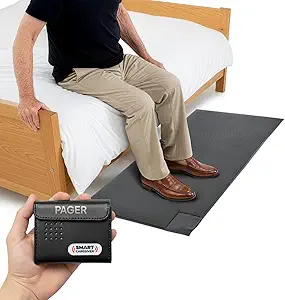 | Best for Wandering and Fall Prevention | Mat Dimensions: 24in x 48in x 0.5in | Maximum Range: 300 feet | Alert Volume: 70 dB, plus vibration mode | VIEW ON AMAZON | See Our Full Breakdown |
| PILSAMAS WiFi Caregiver Call Button for Elderly with App Notification |  | Best Budget Minimalist Pick | Connectivity: 2.4G WiFi only (not 5G) | Maximum Range: 15 meters from router | Power Source: Battery powered, 1 Lithium Polymer (included) | VIEW ON AMAZON | See Our Full Breakdown |
| smart home devices for elderly living alone | Connectivity |
|---|---|
| PILSAMAS 3-Pack WiFi Wireless | WiFi 2.4GHz + 433MHz RF |
| Smart Caregiver Bed Alarm for | — |
| DAYTECH WiFi Caregiver Call Bu | WiFi 2.4GHz only |
| WiFi Wireless Home Alarm Syste | WiFi 2.4GHz |
| JoneR WiFi Caregiver Call Butt | WiFi |
| WiFi Caregiver Pager Life Aler | 2.4GHz Wi-Fi only |
| CallToU Caregiver Pager with 2 | 433MHz wireless, no Wi-Fi needed |
| SINGCALL Tuya WiFi Smart SOS C | WiFi (2.4GHz only) |
| Medical Alert System for Senio | 2.4GHz Wi-Fi plus independent wireless channel |
| CallToU Wi-Fi Wireless Caregiv | — |
| Wireless Caregiver Pager | — |
| PILSAMAS WiFi Smart Caregiver | 2.4G Wi-Fi hub + 433 MHz button link |
| Smart Caregiver Wireless Floor | — |
| PILSAMAS WiFi Caregiver Call B | 2.4G WiFi only (not 5G) |
More Details on Our Top Picks
PILSAMAS 3-Pack WiFi Wireless Caregiver Call Button for Elderly at Home
Most call button systems in this roundup give you one or two buttons, which forces families to choose between the bedside and the bathroom — the two highest-risk spots. PILSAMAS solves that with three pre-paired buttons plus a WiFi hub, so coverage can span an entire single-story home. The 230ft range through walls and doors outpaces typical pagers like the CallToU two-button kit, and the app’s battery-level and status monitoring means family members catch a dying button before it fails silently. The tradeoff is alert depth: basic app push notifications are free, but SMS, phone, and email alerts sit behind a subscription — unlike the JoneR, which keeps everything fee-free. It also requires a 2.4GHz network only, so homes on 5GHz-only routers will hit a setup wall.
Pros:- Three buttons and 230ft wall-penetrating range cover a whole home
- No monthly fees for core app notifications
- App shows real-time battery levels and alarm history
- Pre-paired buttons with wearable, wall, and tabletop mounting options
Cons:- SMS, phone, and email alerts require a paid subscription
- 2.4GHz WiFi only — incompatible with 5GHz-only networks
- Loud alarm mode is poorly suited to households wanting discreet alerts
Best for: Seniors living alone in larger homes where buttons are needed in the bedroom, bathroom, and living room simultaneously
Not ideal for: Families who want guaranteed SMS or phone-call alerts without a subscription, since those channels require a paid plan
- Connectivity:WiFi 2.4GHz + 433MHz RF
- Range:230 ft through walls and doors
- Included:3 call buttons, 1 WiFi hub
- Ringtones:18 selectable
- Volume Levels:4
- Monthly Fee:None for app push
- Alerts:App push free; SMS/phone/email via subscription
Our verdict“This is the pick for covering multiple rooms in one purchase, provided the family is satisfied with free app push alerts.”
Smart Caregiver Bed Alarm for Elderly Adults with Sensor Pad
Every other product here waits for a senior to press a button — but dementia patients often forget or can’t press anything. This bed alarm takes the opposite approach: a 10″ x 30″ pressure pad under the fitted sheet sounds the moment weight lifts off it, alerting a caregiver before a fall happens rather than after. That proactive logic is what separates it from button systems like the PILSAMAS kit, which depends entirely on the senior’s cognition and mobility. The sealed vinyl pad handles incontinence, and indicator lights flag low battery or a displaced sensor. Two real annoyances: the wireless caregiver pager is a separate add-on, and the AC adapter isn’t included, so budget for both or you’re running on a 9-volt battery alone.
Pros:- Triggers instantly when weight leaves the pad — prevention, not just response
- Sealed, wipe-clean vinyl pad withstands incontinence
- Low battery and sensor status indicator lights
- Optional wireless add-on can alert a caregiver in another room without startling the patient
Cons:- Wireless caregiver alert requires a separately sold add-on kit
- AC power adapter not included — battery-only out of the box
Best for: Caregivers of seniors with dementia or fall risk who need to know the exact moment someone gets out of bed
Not ideal for: Seniors who want independence and privacy, since the alarm monitors movement rather than waiting for a deliberate call for help
- Sensor Pad Size:10″ x 30″
- Pad Material:Soft vinyl with foam interior
- Volume Settings:Two levels
- Power:One 9V battery (included) or AC adapter (not included)
- Incontinence Protection:Yes, sealed pad
- Wireless Option:Available via add-on kit sold separately
Our verdict“The only option in this lineup that acts before a fall, making it the choice for dementia and fall-risk monitoring at night.”
DAYTECH WiFi Caregiver Call Button Calls Phone, 2Button 1 Wrist 1 Receiver
This kit earns its spot by pairing a wrist-worn button with a fixed bedside button at a price point where competitors like the CallToU two-button kit offer only stationary pucks. For a senior living alone, the wrist option matters — a fall in the hallway leaves a nightstand button useless. The shared app alerts let multiple family members receive notifications, and with 20 ringtones and 5 volume levels you can assign distinct sounds to each button, so the caregiver knows where a call came from before checking the app. Compared with the PILSAMAS three-pack, you get fewer buttons but a more practical mix of wearable and fixed triggers. The catch: phone and text notifications that work offline are an upgrade tier, and like most budget WiFi pagers it’s 2.4GHz only.
Pros:- Wrist button plus fixed button covers mobile and bedside scenarios
- Shared app alerts reach multiple family members
- 20 ringtones and 5 volume levels distinguish which button was pressed
- Loud in-home receiver doubles as a local alarm for live-in caregivers
Cons:- Offline phone and SMS alerts require a paid upgrade
- 2.4GHz WiFi only
- Receiver must stay plugged into an outlet, limiting placement
Best for: Budget-minded families who want both a wearable wrist button and a bedside button under one hub
Not ideal for: Caregivers who can’t rely on app notifications alone and need offline phone or SMS alerts without paying for an upgrade
- Included:1 wrist button, 1 fixed call button, 1 receiver
- Connectivity:WiFi 2.4GHz only
- Ringtones:20 selectable
- Volume Levels:5
- Notifications:App push standard; phone/SMS via optional upgrade
- Receiver Power:Plugs into wall outlet
- Battery:1 x 12V battery required
Our verdict“A sensible entry point for families who want wearable protection without paying for a premium multi-room system.”
WiFi Wireless Home Alarm System, 21-Piece Kit, Alexa-Compatible
This is the odd one out here — not a caregiver pager but a full 21-piece security system, and that scale is exactly why it belongs. Call buttons like the JoneR and PILSAMAS answer “I’ve fallen and need help”; this kit answers “someone just opened the door at 3 a.m.” — a genuine concern for seniors living alone. With door/window sensors, motion detection, RFID tags, and a 120dB siren, it wraps the whole house in monitoring, and the 48-hour battery backup keeps protection alive through outages that would knock a WiFi-only pager offline. Alexa voice control lets a senior arm or check the system without fumbling with an app. Tradeoffs: it demands more setup and configuration than any single-button device, the code-based disarming can frustrate users with memory issues, and 2.4GHz is again the only WiFi band supported.
Pros:- 21 pieces cover doors, windows, and motion across a whole home
- 48-hour rechargeable battery backup survives power outages
- No monthly fees or SIM card required
- Alexa voice control plus app, remote, and keypad operation
Cons:- Substantially more complex to install and configure than a call button system
- PIN-code disarming may confuse seniors with memory difficulties
- 2.4GHz WiFi only
Best for: Seniors and families who want intrusion protection and environmental awareness across the entire home, not just a call button
Not ideal for: Anyone wanting a simple help button — this requires real setup time and complements rather than replaces a caregiver pager
- Kit Size:21 pieces
- Connectivity:WiFi 2.4GHz
- Battery Backup:48 hours, rechargeable
- Compatibility:Amazon Alexa, Smart Life, Tuya
- Siren Loudness:120 dB
- Maximum Range:330 feet
- Sensor Types:Magnetic contact, PIR motion, RFID
- Control Methods:App, push button, remote, voice
Our verdict“Pair this with a call button rather than choosing between them — it protects the house while a pager protects the person.”
JoneR WiFi Caregiver Call Button with Voice Activation for Elderly
The JoneR’s differentiator is voice activation: two gentle taps, a knock, a spoken “Help,” a button press, or a pull cord all trigger it. Every button-only system in this roundup — PILSAMAS, DAYTECH, the CallToU kits — fails the same test: a senior who has fallen and can’t reach, grip, or press anything. The JoneR is the only option here that works without hands at all. Add two-way intercom to up to four family members worldwide, no monthly fees, no daily charging, and a camera-free design appropriate for bedrooms and bathrooms, and the value case is strong. The limitation is structural: it’s a nightstand device, not a wearable, so protection ends the moment the senior leaves the room. Compared with the DAYTECH wrist combo, you trade mobility for hands-free triggering — that’s the real decision.
Pros:- Four trigger methods including voice — no grip or precise pressing needed
- Two-way intercom lets family speak with the senior immediately
- Alerts up to 4 family members worldwide with no subscription
- No camera, no daily charging, 2-minute setup
Cons:- Not wearable — completely useless if the senior falls in another room
- Requires WiFi and initial family-member linking before any alert works
- App verification code sometimes lands in spam during setup
Best for: Seniors with arthritis, tremors, or limited grip strength who cannot reliably press a small button
Not ideal for: Active seniors who move around the house all day, since the device only hears commands within its immediate vicinity
- Trigger Methods:Voice command, tap/knock, button press, pull cord
- Connectivity:WiFi
- Family Alerts:Up to 4 members via app push
- Communication:Two-way intercom
- Monthly Fee:None
- Warranty:2 years with lifetime technical support
- Setup Time:2 minutes
- Camera:None — privacy by design
Our verdict“The strongest choice for a senior whose hands can’t be trusted, as long as they spend most of their time near the nightstand.”
WiFi Caregiver Pager Life Alert Systems for Seniors No Monthly Fee App Control
This option stands out for one thing its rivals can’t match: a 656-foot range that pushes through walls, doors, and even multiple floors. Compared with the CallToU 2-button kit, which tops out around 500 feet, this system makes more sense for larger homes or multi-story houses where a bedroom button needs to reach a receiver in the basement or garage. The pairing of a waterproof wall button plus a wearable watch button covers the two highest-risk scenarios — bathroom falls and wandering out of a fixed spot. I’d flag two real tradeoffs: it only works on 2.4GHz Wi-Fi, and the app notifications are free while SMS and phone-call alerts hide behind a subscription. Setup also leans on whoever configures the app, so it’s a family project, not a solo purchase.
Pros:- 656-foot range penetrates walls, doors, and works across 2-3 floors
- Includes both a waterproof stationary button and a lightweight wearable watch button
- Free app notifications shareable with family anywhere in the world
- Multiple mounting options: screw, adhesive, or lanyard
Cons:- Only supports 2.4GHz Wi-Fi networks
- SMS and phone-call alerts require a paid subscription
- App setup requires a family member’s involvement
Best for: Families in larger or multi-story homes who need buttons to reach across long distances and want both a fixed bathroom button and a wearable
Not ideal for: Seniors without a family member willing to handle app setup and Wi-Fi configuration — this system depends on someone managing the smartphone side
- Range:Up to 656 ft (200m) through walls and doors
- Connectivity:2.4GHz Wi-Fi only
- Included Components:1 waterproof call button, 1 watch button, 1 receiver
- Alerts:Loud alarm, flashing light, app push notification
- Customization:Customizable ringtones, 4 volume levels
- Mounting:Screw mount, adhesive patch, or lanyard
- Monthly Fee:None for app alerts (SMS/call alerts require subscription)
Our verdict“Pick this if distance is your problem — it reaches farther through walls than anything else in this lineup.”
CallToU Caregiver Pager with 2 Wireless Call Button for Elderly at Home
This is the simplest, most dependable pick in the batch because it skips Wi-Fi entirely. Unlike the SINGCALL Tuya button or the LED-display medical alert system, both of which need a router, an app, and a working internet connection, this CallToU kit is a pure radio link: press the button, the plug-in receiver chimes. That means no app setup, no 2.4GHz compatibility headaches, and no dependence on Wi-Fi at all. The tradeoff is equally clear — alerts only reach whoever is holding or near the receiver, so remote family members get nothing. With two receivers and two buttons included, it’s better suited to a live-in caregiver or spouse than to long-distance monitoring. The 55 ringtones and up-to-110dB volume are genuinely useful for caregivers who are hard of hearing or sleeping.
Pros:- No Wi-Fi, app, or internet required — works out of the box
- Two receivers and two buttons included for whole-home coverage
- 55 ringtones and volume up to 110dB with 5 adjustable levels
- Waterproof and dustproof buttons safe for bathroom use
Cons:- No remote alerts — notifications only reach the in-home receiver
- Receivers must stay plugged into an outlet, limiting placement
Best for: Live-in caregivers or spouses who need an affordable, foolproof pager with no app, no Wi-Fi, and no setup friction
Not ideal for: Adult children monitoring a parent from another home or city — there’s no phone or app notification at all
- System Configuration:2 receivers, 2 call buttons
- Range:500+ ft open area, through-wall
- Ringtones:55 selectable tones
- Volume:5 levels, 0 to 110 dB
- Power:Buttons run on 2 included 12V alkaline batteries; receivers plug into outlets
- Weather Resistance:Waterproof and dustproof buttons
- Connectivity:433MHz wireless, no Wi-Fi needed
Our verdict“The most hassle-free choice when a caregiver is physically present but can’t watch every room at once.”
SINGCALL Tuya WiFi Smart SOS Caregiver Personal Alert Call Button
Where the CallToU 2-receiver kit is built around a fixed receiver, this SINGCALL button takes the opposite approach: it’s small enough to pocket, wear, or wall-mount, and it alerts phones directly through the Tuya app. That makes this pick the better fit for a senior who moves between rooms, sits on a porch, or wants something invisible rather than a pendant-style alarm. Alerts can be shared with multiple family members, so siblings in different cities all see the same SOS. Two limitations shape who should buy it: there’s no local alarm chime — if the internet drops, nobody hears anything — and it must stay within the Wi-Fi network it was paired to, meaning it can’t travel to a hotel or relative’s house without reconfiguration. Compared with the Wi-Fi CallToU watch-button system, it trades the loud home receiver for pure portability.
Pros:- Sends push alerts to phones anywhere in the world, not just in the home
- Alerts shareable with multiple family members for coordinated response
- Three wearing options: pocket, wearable, or wall-mounted
- Low-battery LED indication plus app notification
Cons:- No local receiver or audible alarm in the home
- Only works on 2.4GHz Wi-Fi and only within the paired network
Best for: Seniors living alone whose family wants a discreet, pocketable button that pushes alerts straight to multiple phones
Not ideal for: Homes with unreliable Wi-Fi or anyone who wants a loud in-home alarm — this button has no local sound at all
- Connectivity:WiFi (2.4GHz only)
- App:Tuya Smart
- Alerts:Smartphone push notifications
- Sharing:Multiple smartphones can receive alerts
- Battery:Rechargeable with low-battery LED and app alert
- Mounting:Pocketable, wearable, or wall-mountable
Our verdict“A minimal, travel-around-the-house button for families who monitor by phone rather than by ear.”
Medical Alert System for Seniors – No Monthly Fee, App-Controlled with LED Number Display
The standout feature here isn’t range or portability — it’s the LED number display that shows which button was pressed. In a household with two seniors, or where a senior shares a home with a patient relative, that identification matters: the caregiver knows who needs help before walking down the hall. No other Wi-Fi pager in this lineup offers that. Its second differentiator is dual-channel reliability — the 300-foot wireless link keeps the receiver chiming even during an internet outage, something the SINGCALL button can’t do since it has no local channel at all. The tradeoffs: 300 feet is the shortest range among the Wi-Fi systems here (the B0GXF41RX5 system more than doubles it), and SMS or phone-call alerts require a paid subscription, though app pushes are free.
Pros:- LED number display identifies which of up to 6 people pressed for help
- Dual-channel design keeps local alerts working during internet outages
- Free app notifications shareable with multiple caregivers
- Two call buttons and a receiver included with no monthly fee
Cons:- 300-foot range is the shortest among Wi-Fi rivals in this roundup
- SMS and phone-call alerts require a paid subscription
- App notifications depend on internet connectivity
Best for: Caregivers watching two people at once — couples aging in place or shared households — who need to know who pressed the button
Not ideal for: Very large or sprawling properties where 300 feet may not bridge bedrooms to a kitchen or backyard receiver
- Connectivity:2.4GHz Wi-Fi plus independent wireless channel
- Range:Up to 300 ft through walls and doors
- Call Buttons Included:2
- Receivers Included:1
- Display:1-6 LED number display
- Compatible Apps:Tuya Smart / Smart Life
- Monthly Fee:None for basic use (SMS requires subscription)
Our verdict“The clear choice when you’re monitoring two people and guessing who needs help isn’t acceptable.”
CallToU Wi-Fi Wireless Caregiver Pager Call Button System (1 Call Button, 1 Watch Button, 1 Receiver)
This is the most well-rounded package in the batch: a wearable watch button, a stationary call button, a loud receiver with flashing lights, and free app alerts — all in one box. Compared with the longer-range B0GXF41RX5 system, it gives up about half the wireless distance (328 vs 656 feet) but adds conveniences that system lacks: custom button names in the app, a lifetime warranty, and included AAA batteries so it works the day it arrives. The 433MHz link plus Wi-Fi means the home alarm still sounds if the internet hiccups, mirroring the dual-channel logic of the LED-display system but with fewer buttons. The main drawbacks are familiar: 2.4GHz-only Wi-Fi, and phone-call or SMS alerts sit behind a subscription that costs extra monthly.
Pros:- Includes both a wearable watch button and a stationary call button
- Works over 328ft/100m through walls and doors on 433MHz
- Free app notifications with family sharing and custom button names
- Lifetime warranty and batteries included
Cons:- Only supports 2.4GHz Wi-Fi, not 5GHz
- Phone call and SMS alerts require a paid subscription
Best for: Families wanting one kit that covers both a wearable and a fixed button with backup local alarm — without paying a monthly fee for core features
Not ideal for: Buyers who want automated phone calls to family during emergencies without paying the subscription
- Wireless Frequency:433MHz
- Maximum Range:328 ft / 100m through walls
- Wi-Fi Compatibility:2.4GHz only
- Included Components:1 call button, 1 watch button, 1 receiver
- Power:2 AAA batteries included
- Ringtones / Volume:20 ringtones, 5 volume levels
- Warranty:Lifetime warranty
Our verdict“The best single-purchase balance of wearable, stationary, local alarm, and remote app alerts for a typical one-senior household.”
Wireless Caregiver Pager, 1 Call Button + 1 Receiver for Elderly at Home
This option stands out for raw range and simplicity: the button-to-receiver link stretches up to 1,500 feet, which is roughly four times the reach of the PILSAMAS WiFi hub system in this lineup. For a senior living alone with an in-home or next-door caregiver, that coverage means a chime still fires even if the receiver is out in a garden or garage. Setup involves no Wi-Fi, no app, and no account — press the button, hear the tone. That simplicity is also its limit: unlike the PILSAMAS WiFi pager, there is no smartphone notification, so family members who live elsewhere are out of the loop entirely. The 58 ringtones and 120 dB max volume are generous, and IP55 protection covers bathroom splash zones, though it falls short of the IP65 shower-rating on the PILSAMAS.
Pros:- 1,500 ft wireless range — the longest in this lineup by a wide margin
- 58 ringtones and volumes up to 120 dB, loud enough for large homes
- Expands to 30 buttons and multiple receivers for multi-room coverage
- No Wi-Fi, app, or subscription needed — works straight out of the box
- IP55 water and dust resistance handles bathroom and kitchen placement
Cons:- No smartphone or remote notification — alerts only reach whoever holds the receiver
- Lower IP55 rating is splash-proof but not suited to direct shower exposure
- Only one button and one receiver in the base kit
Best for: Seniors with a live-in or nearby caregiver who want a no-app, plug-and-play alert at the longest range in this roundup
Not ideal for: Families monitoring from another city — with no Wi-Fi or app component, remote relatives get no alert at all
- Wireless Range:Up to 1,500 ft
- Ringtones:58 selectable tones
- Volume:5 levels, 0–120 dB
- Operating Temperature:-4°F to 140°F
- Expandability:Up to 30 call buttons, multiple receivers
- Warranty:18 months
Our verdict“This pick makes the most sense for seniors whose caregiver is on-site or very close by and who value range and zero-setup simplicity over remote connectivity.”
PILSAMAS WiFi Smart Caregiver Pager, 1 Receiver, 2 Call Buttons & Wristband
Where the basic Wireless Caregiver Pager only sounds a local chime, this system adds the piece that matters most when a senior lives alone: app notifications that reach family anywhere. Each button can be named — “Grandma – Bathroom” — and the hub flashes a numbered red LED so an in-home caregiver instantly knows who and where, a detail the cheaper PILSAMAS single call button skips entirely. The bundle is well thought out for solo living: a hypoallergenic wristband for all-day wear plus two IP65 buttons that survive direct shower jets, covering the highest-risk room in the house. The tradeoff is range — 328 feet through walls is fine for most homes but a fraction of the 1,500-foot analog pager. App alerts are free, though SMS and phone-call alerts sit behind an optional paid plan, and the hub refuses 5 GHz networks.
Pros:- Free app alerts with named buttons showing who needs help and where
- IP65 wristband and buttons survive direct shower and bathtub exposure
- Alert history log lets family review incidents after the fact
- Pre-paired system works out of the box with no subscription for app alerts
Cons:- 328 ft range is short compared with non-WiFi pagers in this roundup
- 2.4G Wi-Fi only — will not connect to 5 GHz networks
- SMS, phone, and email alerts require a paid plan
Best for: Families coordinating care from different locations who need to know exactly which room an alert came from
Not ideal for: Sprawling properties or detached-caregiver setups — the 328 ft hub range can’t match long-range RF pagers
- Connectivity:2.4G Wi-Fi hub + 433 MHz button link
- Range:328 ft through walls
- Included Components:1 hub/receiver, 2 call buttons, 1 wristband
- Alerts:18 tones, 4 volume levels, app push (free)
- Button Capacity:Up to 6 numbered buttons
- Battery:12V battery (included)
- Weight:9.3 ounces
Our verdict“This is the pick for dispersed families who want a shower-safe wearable plus room-level identification and app alerts without a mandatory monthly fee.”
Smart Caregiver Wireless Floor Mat Alarm and Pager System (24in x 48in)
Every other product here waits for a senior to press a button — this one removes that requirement entirely. The weight-sensing floor mat triggers the pager the moment someone steps on it, which is a different category of protection: it catches nighttime wandering, dementia-related exit attempts, and get-out-of-bed moments the person may not think to signal. A 24 x 48 inch mat covers a bedside or doorway reliably, and the pager’s vibration mode plus 300 ft range lets a caregiver sleep in another room without alarms waking the senior. Compared with the Smart Caregiver bed alarm elsewhere in this roundup, the floor mat approach avoids a pad slipping out from under a mattress cover. The gaps are real, though: no app or remote family alerts, batteries aren’t included, and expanding with motion sensors or bed pads means buying each add-on separately.
Pros:- Hands-free detection — no button press required from the senior
- Audible or vibration pager alerts up to 300 ft away
- No alarm sounds in the senior’s room, avoiding startling or agitation
- Large 24in x 48in mat works bedside or at exit doors
Cons:- Requires 2 AA batteries that are not included
- Additional Smart Caregiver sensors and pads sold separately
- No app or remote notification for off-site family members
Best for: Dementia or fall-risk seniors who may not reliably press a button, monitored by an on-site caregiver
Not ideal for: Families needing remote smartphone alerts — this is a closed local system with no app connectivity
- Mat Dimensions:24in x 48in x 0.5in
- Maximum Range:300 feet
- Alert Volume:70 dB, plus vibration mode
- Sensor Technology:Contact/weight sensor
- Power Source:2 AA batteries (not included)
- Compatibility:Expandable with Smart Caregiver call buttons, motion sensors, bed and chair pads
- Warranty:1-year manufacturer warranty
- Models:TL-2020P pager, PTFM-07C floor mat
Our verdict“This system earns its place for seniors who cannot be trusted to press a button — passive floor sensing is the only approach here that catches unassisted bed exits and wandering.”
PILSAMAS WiFi Caregiver Call Button for Elderly with App Notification
This is the stripped-down entry point to app-based alerting: one battery-powered button, no hub, no wiring — it talks straight to a 2.4 GHz router and pushes notifications to shared family phones. Compared with its sibling, the PILSAMAS WiFi Smart Caregiver Pager, you give up the receiver hub, the numbered LED identification, the wristband, and two-thirds of the range; what you keep is the core promise of remote family alerts with no monthly fee. The included lanyard and tape mean it can be worn or wall-mounted in minutes, which suits a senior who wants a single panic button in a fixed spot like a nightstand or shower door. The constraints are tight: a 15-meter router range makes it unusable far from the Wi-Fi source, and anything beyond app alerts — SMS, calls, email — moves behind a subscription.
Pros:- No hub, gateway, or wiring — connects directly to home Wi-Fi
- Free app notifications shareable with multiple family members
- Battery included, with both lanyard and tape for wear or wall mounting
- Smallest footprint in this lineup — a true single-button setup
Cons:- 15-meter maximum range from the router is the shortest in this roundup
- 2.4G Wi-Fi only, with no 5 GHz support
- SMS, phone, and email alerts require a paid subscription
Best for: Budget-conscious buyers adding one simple app-alert button in a Wi-Fi-strong area like a bedroom or bathroom
Not ideal for: Large homes or weak-signal rooms — the 15 m router limit will drop the connection
- Connectivity:2.4G WiFi only (not 5G)
- Maximum Range:15 meters from router
- Power Source:Battery powered, 1 Lithium Polymer (included)
- Control Method:Touch
- Mounting:Wall mount (tape included) or lanyard wear
- Alerts:Real-time smartphone app notifications, multi-user sharing
- Color:White
Our verdict“Choose this if you want the cheapest possible path from one button press to a family phone notification, and the button will live close to the router.”

How We Picked
I judged every device against what actually matters when an elderly person lives alone: how the alert travels (local pager chime, phone app, or both), how easy the button is to press for weak or arthritic hands, and whether it works during a WiFi or power hiccup. Coverage was the next filter — a single button by the bed protects far less of a home than a three-button kit or a wrist-worn pendant. I also weighed setup difficulty, because a device a worried adult child installs in one weekend visit beats one that never gets configured.
That logic drives the ranking. Systems that combine local and remote alerting ranked highest, since they cover both a spouse in the next room and children in another state. Preventive motion-sensor alarms earned mid-tier spots for fall-risk and dementia households despite the higher price. Simple local-only pagers filled the value and beginner slots — genuinely useful, but limited to caregivers who are physically nearby. Ranked lowest were the models with connectivity constraints, thin button ergonomics, or coverage gaps a buyer wouldn’t notice until an emergency exposed them.
Factors to Consider When Choosing Smart Home Devices For Elderly Living Alone
Before choosing any single device, it helps to understand how these systems differ in reach, reliability, and the kind of emergency they’re built for. These are the factors that separate a purchase that brings peace of mind from one that sits unused in a drawer.Who Receives the Alert — and How Fast
The single biggest decision is whether the alert reaches someone inside the home or miles away. Local pager systems chime a receiver within a few hundred feet, which is ideal when a spouse or live-in caregiver is present but useless if the nearest family member is across town. WiFi-based systems send app notifications to multiple phones anywhere, but they depend on the home’s internet staying up — worth testing before you rely on it. A common mistake is buying a local-only pager for a senior who genuinely lives alone, which means nobody hears the chime when it matters. The best setups for solo seniors either pair a WiFi system with a daily check-in routine, or layer both types so every base is covered.
Button Design and Physical Ability
Not every call button is pressable by every senior. Fixed wall buttons assume the person can reach the button, while wrist-worn pendants travel with them to the bathroom, garden, or hallway — statistically where most falls happen. Button size and activation force vary more than buyers expect; some models need a firm press that defeats arthritic or tremoring fingers. Voice-activated options exist in this category and suit seniors with limited hand mobility, though they can misfire or miss a quiet call. If your parent has dropped or fumbled a phone before, prioritize a wearable over anything mounted to furniture.
Where Falls Actually Happen — Coverage Mapping
Walk through the home and mark the spots where a fall would leave someone stranded: beside the bed, in the bathroom, at the top of stairs, in the kitchen. That map tells you how many buttons you need, and it’s why single-button kits cost less upfront but often leave the most dangerous room uncovered. Waterproofing matters most for bathroom buttons, since shower falls are both common and hard to call for help from. Ceiling coverage and WiFi dead zones deserve a check too — a smart button that can’t reach the router from the master bathroom is a false sense of security.
Reactive Buttons Versus Preventive Sensors
Call buttons require the senior to be conscious and able to press them, which is exactly their weakness: a fall that causes confusion or unconsciousness defeats them entirely. Bed sensor pads and floor mat alarms flip the model, alerting a caregiver the moment weight shifts — before the senior stands unassisted or wanders at night. This preventive approach is strongest for dementia, post-surgery recovery, and night-time fall risk, but it demands a caregiver who can actually respond to the alert. Expect more false alarms with motion sensors, and budget for pad replacement since sensor mats wear out with daily use. For a senior with no cognitive issues, a simple button system is usually the better fit and less intrusive at night.
WiFi Requirements and Setup Reality
Most app-connected systems in this category run only on 2.4GHz WiFi, and older routers — common in seniors’ homes — sometimes struggle to broadcast it reliably to far bedrooms. Before buying, check where the router sits and whether the signal reaches the bedroom and bathroom; a mesh node or extender may be a smarter first purchase than a fancier button. Setup difficulty also varies widely: some systems pair in minutes through a phone app, while others involve account creation and button-registration steps that frustrate a first-time installer. If an adult child handles installation during a visit, choose a system that can be fully configured and tested before they leave. And always run a monthly test alert — batteries die and firmware silently updates.
Monthly Fees, Expansion, and Total Cost of Ownership
Every device in this roundup avoids subscription fees, but that isn’t universal in the senior-safety market, so read the fine print on any monitored medical alert brand. Where costs do accumulate: sensor pads wear out, batteries need replacing, and single-room starter kits tempt you into buying a second system later. Buying an expandable system up front — one that supports extra buttons, watch pendants, or receivers — usually beats stacking incompatible devices from different brands. Cheapest is rarely wisest here; the goal is the lowest-cost system that covers every fall-prone room with alerts that reach the right person. Balance that against overbuying, since a senior overwhelmed by gadgets may stop using them entirely.
Frequently Asked Questions
Do these devices work if the WiFi goes out?
It depends on the model, and this is the most common false assumption in the category. Pure pager-style systems like the CallToU and basic wireless receivers use radio signals between button and receiver, so they keep working with no internet at all — but they only alert someone inside the home. WiFi app-based systems like the PILSAMAS and SINGCALL models lose remote phone notifications during an outage, though some still chime a local receiver if one is included. The safest approach for a senior living truly alone is a WiFi system layered with a basic local pager as backup, plus a daily phone check-in from family. Test what happens during an outage rather than assuming, since behavior varies by model.
Are call buttons enough, or do I need a bed or floor sensor too?
Call buttons only work when the senior is conscious and physically able to press them, which covers most falls but not confusion, fainting, or dementia-related wandering. If your parent has fallen before without calling for help, or gets up unsteadily at night, a bed sensor pad or floor mat alarm is the stronger tool because it alerts the caregiver before the risky movement completes. The Smart Caregiver bed alarm and floor mat system fills exactly that gap, though it presumes a caregiver can respond quickly — which a remote family member cannot. For cognitively sharp seniors, a well-placed button system is usually sufficient and less disruptive to sleep. Many families end up using both: buttons for daytime, sensors for overnight.
Can more than one family member receive the phone alerts?
Most WiFi app-based systems in this roundup — including the PILSAMAS, JoneR, SINGCALL, and app-controlled no-monthly-fee models — allow multiple phones to install the app and receive the same push notification. That’s a genuine advantage over traditional monitored medical alert services, which typically route to a single call center. Check whether the app requires each family member to create an account or share login credentials, since shared logins can cause missed notifications if someone changes the password. Also confirm notification settings are set to bypass silent mode on each phone, because a suppressed alert at night defeats the whole system. Local pager receivers, by contrast, alert whoever is physically nearby regardless of phone settings.
How far away can a caregiver be and still get the page?
For local pager systems, realistic range is typically a few hundred feet in open air but much less through walls and floors — a receiver in a detached garage or basement may miss the chime. WiFi systems remove that distance limit entirely, since the notification travels over the internet to phones anywhere in the world. The catch is the front half of that chain: the button still has to reach the home’s router, so a distant bedroom can be the weak link even when the caregiver is on another continent. If you need both in-home and remote coverage, the hybrid kits with a wrist button, receiver, and app support are designed precisely for that scenario. Always test from the farthest point of the house.
Will my parent actually use it, or is it too complicated?
Adoption is the hidden failure point — a perfectly configured system that a senior refuses to wear or can’t remember to press is worthless. Large single-purpose buttons with no menus are the easiest to adopt, which is why simple pager kits work well for seniors resistant to technology. Wrist pendants succeed when they look like a normal watch rather than a medical device, so consider how the wearable looks and feels before buying. Voice-activated options help seniors with hand weakness or memory issues, though they occasionally misinterpret background noise. Involve your parent in the choice where possible; the device they picked themselves is the one they’ll actually use.
Conclusion
For best overall, the PILSAMAS 3-Pack WiFi Caregiver Call Button covers the three most fall-prone rooms and pushes app alerts to remote family with no monthly fee — the most complete protection per dollar in this lineup. The best value pick is the CallToU Caregiver Pager two-button kit: simple, dependable, and ideal when a caregiver is in or near the home and complexity is the enemy. For premium, preventive protection, the Smart Caregiver Bed Alarm with sensor pad is worth the extra spend for dementia, post-surgery, or night-wandering households where a button press can’t be counted on — and the wireless floor mat system fills the same role for hallways and doorways. Beginners and seniors wary of technology should start with the single-button wireless pager or the PILSAMAS single-button app model, both of which can be working within minutes of opening the box. For hands-free and mobility-limited needs, the JoneR voice-activated button and the wrist-worn WiFi kits stand apart. Whatever you choose, place the buttons where falls actually happen, test the alerts monthly, and remember that the best device is the one your parent will genuinely use every day.
Cold & flu season Picks
humidifiers
As an affiliate, we earn on qualifying purchases.