
Choosing smart home devices for a senior often means balancing simple controls and useful alerts against setup effort, ongoing costs, and privacy. Amazon Alexa and Apple Home can both support voice control, lights, plugs, routines, and connected sensors, but they suit different households. Alexa is usually the more flexible, budget-friendly starting point, especially when relatives want to help manage devices remotely. Apple Home makes more sense when the senior already uses an iPhone or iPad and the household values Apple’s privacy approach and ecosystem. Neither system replaces a medical alert service or guarantees that someone will notice an emergency.

Turn quiet afternoons into listening time
- Thousands of audiobooks, podcasts and originals
- Listen on your phone, tablet or Echo — also offline
- Cancel anytime
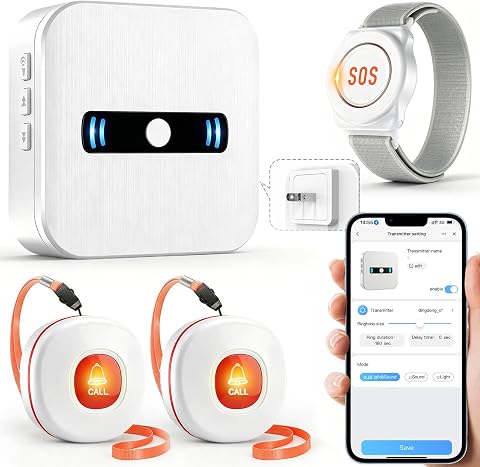
DAYTECH WiFi Caregiver Call Button System with Wristband and Receiver
- ✔ Brand: DAYTECH
- ✔ Model: CR02TY-CT02WR-WB06WH
- ✔ Connectivity: 2.4 GHz Wi-Fi

PILSAMAS WiFi Caregiver Call Button for Elderly with App Notification
- ✔ Brand: PILSAMAS
- ✔ Model: CF101W
- ✔ Connectivity: 2.4 GHz Wi-Fi

XUK Wi-Fi SOS Caregiver Pager System with Two Watch Buttons and Receiver
- ✔ Brand: XUK
- ✔ Model: PW-150
- ✔ Included components: One host receiver and two watch SOS pagers
At a Glance
| Criteria | Amazon Alexa | Apple Home | Winner |
|---|---|---|---|
| Ease of everyday control | Voice control through Echo devices; broad range of compatible products | Voice control through HomePod; convenient for households already using Apple devices | Depends |
| Device compatibility | Very broad selection across price points, though compatibility varies by device | Works with HomeKit and Matter-compatible devices; selection is narrower than Alexa’s overall catalog | A |
| Safety and alerts | Can support routines, cameras, contact sensors, and emergency calling features; capabilities depend on products and region | Supports compatible cameras, sensors, and automations; emergency use depends on configured devices and services | Depends |
| Remote family support | Caregivers can use Alexa features and compatible apps; remote access varies by setup | Home app sharing supports household access; remote management requires appropriate Apple setup | A |
| Privacy | Some features process requests in the cloud; settings and controls vary by device | Apple emphasizes local processing and encrypted services for supported features; specifics vary by device | B |
| Setup and maintenance | Easy to start, but a mixed device setup can take extra troubleshooting | Can be straightforward within Apple households, but compatible hubs and devices may raise setup demands | A |
| Cost and value | Low-cost entry options and wide choice; some services and devices add recurring costs | Higher entry cost for HomePod and some compatible devices; no broad device-price advantage | A |
DAYTECH WiFi Caregiver Call Button System with Wristband and Receiver
DAYTECH is the most adaptable kit in this comparison because it combines two call buttons, a wristband, and a receiver. That gives a household more than one way to place an alert: a wearable option can stay close at hand, while buttons can be positioned where they are most useful. Its receiver also provides a local alarm, so a caregiver at home has an audible signal in addition to the app notification.Compared with PILSAMAS’s single-button format, DAYTECH is better suited to a home where one trigger point may not be enough. Shared alerts can notify multiple caregivers, and 20 ringtone options with five volume levels help distinguish calls and adjust the sound. The tradeoff is a more involved setup: the system needs constant Wi-Fi for core functions and the receiver needs an outlet. Phone and text alerts also require a paid upgrade for offline alerts, so households should not assume the basic app covers every backup scenario.
Pros:
- Includes two buttons, a wristband, and one receiver
- Shared app alerts can reach multiple caregivers
- Receiver provides a loud local alarm
- Customizable ringtones and five volume levels
Cons:
- Core functionality requires a constant Wi-Fi connection
- Receiver must remain plugged into a power outlet
- Phone and text notifications for offline alerts require a paid upgrade
Best for: Families who want several included ways for a senior to call for help, plus both a local receiver and shared app alerts.
Not ideal for: People who need a self-contained alert system that works without Wi-Fi, or caregivers who require phone and text alerts without an upgrade.
Bottom line: We recommend DAYTECH for households that value flexible call access and a local alarm alongside shared app notifications.
“We recommend DAYTECH for households that value flexible call access and a local alarm alongside shared app notifications.”
PILSAMAS WiFi Caregiver Call Button for Elderly with App Notification
PILSAMAS keeps the core idea easy to grasp: the senior presses one Wi-Fi call button, and caregivers receive app notifications. It can be worn on a lanyard or mounted on a wall, allowing a family to choose between keeping the button close or placing it at a regular call point. The product also avoids a separate gateway and complex wiring, which makes it the most approachable starting point in this group.Compared with DAYTECH, PILSAMAS provides a simpler single-button arrangement rather than multiple triggers and a receiver. Its stated basic app alerts carry no monthly fee, and multiple family members can receive them. That makes it a sensible choice when the household mainly needs shared phone alerts, not a loud in-room alarm. Its stated range is 15 meters from the router, and it only supports 2.4 GHz networks. SMS, phone, and email alerts need a paid subscription, so caregivers who need those channels should account for that limitation before relying on it.
Pros:
- No gateway or complex wiring required
- Basic app notifications have no monthly fee
- Can be worn on a lanyard or mounted on a wall
- Supports notifications to multiple family members
Cons:
- Works only with 2.4 GHz Wi-Fi
- Stated effective range is 15 meters from the router
- SMS, phone, and email alerts require a paid subscription
Best for: Families seeking a simple wearable or wall-mounted button that sends basic app alerts to several caregivers.
Not ideal for: Households needing a local receiver alarm, a longer stated router range, or SMS and phone alerts without a subscription.
Bottom line: PILSAMAS is the clearest fit for families who want a basic shared app alert from one easy-to-place call button.
“PILSAMAS is the clearest fit for families who want a basic shared app alert from one easy-to-place call button.”
XUK Wi-Fi SOS Caregiver Pager System with Two Watch Buttons and Receiver
XUK is the distinctive option for households already using Alexa: the system supports voice control as well as app sharing, and its receiver sounds when a watch SOS button is pressed. The included pair of watch pagers may suit a home where the senior wants a wearable trigger and a second one is useful for another person or as an extra. Its stated range reaches up to 500 feet, although actual performance will depend on the home and Wi-Fi conditions.Compared with PILSAMAS, XUK adds a receiver and Alexa compatibility; compared with DAYTECH, it includes two watch pagers rather than a mix of wristband and separate buttons. The product description mentions other button styles separately, so buyers should confirm which accessories are included in the specific kit. Like the others, it depends on 2.4 GHz Wi-Fi for connected features, and phone alerts require a smartphone and home Wi-Fi. The broader stated range is useful context, but it is not a substitute for confirming signal coverage in the rooms where the system will be used.
Pros:
- Includes two watch SOS pagers and one receiver
- Supports shared app alerts
- Compatible with Alexa voice control
- States a range of up to 500 feet
Cons:
- Phone alerts require home Wi-Fi and a smartphone
- Uses 2.4 GHz Wi-Fi
- Description of included watch pagers differs from mentions of other button styles
Best for: Households that use Alexa and want two wearable SOS pagers with a receiver and shared app alerts.
Not ideal for: Buyers who want clearly varied included trigger styles, or a call system that does not depend on home Wi-Fi and a smartphone for phone alerts.
Bottom line: Choose XUK when Alexa support and two included watch pagers matter more than having DAYTECH’s mix of wearable and separate buttons.
“Choose XUK when Alexa support and two included watch pagers matter more than having DAYTECH’s mix of wearable and separate buttons.”
As an Amazon Associate we earn from qualifying purchases.
Key Differences
The clearest difference is breadth versus ecosystem fit. Alexa works with a larger variety of smart home products and has low-cost speakers, bulbs, and plugs, so families can build a useful setup gradually. Apple Home has a more defined compatibility boundary. That can simplify choices for an Apple household, but it can rule out cheaper or less common products.
For senior safety, the platform matters less than the specific devices, their reliability, and who responds to an alert. A motion sensor or camera can help family members check in, but neither Alexa nor Apple Home automatically provides medical monitoring. Alexa’s broader range can make it easier to find a particular sensor or calling feature; Apple Home may appeal when privacy and iPhone-based control take priority. In either case, discuss consent, alert recipients, and what happens if internet or power fails before installing monitoring devices.
For most households starting from scratch, Alexa offers better practical value because it is cheaper to enter and supports more device choices. Apple Home earns its higher cost when the senior already relies on Apple devices and the family prefers a tightly integrated, privacy-conscious setup.
Detailed Comparison
Ease of everyday control (moderate difference)
Both systems offer voice control and app-based operation. Alexa has more speaker choices and can be placed in several rooms at modest cost, which helps when a senior wants to control lights without finding a phone. Apple Home is often simpler when the user already knows Siri and uses an iPhone. The winner depends on familiar devices and voice habits; the gap is moderate because familiarity outweighs small interface differences.
Device compatibility (Amazon Alexa wins — moderate)
Alexa wins by a moderate margin for sheer choice. Its broad ecosystem includes many budget bulbs, plugs, sensors, and cameras. Apple Home supports HomeKit and Matter products, but shoppers need to check compatibility carefully and may have fewer low-priced alternatives. In practice, Alexa is easier when a family wants to match a specific device or shop by price.
Safety and alerts (minor difference)
Neither platform should be treated as a medical alert system. Both can connect compatible sensors and cameras and trigger notifications or automations, but performance depends on the product, internet access, configuration, and a person who responds. Alexa has an edge in the range of possible add-ons, though that does not make every configuration safer. This is a small platform-level difference; choose dedicated emergency equipment when dependable emergency response is the priority.
Remote family support (Amazon Alexa wins — moderate)
Alexa has a moderate advantage for families seeking a range of check-in or connected-device options, although exact remote controls depend on the features and products available in the region. Apple Home’s shared access is useful for relatives already in Apple’s ecosystem, but setup can be less convenient if caregivers use other phones. The practical winner is the platform the designated helper can reliably manage.
Privacy (Apple Home wins — moderate)
Apple Home wins by a moderate margin for households prioritizing Apple’s privacy model and supported local processing. Alexa includes cloud-based features, and privacy controls differ across services and devices. These broad approaches do not tell the whole story: camera placement, account security, recording settings, and consent matter in both systems. Families should review the controls on each device before enabling monitoring.
Setup and maintenance (Amazon Alexa wins — minor)
Alexa is generally easier to build around varied products because compatibility is broad and inexpensive devices are easy to find. That variety can also produce a less consistent setup if products use separate apps. Apple Home can feel coherent when all users and devices are already Apple-compatible, but choosing a hub and checking device support may add work. Alexa has a slight advantage for mixed households; Apple can be simpler within its own ecosystem.
Cost and value (Amazon Alexa wins — moderate)
Alexa wins on entry cost and flexibility. A household can begin with an Echo speaker and a few compatible plugs or bulbs, then add devices as needs become clear. Apple Home may require a HomePod or other suitable home hub and compatible accessories, which can raise the initial bill. Paying more is worthwhile when Apple integration and privacy matter enough to justify the narrower, costlier choices; otherwise Alexa is the better value.
Amazon Alexa: Pros and Cons
Pros:
- Affordable speakers and accessories make gradual setup practical.
- Broad compatibility gives families more choices across device types and budgets.
- Useful for mixed-device households where caregivers may not use Apple products.
Cons:
- Cloud features and device-level privacy settings need review.
- A wide assortment of brands can mean multiple apps and uneven setup.
- Smart home alerts do not provide medical monitoring or guaranteed emergency response.
Apple Home: Pros and Cons
Pros:
- Fits naturally into households already using iPhone, iPad, or Siri.
- Apple’s privacy approach and supported local processing appeal to privacy-conscious families.
- Shared Home access can help Apple-using relatives manage compatible devices.
Cons:
- Compatible products can be more limited or cost more.
- A suitable hub or Apple hardware may increase the initial expense.
- Remote support is less convenient when caregivers do not use Apple devices.
Who Should Choose What
Choose Amazon Alexa if:
- You want to start with a small budget and add devices over time.
- The household uses a mix of phones and wants a wide choice of compatible sensors, lights, or cameras.
- A caregiver needs flexibility to select products based on availability and price.
Choose Apple Home if:
- The senior already uses an iPhone and prefers Siri for voice control.
- The family prioritizes Apple’s privacy approach and accepts a narrower device selection.
- Caregivers who will manage the setup also use Apple devices.
Skip both if: Skip both as the main safety solution if you need professional monitoring or a reliable emergency response service; choose dedicated medical alert equipment and treat smart home devices as supplementary.
Value for Money
For most families, Alexa delivers more for the money: inexpensive speakers and a broad accessory market make it possible to test a few useful routines before expanding. That matters when the senior’s needs are still being figured out or relatives are paying for the setup. Apple Home’s premium is justified when the household already owns Apple hardware, values Apple’s privacy model, and wants familiar iPhone-based management. Paying extra for Apple compatibility alone does not improve emergency response; invest in devices and services that match the actual safety need.
Final Verdict
Choose Amazon Alexa for the most practical starting point in most senior households: it costs less to try, supports more device options, and suits families with mixed phones and budgets. Choose Apple Home when the senior and caregivers already use Apple devices and privacy-focused integration matters enough to accept higher costs and fewer choices. The deciding factor is the household’s existing technology and who will maintain it. If an emergency response is the core need, choose a dedicated medical alert service and use either smart home system only for added convenience and check-ins.
Frequently Asked Questions
Are smart home devices a substitute for a medical alert system?
No. Smart speakers, sensors, and cameras can support check-ins or send configured alerts, but they do not guarantee that an emergency will be detected or answered. Use a dedicated medical alert service when emergency response is needed.
Which system is easier for family members to manage remotely?
Alexa often gives mixed-device families more options, while Apple Home can be convenient when the senior and caregivers use Apple devices. Remote access depends on the products, accounts, and region, so confirm the specific feature before relying on it.
Which is better for an older adult who does not use a smartphone?
Either can work through voice control from a smart speaker, but a relative will likely need to handle setup and ongoing changes. Place speakers where they can be heard, use simple commands, and keep physical switches available for lights and other essentials.
Is Apple Home worth paying more for?
It can be, when the household already owns Apple devices, wants Siri integration, and values Apple’s privacy approach. For families mainly seeking affordable voice control and broad device choice, Alexa is usually better value.