
TL;DR
Prebuilt AI workstations now often match or beat DIY builds on price, thanks to component shortages and bulk buying. They save time, offer validated thermals, and come with support. Building gives you control and upgradeability but demands more time and expertise.
Imagine you’re ready to dive into AI projects. You need a powerful machine — fast, reliable, and ready to go. But do you build it yourself, piecing together parts like a puzzle, or buy a prebuilt that’s ready to fire up? That choice has never been trickier, especially as the market shifts.
In 2026, the old rule — build for savings, buy for convenience — no longer holds as tightly. Component shortages, price spikes, and AI-specific hardware like NPUs and optimized GPUs have turned the tables. Now, your decision hinges on more than just wallet weight; it’s about speed, support, control, and how much effort you want to invest.
Build vs buy
an AI workstation.
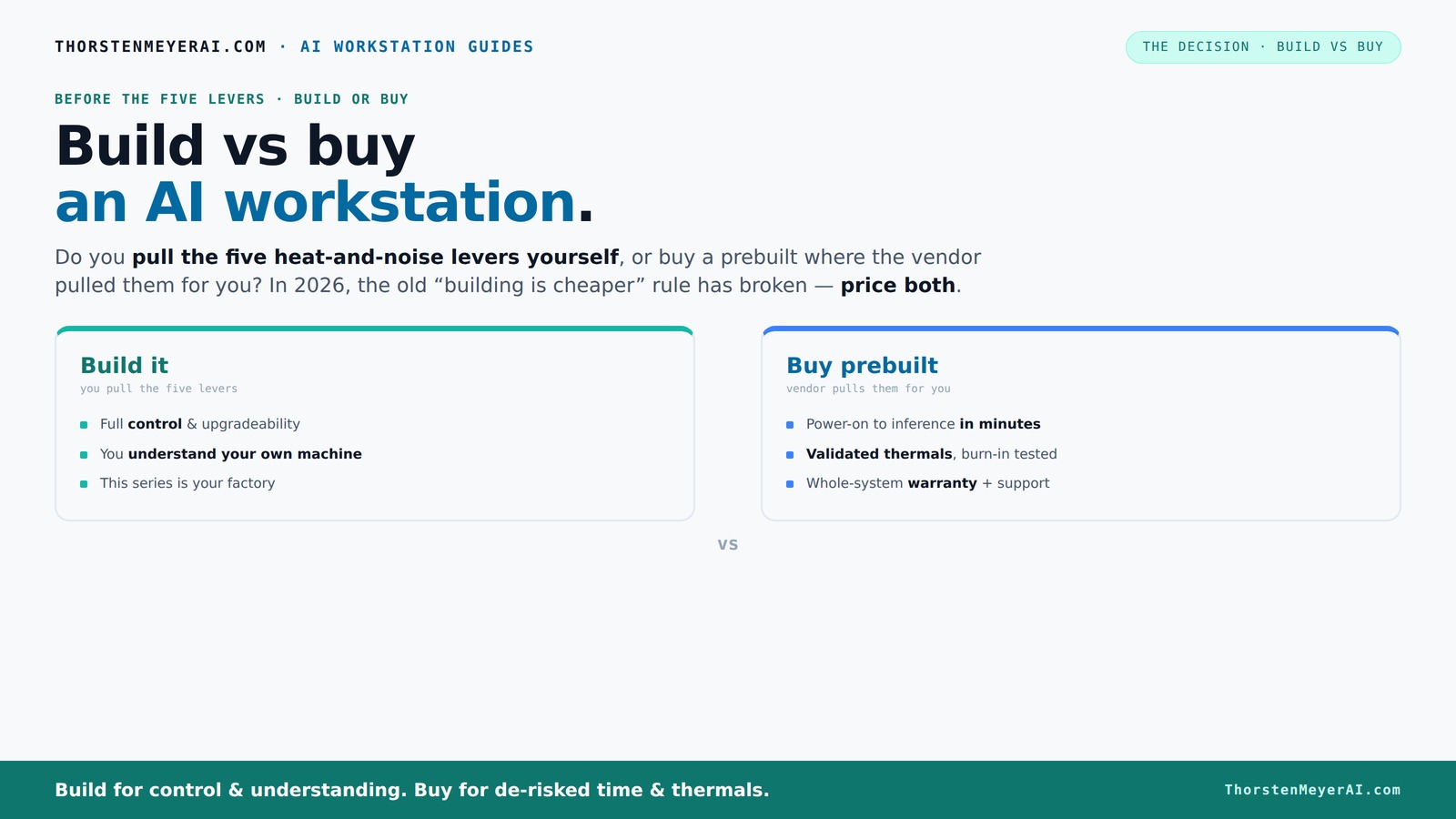
The real question behind this whole series: do you pull the five heat-and-noise levers yourself, or buy a prebuilt where the vendor pulled them for you? And in 2026, the old “building is cheaper” rule has broken. Match your situation in Part 3.
Key Takeaways
- Component shortages and bulk buying in 2026 make prebuilt systems often as affordable or cheaper than DIY builds for high-end AI workstations.
- Prebuilts save time, come fully tested for thermals and noise, and include warranty support — ideal if you want quick deployment and peace of mind.
- Building your own offers unmatched control over hardware, upgrade paths, and cooling, but demands more time, skills, and troubleshooting patience.
- AI hardware like NPUs and vendor-tuned software stacks are shifting the value equation — prebuilt systems often include these, optimized for AI tasks.
- Deciding factors hinge on your priorities: speed and support or control and upgrade flexibility.
prebuilt AI workstation with high-end GPU
As an affiliate, we earn on qualifying purchases.
As an affiliate, we earn on qualifying purchases.
Why the Build vs Buy debate got real in 2026
Building your AI workstation used to be cheaper — plain and simple. But today, component prices like DDR5 RAM and high-end GPUs have skyrocketed. A build that cost $1,000 a few years ago now easily hits $1,250 or more. Meanwhile, large vendors bought parts in bulk before prices spiked, allowing them to offer systems at prices that are hard to beat.
According to recent reports, prebuilt systems now match or beat DIY costs in many configurations. This flips the old script on its head. It’s no longer just about saving money; it’s about what you get for your investment — speed, support, reliability, and customization.
Why does this matter? Because the tradeoff between cost and value has shifted. When components are expensive and scarce, the time and expertise required to build a system become significant costs themselves. Prebuilts, with their validated thermals and integrated support, reduce these hidden costs and risks, making them more attractive even if their sticker price is similar or slightly higher.
As an affiliate, we earn on qualifying purchases.
The five levers: who pulls the heat and noise controls?
Making a high-power AI workstation run cool and quiet is like tuning a race car. It involves five critical levers: undervolting the GPU, matching the cooler, optimizing airflow, tuning fans, and strategic placement.
When you buy prebuilt, the vendor handles this tuning. They validate thermals, run burn-in tests, and often include water cooling for quieter operation. For example, BIZON systems promise up to 30% lower noise and temperatures, all done at the factory.
If you build yourself, you get to pull those levers. You pick a quiet GPU, like the RTX 4090, and undervolt it using tools like [this guide](https://thorstenmeyerai.com/undervolt-gpu-local-inference/). You choose a case with good airflow, set up your fans properly, and learn how to tweak everything for the best thermal performance. This control allows you to tailor your system’s acoustics and thermal profile precisely, which can be critical in a noisy or temperature-sensitive environment. However, it requires a good understanding of thermal dynamics and patience to fine-tune these settings effectively. The tradeoff here is between customization and effort — the more control you want, the more time and expertise you'll need to invest.
AI workstation support and warranty
As an affiliate, we earn on qualifying purchases.
As an affiliate, we earn on qualifying purchases.
Prebuilt vs DIY: Who wins on time and hassle?
If you need a machine yesterday, prebuilt systems shine. They arrive assembled, tested, and ready with your OS and AI stack installed. You power on, and within minutes, you’re running models.
Building your own takes time. You’ll spend hours sourcing parts, assembling components, updating BIOS, troubleshooting driver issues, and tuning for thermals. That process can stretch from a few days to a week, especially if you’re new to it.
Why does this matter? Because time is a critical factor in many projects. A prebuilt system minimizes downtime and lets you focus on your work rather than troubleshooting hardware issues. Conversely, the DIY route offers a learning experience and potentially better customization, but at the cost of increased effort and risk of delays. For example, a recent user reported that assembling their AI workstation took three days — troubleshooting BIOS settings, managing component compatibility, and fine-tuning cooling. Meanwhile, a prebuilt from Lambda or Puget was ready to deploy in just one day. The key implication? Consider your timeline and technical skill level before choosing between immediate deployment and customization.
As an affiliate, we earn on qualifying purchases.
Cost showdown: Is building really cheaper?
Building a machine used to be the budget choice, but in 2026, that’s not always true. Component prices have surged, and bulk buying by OEMs means prebuilt systems often cost the same or less.
Let’s look at a typical setup: a high-end AI workstation with a 4090 GPU, 64GB DDR5 RAM, and a fast SSD. Building it might cost around $2,000, but a prebuilt from a vendor like Lambda could be priced at $2,100, with the added benefit of validation and support.
Beyond raw costs, consider the hidden expenses. Troubleshooting hardware compatibility, driver issues, and thermal management can add days or even weeks of effort. Support and warranty services included with prebuilts can offset these costs, providing peace of mind and reducing unexpected downtime. DIY offers flexibility—you can choose specific parts to optimize for noise, power efficiency, or future upgrades—but this tailoring often requires more time and technical expertise, which can translate into higher indirect costs. The bottom line: the true cost comparison depends on your skills, patience, and the value you place on support and reliability.
Upgradeability and future-proofing: Build wins, buy depends
If you love tinkering and want to keep your system evolving, building has a clear edge. You pick a motherboard with a good upgrade path, more RAM slots, and easier GPU swaps.
Prebuilt OEMs sometimes use proprietary connectors or limited upgrade options, making future upgrades trickier. For instance, some systems restrict PSU compatibility or use custom cooling solutions that aren’t user-friendly.
Consider this: a DIY user upgraded from a 3080 to a 4090 in less than an hour, swapping out the GPU and adding more RAM without much fuss. This flexibility directly impacts your long-term investment, allowing you to adapt to new hardware and software demands as they arise. Conversely, prebuilt systems may require you to replace entire units or send them back for upgrades, which can be costly and time-consuming. The tradeoff is clear: if upgradeability and customization are priorities, building provides a significant advantage, enabling you to future-proof your system more effectively and economically over time.
Support, warranty, and peace of mind
Prebuilt systems come with single-vendor warranties — often 3 to 5 years. If something breaks, you call one support line, and they handle the rest. That’s a huge plus if your time is valuable and downtime is costly. This streamlined support reduces the complexity of troubleshooting, minimizes downtime, and often ensures faster repairs, which is critical in professional or time-sensitive environments.
DIY builds mean managing multiple warranties — CPU, GPU, motherboard, RAM — and troubleshooting issues on your own or through separate support channels. If a component fails, you may face days of diagnostic work, shipping parts back, or waiting for repairs. This can lead to significant delays, especially if you lack the technical know-how or support network. For example, a user who faced a GPU failure on a DIY system spent days troubleshooting, whereas a prebuilt owner received quick support and a replacement within a week. This difference can be the deciding factor for professionals who need reliable, predictable support to keep their workflows running smoothly.
The role of AI-specific hardware — NPU, GPU, and software stacks
AI workloads today benefit from more than just powerful GPUs. NPUs (Neural Processing Units) and vendor-optimized hardware are game-changers. Prebuilt systems often include these, tuned for AI tasks. Incorporating NPUs can drastically reduce inference times and power consumption, which is vital for deploying scalable AI solutions. For instance, Dell emphasizes AI PCs with NPUs that reduce power consumption by up to 41% while improving inference speed, according to recent benchmarks ([1]).
Building your own system allows you to select hardware tailored for your specific AI workloads. You might choose a GPU with advanced AI features, add an NPU card if your software supports it, or optimize the software stack for maximum efficiency. This level of customization can lead to better performance or energy efficiency tailored precisely to your needs. However, it requires a deeper understanding of hardware capabilities and compatibility. The tradeoff involves balancing convenience with the potential gains from hardware customization, which can be critical for specialized or large-scale AI deployments.
Frequently Asked Questions
Is it cheaper to build or buy a prebuilt AI workstation?
In 2026, component prices and bulk vendor discounts mean prebuilts often match or beat DIY costs, especially when factoring in time and troubleshooting. Always compare specific configurations before deciding.
Which option offers better performance for local AI workloads?
Performance depends on hardware choices and tuning. Prebuilts include optimized hardware and validated thermals, often providing reliable, stable performance. DIY can match or surpass this with careful selection and tuning.
Do prebuilt AI workstations come with NPUs or AI-optimized GPUs?
Many prebuilt systems now include AI-optimized hardware like NPUs and tuned GPUs designed for AI tasks, often with software stacks preinstalled. Check vendor specs to confirm.
How important is an NPU versus a GPU for AI work?
GPUs excel at training and inference for general models; NPUs are specialized chips that boost efficiency for specific AI workloads. The choice depends on your software and use case.
Are prebuilts easier to upgrade later?
Generally, yes. Prebuilts tend to use standard parts, but some OEMs opt for proprietary components. Building your own always offers more straightforward upgrade options.
Conclusion
In 2026, the choice between build and buy isn’t just about saving a few bucks. It’s about what you value most — immediate power, proven reliability, or hands-on control.
If you want to get your AI projects off the ground fast, a prebuilt system offers a streamlined, supported experience. But if you crave customization and long-term flexibility, building remains a compelling option — just be ready to sweat the details.