Choosing the right monitor for a home office involves balancing performance, size, and budget. The Philips 22 Inch Full HD Monitor stands out as the best overall, thanks to its flicker-free display and reliable performance. For those seeking a larger screen, the Samsung 32-inch Flat Computer Monitor offers ample workspace, while the Dell 24 Plus Monitor delivers fast refresh rates ideal for multitasking. The main tradeoffs often involve size versus desk space, resolution versus affordability, and features versus simplicity. Continue reading for a full breakdown of top contenders and what makes each one suitable for different needs.

Turn quiet afternoons into listening time
- Thousands of audiobooks, podcasts and originals
- Listen on your phone, tablet or Echo — also offline
- Cancel anytime
Complete the kit


Key Takeaways
- Size varies from compact 21.5-inch models to expansive 32-inch screens, affecting workspace and desk space needs.
- Refresh rates above 100Hz are common in gaming-oriented monitors but can benefit home office users for smoother visuals.
- VA panels often provide better contrast, while IPS screens deliver superior color accuracy—choose based on your work type.
- Features like VESA compatibility and adjustable stands add flexibility but may increase cost or complexity.
- Budget options can perform well for basic tasks, but investing in higher refresh rates and better ergonomics benefits long-term comfort.
| Philips 22 Inch Full HD Monitor 100Hz VA Flicker-Free VESA | 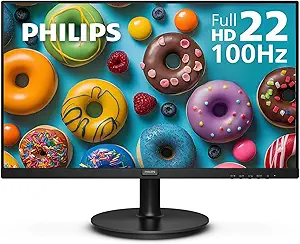 | Best Overall for Versatile Home Office Use | Screen Size: 21.5 inches | Resolution: 1920×1080 (Full HD) | Display Technology: VA LCD | VIEW ON AMAZON | See Our Full Breakdown |
| SANSUI 24-Inch FHD 1080p Monitor with HDMI and VGA |  | Best Value for Versatile Connectivity and Basic Home Office Needs | Screen Size: 23.8 inches | Resolution: 1920 × 1080 | Display Type: LED-backlit LCD | VIEW ON AMAZON | See Our Full Breakdown |
| Dell SE2426H 23.8-Inch FHD 144Hz IPS Monitor |  | Best for Smooth Motion and Color Accuracy in Home Office | Screen Size: 23.8 inches | Resolution: 1920 x 1080 | Panel Type: IPS LCD | VIEW ON AMAZON | See Our Full Breakdown |
| Dell 24 Plus Monitor – S2425HSM – 23.8-inch FHD (1920×1080) 144Hz 1ms Display with Speakers and Adjustable Stand |  | Best for Ergonomic Comfort and Multimedia in Home Office | Display Size: 23.8 inches | Resolution: 1920 x 1080 | Refresh Rate: 144Hz | VIEW ON AMAZON | See Our Full Breakdown |
| Samsung 32-inch Flat Computer Monitor |  | Best for Large Workspace and Multitasking | Display Size: 32 inches | Display Type: LED LCD | Resolution: 1920 x 1080 | VIEW ON AMAZON | See Our Full Breakdown |
| Sceptre 22-Inch Gaming Monitor, FHD 1080p, Up to 144Hz, HDMI, DisplayPort, Built-in Speakers, Matte Finish |  | Best Compact for Gaming and Multitasking | Display Size: 22 inches | Resolution: 1920 x 1080 pixels | Refresh Rate: 144Hz | VIEW ON AMAZON | See Our Full Breakdown |
| KOORUI 27 Inch Computer Monitor 144Hz FHD 1080p VA Display for Work & Play |  | Best Mid-Size for Versatile Use and Color Accuracy | Display Size: 27 inches | Resolution: 1920 x 1080 (FHD) | Refresh Rate: 144Hz | VIEW ON AMAZON | See Our Full Breakdown |
| Great Voell 27 Inch Curved Monitor, 120Hz FHD VA Display for Home Office |  | Best Curved for Immersive Work and Multimedia | Display Size: 27 inches | Resolution: 1920 x 1080 (FHD) | Refresh Rate: 120Hz | VIEW ON AMAZON | See Our Full Breakdown |
| Dell 27 Monitor – SE2726H – 27-inch FHD (1920×1080) 144Hz 1ms IPS Display with AMD FreeSync |  | Best for Accurate Colors and Wide Angles | Display Size: 27 inches | Resolution: 1920 x 1080 (FHD) | Refresh Rate: 144Hz | VIEW ON AMAZON | See Our Full Breakdown |
| Samsung 27″ Essential S3 (S36GD) Series FHD Curved Computer Monitor |  | Best Curved for Visual Comfort and Everyday Use | Display Size: 27 inches | Resolution: 1920 x 1080 (FHD) | Curvature: 1800R | VIEW ON AMAZON | See Our Full Breakdown |
| Amazon Basics 23.8-inch 1080P Computer Monitor, 120 Hz, HDMI, DP, VGA, VESA Compatible for Office, Home |  | Best Value for Basic Home Office Use | Display Size: 23.8 inches | Resolution: 1920 x 1080 (FHD) | Refresh Rate: 120Hz | VIEW ON AMAZON | See Our Full Breakdown |
| LG 27U411A-B 27-inch Full HD IPS Computer Monitor, 120Hz, HDR10, Reader Mode, Flicker Safe, HDMI, Slim Stand Base, Black |  | Best for Vibrant Colors and Versatility | Display Size: 27 inches | Resolution: 1920 x 1080 | Refresh Rate: 120Hz | VIEW ON AMAZON | See Our Full Breakdown |
| Philips 24 Inch FHD VA Monitor 100Hz with VESA Flicker-Free |  | Best for High Contrast and Comfort | Display Size: 24 inches | Resolution: 1920 x 1080 | Refresh Rate: 100Hz | VIEW ON AMAZON | See Our Full Breakdown |
| 24 Inch FHD 100Hz Computer Monitor with HDMI, Built-in Speakers, Wall Mount, Tilt – 2 Pack |  | Best Budget Dual Pack for Multi-User or Multi-Setup Environments | Display Size: 24 inches | Resolution: 1920 x 1080 | Refresh Rate: 100Hz | VIEW ON AMAZON | See Our Full Breakdown |
| Acer 21.5-inch FHD 1920×1080 Office Monitor KB220Q H2bi |  | Best Compact Space-Saver for Budget Home Offices | Display Size: 21.5 inches | Resolution: 1920 x 1080 | Refresh Rate: 100Hz | VIEW ON AMAZON | See Our Full Breakdown |
| monitors for home office | Resolution | Refresh Rate | Display Size | Contrast Ratio |
|---|---|---|---|---|
| Philips 22 Inch Full HD Monito | 1920×1080 (Full HD) | 100Hz | — | 3000:1 |
| SANSUI 24-Inch FHD 1080p Monit | 1920 × 1080 | 75 Hz | — | 4000:1 |
| Dell SE2426H 23.8-Inch FHD 144 | 1920 x 1080 | 144Hz | — | 1000:1 |
| Dell 24 Plus Monitor | 1920 x 1080 | 144Hz | 23.8 inches | 1500:1 |
| Samsung 32-inch Flat Computer | 1920 x 1080 | 75Hz | 32 inches | 4000:1 |
| Sceptre 22-Inch Gaming Monitor | 1920 x 1080 pixels | 144Hz | 22 inches | — |
| KOORUI 27 Inch Computer Monito | 1920 x 1080 (FHD) | 144Hz | 27 inches | 20000000:1 |
| Great Voell 27 Inch Curved Mon | 1920 x 1080 (FHD) | 120Hz | 27 inches | 4000:1 |
| Dell 27 Monitor | 1920 x 1080 (FHD) | 144Hz | 27 inches | — |
| Samsung 27" Essential S3 | 1920 x 1080 (FHD) | 100Hz (adjustable from 60Hz) | 27 inches | — |
| Amazon Basics 23.8-inch 1080P | 1920 x 1080 (FHD) | 120Hz | 23.8 inches | 1500:1 |
| LG 27U411A-B 27-inch Full HD I | 1920 x 1080 | 120Hz | 27 inches | — |
| Philips 24 Inch FHD VA Monitor | 1920 x 1080 | 100Hz | 24 inches | 3000:1 |
| 24 Inch FHD 100Hz Computer Mon | 1920 x 1080 | 100Hz | 24 inches | 1000:1 |
| Acer 21.5-inch FHD 1920×1080 O | 1920 x 1080 | 100Hz | 21.5 inches | — |
More Details on Our Top Picks
Philips 22 Inch Full HD Monitor 100Hz VA Flicker-Free VESA
This Philips 22-inch monitor stands out for its vivid VA panel, which delivers deep blacks and wide viewing angles—crucial for long work sessions that demand clarity and color accuracy. The 100Hz refresh rate and Adaptive-Sync technology provide smooth visuals, making it suitable for light gaming or multimedia as well. Compared to larger options like the Samsung 32-inch, this monitor’s compact size fits smaller desks comfortably, though its brightness may be less effective in very bright rooms. Its eye-friendly features, including flicker-free technology and LowBlue Mode, help reduce fatigue, a key advantage for those working extended hours. However, lacking built-in speakers and having a modest brightness level are notable tradeoffs if multimedia is a priority. This monitor makes the most sense for users needing a compact, versatile display that balances image quality and eye comfort.Pros:- Vivid VA panel with excellent contrast and wide viewing angles
- Smooth visuals thanks to 100Hz refresh rate and Adaptive-Sync
- Eye-friendly features reduce eye fatigue during extended use
- VESA compatibility for flexible mounting
Cons:- Limited to 21.5-inch screen size, less workspace for multitasking
- No built-in speakers, requiring external audio solutions
- Brightness of 250 cd/m² may be insufficient in very bright environments
Best for: Home office workers who prioritize image quality, eye comfort, and space efficiency
Not ideal for: Users seeking a larger screen for multitasking or multimedia enthusiasts who need built-in audio
- Screen Size:21.5 inches
- Resolution:1920×1080 (Full HD)
- Display Technology:VA LCD
- Refresh Rate:100Hz
- Contrast Ratio:3000:1
- Viewing Angle:178 degrees
- Brightness:250 cd/m²
- VESA Compatibility:Yes
Our verdict“This display is ideal for those who need a compact, high-contrast monitor with eye comfort features for everyday home office tasks.”
SANSUI 24-Inch FHD 1080p Monitor with HDMI and VGA
The SANSUI 24-inch monitor provides a full HD resolution with a 75Hz refresh rate, offering decent motion clarity for general productivity and media. Its wide 178° viewing angles and matte finish help reduce glare, making it suitable for flexible desk setups, especially compared to smaller or less adjustable models. Its inclusion of HDMI and VGA ports, along with VESA compatibility, offers flexible connectivity at an attractive price point. Nonetheless, it lacks built-in speakers and a headphone jack, limiting multimedia options, and its 75Hz refresh rate, while sufficient for most office tasks, isn’t ideal for gaming or fast-paced media. Compared to the Dell SE2426H’s higher refresh rate, this model favors affordability and basic versatility over speed. It suits budget-conscious buyers needing a reliable, adjustable screen for everyday tasks.Pros:- Full HD resolution with a 75Hz refresh rate for smooth basic use
- Wide viewing angles and matte finish reduce glare
- Supports both HDMI and VGA connections for flexible setup
- VESA mount compatible for versatile placement
Cons:- No built-in speakers or headphone jack, limiting multimedia use
- Limited to Full HD resolution, less sharp for large or detailed work
- Refresh rate of 75Hz may feel sluggish for fast motion tasks
Best for: Budget-conscious home office users who need flexible connectivity and decent image quality
Not ideal for: Gamers or multimedia creators requiring higher refresh rates and built-in audio
- Screen Size:23.8 inches
- Resolution:1920 × 1080
- Display Type:LED-backlit LCD
- Refresh Rate:75 Hz
- Contrast Ratio:4000:1
- Viewing Angle:178°
- Brightness:250 nits
- VESA Mount:75 × 75 mm
Our verdict“This monitor offers solid value for users who need a dependable, adjustable display without extra features for casual home office tasks.”
Dell SE2426H 23.8-Inch FHD 144Hz IPS Monitor
The Dell SE2426H combines a 23.8-inch IPS panel with a 144Hz refresh rate, making it an excellent choice for users who want crisp visuals and smooth motion for both work and light gaming. The 1ms MPRT response time and AMD FreeSync support reduce motion blur, surpassing the standard 75Hz screens like the SANSUI. Its wide 178° viewing angles and TÜV Rheinland 3-star eye comfort certification help maintain color consistency and reduce eye strain during long hours. However, the Full HD resolution might feel limiting compared to 4K options for detailed multitasking. Its stand offers only tilt adjustment, which can be a drawback for ergonomic setups. This monitor suits those who prioritize fast response times and color fidelity over larger screen sizes or higher resolutions.Pros:- Fast 144Hz refresh rate with AMD FreeSync for smooth visuals
- 1ms MPRT response time reduces motion blur
- IPS panel provides consistent, accurate colors at wide angles
- Eye comfort certification reduces blue light fatigue
Cons:- Limited to Full HD resolution, less workspace for multitasking
- Stand adjustment limited to tilt only
- Higher refresh rate may be unnecessary for basic office tasks
Best for: Home office users who want a fast, color-accurate display for multitasking and occasional multimedia
Not ideal for: Users needing height or pivot adjustments or planning to do graphic-intensive work in 4K
- Screen Size:23.8 inches
- Resolution:1920 x 1080
- Panel Type:IPS LCD
- Refresh Rate:144Hz
- Response Time:1ms MPRT
- Contrast Ratio:1000:1
- Brightness:300
- VESA Mount:Yes
Our verdict“Ideal for users seeking a quick, color-accurate display with smooth visuals for multitasking and light gaming.”
Dell 24 Plus Monitor – S2425HSM – 23.8-inch FHD (1920×1080) 144Hz 1ms Display with Speakers and Adjustable Stand
The Dell S2425HSM elevates the standard home office monitor with a 23.8-inch FHD display, 144Hz refresh rate, and a highly adjustable stand offering height, tilt, pivot, and swivel. The 1ms response time and AMD FreeSync support ensure crisp, smooth motion for both productivity and casual gaming. Its built-in dual 3W speakers add multimedia convenience, reducing the need for external audio devices. The TÜV-certified eye care technology minimizes blue light and flicker, making it suitable for extended hours. The standout feature here is the comprehensive ergonomic adjustment, which can significantly improve comfort during long workdays—something the Dell SE2426H lacks with its limited tilt. However, its resolution remains at 1080p, and it misses USB-C connectivity, which some users might prefer. This monitor is perfect for home offices where comfort and multimedia integration are priorities.Pros:- Highly adjustable stand improves ergonomic comfort
- Fast 1ms response time and 144Hz for smooth visuals
- Built-in dual speakers enhance multimedia experience
- Eye care technology reduces fatigue during long hours
Cons:- Limited to 1080p resolution, less detailed workspace
- No USB-C port, limiting modern connectivity options
- Relatively heavy at over 11 pounds
Best for: Home office workers who need ergonomic flexibility and integrated audio for extended use
Not ideal for: Users seeking 4K resolution or a more compact form factor for small desks
- Display Size:23.8 inches
- Resolution:1920 x 1080
- Refresh Rate:144Hz
- Response Time:1ms
- Contrast Ratio:1500:1
- Brightness:300 cd/m²
- Stand Adjustment:Height, tilt, pivot, swivel
- VESA Mount:Yes
Our verdict“Best suited for home workers prioritizing ergonomic comfort and integrated audio for prolonged sessions.”
Samsung 32-inch Flat Computer Monitor
The Samsung 32-inch monitor provides a spacious display with a borderless design, making it ideal for multitasking and immersive work environments. Its 75Hz refresh rate offers smooth visuals sufficient for general office tasks and casual multimedia. The Flicker-Free and Eye Saver Mode features help mitigate eye strain during long sessions, especially compared to smaller screens like the Philips 22-inch. The larger size enhances productivity, but the resolution remains at 1080p, which can feel pixelated on a bigger display. The lack of built-in speakers and the stand’s limited height adjustment may be drawbacks for users who want a more integrated multimedia setup or ergonomic flexibility. This monitor is best for those prioritizing a large, modern workspace without requiring 4K or advanced gaming features.Pros:- Large 32-inch display enhances multitasking and immersion
- Borderless design adds aesthetic appeal and workspace efficiency
- Eye care features help reduce fatigue during extended use
- Multiple connectivity options including HDMI and DisplayPort
Cons:- Limited to 1080p resolution, which can appear pixelated on large screens
- No built-in speakers, requiring external audio setup
- Stand may lack height adjustment, affecting ergonomics
Best for: Home office users who need a large, immersive display for multitasking and general productivity
Not ideal for: Those requiring high-resolution detail or integrated audio for multimedia work
- Display Size:32 inches
- Display Type:LED LCD
- Resolution:1920 x 1080
- Refresh Rate:75Hz
- Contrast Ratio:4000:1
- Viewing Angle:178°
- Brightness:250 cd/m²
- Display Finish:Flat
Our verdict“This large-format monitor suits users needing expansive workspace for multitasking and a modern look without 4K resolution.”
Sceptre 22-Inch Gaming Monitor, FHD 1080p, Up to 144Hz, HDMI, DisplayPort, Built-in Speakers, Matte Finish
This 22-inch monitor stands out for users who prioritize a high refresh rate in a smaller form factor. Its 144Hz refresh rate delivers exceptionally smooth visuals, ideal for fast-paced gaming or quick multitasking, especially when compared to larger but slower screens like the Samsung 27″ Essential S3. The built-in speakers add convenience, though the limited size may feel cramped for prolonged work sessions. The nearly bezel-free design enhances immersion, but the lack of ergonomic adjustments or USB ports could be a drawback for those needing more flexibility. It’s a solid choice for space-constrained setups where gaming performance outweighs expandability or advanced ergonomics.
Pros:- High 144Hz refresh rate ensures smooth visuals for gaming and fast workflows
- Built-in speakers provide quick audio without additional peripherals
- Minimal bezel design maximizes screen space and immersion
- Blue light shift technology reduces eye strain during long sessions
Cons:- Limited to 22 inches, which may be too small for detailed multitasking or extended work
- No ergonomic stand adjustments, potentially causing discomfort over long use
- Lacks USB ports or additional connectivity options for peripherals
Best for: Home office users who need a compact, high-performance monitor for gaming and multitasking in limited space
Not ideal for: Users seeking a large, adjustable monitor for extended productivity or ergonomic comfort
- Display Size:22 inches
- Resolution:1920 x 1080 pixels
- Refresh Rate:144Hz
- Response Time:1 ms
- Ports:1 HDMI, 1 DisplayPort
- Finish:Matte
Our verdict“This monitor is best suited for users who want a compact, fast-refresh display primarily for gaming or quick multitasking in tight spaces.”
KOORUI 27 Inch Computer Monitor 144Hz FHD 1080p VA Display for Work & Play
Compared with smaller monitors like the Sceptre 22-inch, the KOORUI 27-inch display offers more screen real estate, making it more suitable for multitasking and extended work sessions. Its VA panel provides a high contrast ratio and vibrant colors, especially with 99% sRGB coverage and HDR10 support, making it ideal for both work and entertainment. However, the lack of response time details might concern gamers who need ultra-fast performance, a tradeoff for the excellent color fidelity. The slim bezel design maximizes the viewing area, but limited tilt adjustment could impact comfort during long hours. Overall, this monitor balances size, color, and performance for users who want a capable all-rounder.
Pros:- Large 27-inch screen provides ample space for multitasking and detailed work
- High refresh rate of 144Hz delivers smooth motion for videos and casual gaming
- Excellent color coverage and HDR10 enhance visual quality
- Multiple connectivity options include HDMI and VGA for flexibility
Cons:- Response time is not specified, which could hinder competitive gaming performance
- Limited tilt adjustment may cause discomfort for prolonged use
- Lacks built-in speakers or USB ports, requiring external peripherals
Best for: Home office users who need a larger display with excellent color accuracy for multitasking, media, and casual gaming
Not ideal for: Gamers requiring ultra-low response times or users needing extensive ergonomic adjustments
- Display Size:27 inches
- Resolution:1920 x 1080 (FHD)
- Refresh Rate:144Hz
- Contrast Ratio:20000000:1
- Color Gamut:99% sRGB
- Connectivity:HDMI, VGA
Our verdict“This monitor fits users seeking a sizable, color-accurate display suitable for both work and leisure, with some compromise on response time details.”
Great Voell 27 Inch Curved Monitor, 120Hz FHD VA Display for Home Office
This 27-inch curved monitor offers a more immersive experience than flat screens like the Samsung S3 series, thanks to its 1800R curvature that enhances depth perception. Its 120Hz refresh rate and 1 ms response time deliver smooth visuals, rivaling the Dell SE2726H’s performance for gaming and media. The VA panel provides a contrast ratio of 4000:1 and 99% sRGB coverage, making it suitable for color-sensitive tasks. However, the resolution remains at 1080p, so it won’t satisfy those seeking 4K clarity. The lack of built-in speakers and a somewhat basic design might deter users wanting more integrated features. It’s a good choice for those who prioritize immersion and visual quality over extra perks.
Pros:- Curved design enhances immersion and reduces eye strain
- High contrast ratio and fast response time for smooth visuals
- Vivid colors with 99% sRGB coverage
- Eye care technology reduces fatigue during long use
Cons:- 1080p resolution may be limiting for detailed work or large spreadsheets
- No built-in speakers, requiring external audio
- Design is somewhat basic without advanced ergonomic features
Best for: Home office users who want an immersive, curved display for media consumption and multitasking, with a focus on visual quality
Not ideal for: Professionals needing detailed 4K clarity or extensive ergonomic adjustments
- Display Size:27 inches
- Resolution:1920 x 1080 (FHD)
- Refresh Rate:120Hz
- Display Technology:VA LCD
- Contrast Ratio:4000:1
- Curvature:1800R
Our verdict“This curved monitor is ideal for users seeking a more immersive visual experience for multimedia and multitasking, accepting the limits of 1080p resolution.”
Dell 27 Monitor – SE2726H – 27-inch FHD (1920×1080) 144Hz 1ms IPS Display with AMD FreeSync
The Dell SE2726H sets itself apart with an IPS panel, providing superior color accuracy and wide viewing angles compared to TN or VA panels like those on the KOORUI or Great Voell models. Its 144Hz refresh rate and 1ms response time make it a strong choice for gaming and multimedia, similar to the KOORUI but with better color fidelity. Its TÜV Rheinland certification for eye comfort adds a layer of reliability for long work sessions. However, the limited connectivity—only HDMI—might be a constraint for users with multiple peripherals. The basic design suits those who value visual accuracy over aesthetic flair, making it a balanced option for home office users who also game or stream media.
Pros:- IPS panel ensures vivid, accurate colors and wide viewing angles
- Fast 144Hz refresh rate and 1ms response time ideal for gaming and video editing
- Eye comfort features improve long-term viewing experience
- Good size for multitasking and detailed work
Cons:- Limited to HDMI connectivity, restricting peripheral options
- Basic aesthetic design may not appeal to all users
- No built-in speakers or USB ports
Best for: Home office users who need accurate colors, wide viewing angles, and a balance of work and play capabilities
Not ideal for: Those who require extensive connectivity options or a more stylish design
- Display Size:27 inches
- Resolution:1920 x 1080 (FHD)
- Refresh Rate:144Hz
- Response Time:1 ms
- Panel Technology:IPS
- Connectivity:2x HDMI
Our verdict“This monitor is best for users who want color accuracy, wide angles, and fast visuals for both work and gaming in a straightforward design.”
Samsung 27″ Essential S3 (S36GD) Series FHD Curved Computer Monitor
The Samsung S3 series offers a 27-inch curved screen with a 1800R radius, designed to create a more natural viewing experience and reduce eye fatigue compared to flat screens like the Dell SE2726H. Its 100Hz refresh rate is adequate for general home office tasks and light multimedia, although it is lower than the 144Hz options for gaming. The monitor’s eye comfort technology, certified by TÜV, makes it a good pick for long hours. Yet, the default 60Hz refresh rate may not satisfy gamers or users seeking ultra-smooth motion, requiring manual adjustment. The basic connectivity options limit versatility, but the curved design provides an immersive experience for everyday tasks.
Pros:- Curved design enhances immersion and reduces eye strain
- Comfortable viewing angle with reduced fatigue during long work sessions
- Versatile connectivity including HDMI and D-sub
- Affordable price point for a curved display
Cons:- Default 60Hz refresh rate limits smoothness compared to higher-end models
- Image quality and resolution are basic 1080p, not suitable for detailed 4K tasks
- Limited adjustment options beyond tilt
Best for: Home office users who prefer a curved display for comfort and multimedia use, with moderate refresh needs
Not ideal for: Gamers or users requiring high refresh rates or extensive connectivity options
- Display Size:27 inches
- Resolution:1920 x 1080 (FHD)
- Curvature:1800R
- Refresh Rate:100Hz (adjustable from 60Hz)
- Connectivity:HDMI, D-sub
Our verdict“This monitor is well-suited for users who want a comfortable, curved display for everyday productivity, accepting some performance limitations.”
Amazon Basics 23.8-inch 1080P Computer Monitor, 120 Hz, HDMI, DP, VGA, VESA Compatible for Office, Home
This Amazon Basics monitor stands out for offering a smooth 120Hz refresh rate at an affordable price, making it a strong choice for users seeking fluid motion without the higher cost of premium models like the LG 27U411A-B. Its vibrant IPS panel with 99% sRGB coverage delivers accurate colors ideal for everyday tasks, though the 1080p resolution may feel limiting for multitasking or detailed work compared to higher-res options. Connectivity is versatile with HDMI, DisplayPort, and VGA, but it lacks a USB hub or additional ports, which could be a drawback for those wanting a more integrated setup. The eye comfort features reduce fatigue, supporting longer work sessions. However, the need for compatible cables and graphics cards to fully utilize 120Hz might involve extra investment. This monitor makes the most sense for budget-conscious home office users who prioritize smooth visuals and color accuracy over ultra-high resolution.Pros:- Vibrant display with accurate color coverage
- 120Hz refresh rate ensures smooth motion
- Eye comfort features like Flicker-Free and LowBlue Light
- Versatile connectivity options
Cons:- Limited to 1080p resolution, not suitable for detailed editing or multitasking
- Requires compatible cables and graphics cards for full 120Hz performance
- No built-in USB hub or extra ports
Best for: Budget-conscious professionals or students needing a reliable, smooth display for everyday tasks
Not ideal for: Creative professionals or multitaskers requiring 4K resolution or extensive connectivity options
- Display Size:23.8 inches
- Resolution:1920 x 1080 (FHD)
- Refresh Rate:120Hz
- Panel Type:IPS
- Contrast Ratio:1500:1
- Connectivity:HDMI 1.4, DisplayPort 1.2, 3.5mm audio-out
- Item Dimensions:7.3″D x 21.3″W x 16.4″H
- Item Weight:3.16 kg
Our verdict“This monitor is ideal for home office users seeking a cost-effective, smooth-performing display for everyday tasks.”
LG 27U411A-B 27-inch Full HD IPS Computer Monitor, 120Hz, HDR10, Reader Mode, Flicker Safe, HDMI, Slim Stand Base, Black
The LG 27U411A-B excels in delivering vivid, accurate colors with its 99% sRGB coverage and HDR10 support, making it suitable for creative tasks and media consumption compared to the smaller Philips VA monitor. Its large 27-inch IPS panel combined with a 120Hz refresh rate and 1ms response time offers smooth visuals that benefit both work and casual gaming, though it’s limited to Full HD resolution, which may not satisfy those seeking 4K clarity. The virtually borderless design and adjustable tilt add to its aesthetic appeal and ergonomic comfort, but the lack of built-in speakers means additional peripherals are needed for audio. Some features require software setup, potentially complicating initial use. This monitor is best suited for users who want an attractive, versatile display for media, multitasking, and light gaming, but not for those needing maximum resolution or integrated audio.Pros:- Vivid, accurate colors with HDR10 and 99% sRGB coverage
- Fast 120Hz refresh rate and 1ms response time for smooth motion
- Modern, virtually borderless design with adjustable tilt
- Versatile for work, entertainment, and light gaming
Cons:- Limited to 1920 x 1080 resolution, not 4K
- No built-in speakers, requiring external audio devices
- Some features need software installation
Best for: Creative professionals or multimedia enthusiasts needing accurate colors and a sleek design for varied tasks
Not ideal for: High-end gamers or users requiring 4K resolution and built-in speakers for a seamless multimedia experience
- Display Size:27 inches
- Resolution:1920 x 1080
- Refresh Rate:120Hz
- Response Time:1ms
- HDR:HDR10
- Stand:Adjustable tilt
- Connectivity:HDMI
- Additional Features:Black Stabilizer, Reader Mode
Our verdict“This monitor offers a vibrant, flexible display for users who prioritize color accuracy and style over ultra-high resolution.”
Philips 24 Inch FHD VA Monitor 100Hz with VESA Flicker-Free
The Philips 24-inch VA monitor shines with high contrast ratios and wide viewing angles, making it ideal for prolonged use in home offices compared to smaller screens like the Acer 21.5-inch. Its 100Hz refresh rate ensures smooth visuals for casual work and entertainment, while Flicker-Free and Blue Light Mode features help reduce eye strain during long sessions. The VA panel provides richer colors and deeper blacks, though its 24-inch size might feel cramped for multitasking or detailed editing, and the brightness of 250 nits could be insufficient in very bright rooms. Lacking built-in speakers, it relies on external audio, but its sleek bezel-free design complements multi-monitor setups well. This monitor is best for users prioritizing contrast, comfort, and long-term eye health in a compact size, but it’s less suited for those needing larger screens or integrated audio.Pros:- High contrast ratio with vibrant colors
- Flicker-Free and Blue Light Mode for eye comfort
- Wide viewing angles and bezel-free design
- Good for long work sessions
Cons:- Limited to 24 inches, less space for multitasking
- Brightness of 250 nits may be insufficient in bright environments
- No built-in speakers
Best for: Home office users seeking a high-contrast display with eye-friendly features in a compact size
Not ideal for: Users who need larger screens or built-in audio for multimedia tasks
- Display Size:24 inches
- Resolution:1920 x 1080
- Refresh Rate:100Hz
- Contrast Ratio:3000:1
- Viewing Angle:178 degrees
- Brightness:250 nits
- VESA Compatibility:Yes
- Additional Features:Flicker-Free, Blue Light Mode
Our verdict“This monitor provides excellent contrast and eye comfort for users with limited desk space who value visual clarity.”
24 Inch FHD 100Hz Computer Monitor with HDMI, Built-in Speakers, Wall Mount, Tilt – 2 Pack
The 2-pack of 24-inch FHD monitors provides an economical solution for multi-user setups or dual workspace environments, offering 100Hz refresh rate and built-in speakers that save desk space compared to single, more expensive models like the LG 27U411A-B. Their 100% sRGB coverage ensures lively colors, and the inclusion of wall mounts and tilt adjustment adds flexibility. However, the resolution remains at 1080p, which might be limiting for detailed tasks or large spreadsheets, and the lack of height adjustment could impact ergonomic comfort. The compact size and twin setup are ideal for small offices or shared spaces, but users requiring higher resolution or more advanced ergonomic features should look elsewhere. This pick suits budget-focused users needing multiple screens for productivity or casual gaming.Pros:- Vibrant colors with 100% sRGB coverage
- Includes two monitors with built-in speakers
- Wall mountable and tilt adjustable for flexibility
- Cost-effective for multi-monitor setups
Cons:- Limited to 1080p resolution, not 4K
- No height adjustment, which may impact ergonomics
- Requires multiple HDMI connections for dual setup
Best for: Small offices or shared workspaces needing affordable, space-saving dual monitors
Not ideal for: Creative professionals or power users requiring 4K resolution and adjustable stands
- Display Size:24 inches
- Resolution:1920 x 1080
- Refresh Rate:100Hz
- Contrast Ratio:1000:1
- Brightness:250 cd/m2
- Viewing Angle:170 degrees
- Additional Features:Wall Mount, Tilt Adjustment
Our verdict“This dual pack is a practical, budget-friendly choice for multi-monitor setups in small or shared home offices.”
Acer 21.5-inch FHD 1920×1080 Office Monitor KB220Q H2bi
The Acer KB220Q offers a compact, space-efficient 21.5-inch Full HD display, making it an excellent choice for small desks or secondary monitors compared to larger options like the LG 27U411A-B. Its zero-bezel design maximizes screen real estate, and the 100Hz refresh rate with a 1ms response time ensures smooth visuals for basic tasks and casual gaming. While it lacks ergonomic features such as height adjustment, its space-saving form and adaptive sync support make it suitable for tight setups. The absence of built-in speakers and limited size might be a downside for users seeking a more immersive or versatile workstation. This monitor is ideal for those needing a secondary display or primary workspace where desk space is at a premium, but not for those requiring extensive adjustability or higher resolution.Pros:- Zero-bezel, space-efficient design
- Vivid Full HD resolution with 100Hz refresh rate
- Adaptive-Sync support for smooth visuals
- Compact size fits tight spaces
Cons:- Limited to 21.5 inches, less workspace
- No height adjustment or ergonomic features
- No built-in speakers
Best for: Users with limited desk space needing a secondary or primary compact monitor for basic tasks
Not ideal for: Creative professionals or multitaskers who require larger screens or ergonomic adjustments
- Display Size:21.5 inches
- Resolution:1920 x 1080
- Refresh Rate:100Hz
- Response Time:1ms
- Adaptive Sync:Yes
- Finish:Matte
- Item Dimensions:7″D x 21.5″W x 15″H
- Item Weight:Approximately 4.4 pounds
Our verdict“This monitor is best suited for small spaces or secondary screens where size and clarity are priorities over adjustability.”

How We Picked
The monitors featured in this roundup were selected based on a combination of performance, usability, build quality, and value for home office use. I prioritized screens that balance clarity, refresh rates, ergonomic features, and connectivity options suitable for daily work tasks. Devices with adjustable stands, VESA compatibility, and flicker-free technology scored higher, as these features improve comfort and versatility. The ranking reflects an assessment of how well each monitor meets common home office needs while considering price points and user convenience.Factors to Consider When Choosing Monitors For Home Offices
When selecting a monitor for your home office, it’s vital to weigh several key factors to ensure a comfortable and productive setup. Beyond basic resolution, consider ergonomics, connectivity options, and display technology. Making the wrong choice can lead to eye strain, poor posture, or limited flexibility, so understanding these aspects helps avoid costly mistakes and ensures your monitor adapts to your workflow.Size and Resolution
Choosing the right size depends on your desk space and the nature of your work. Larger screens (27 inches and above) can boost productivity by providing more screen real estate, especially for multitasking and detailed tasks. Resolution is equally important; Full HD (1080p) is common and sufficient for most tasks, but higher resolutions like QHD or 4K offer sharper images for design work or detailed spreadsheets. Be mindful that larger, higher-resolution monitors often come at a higher price and may require better graphics hardware.
Ergonomics and Adjustability
Comfort is key for long hours at a home office. Monitors with adjustable stands—allowing height, tilt, and swivel adjustments—help maintain good posture and reduce neck strain. VESA compatibility offers additional mounting flexibility, freeing up desk space or enabling ergonomic setups. Skipping these features can lead to discomfort over time, especially if you’re working multiple hours daily. Investing in an ergonomic monitor can pay off with increased comfort and productivity.
Display Technology and Panel Type
VA panels typically provide better contrast ratios, making them suitable for multimedia and general productivity. IPS panels excel in color accuracy and viewing angles, ideal for creative tasks or if you work with visual content. TN panels, while faster, tend to have poorer color and viewing angles, making them less ideal for home office use. Understanding these differences helps match the monitor to your specific work needs and reduces eye strain caused by poor screen quality.
Connectivity and Features
Multiple ports, including HDMI, DisplayPort, and USB-C, ensure compatibility with various devices. USB-C is increasingly popular for its convenience, allowing video, data, and charging through a single cable. Built-in speakers can save desk space but often sacrifice audio quality, so consider external speakers if sound is important. Features like flicker-free technology and blue light filters can also reduce eye fatigue during long work sessions.
Price and Value
Budget monitors can handle basic tasks well, but investing a bit more typically offers better build quality, ergonomic features, and display technology. Premium models with 4K resolution, high refresh rates, or advanced color accuracy are better suited for specialized tasks or those prioritizing comfort and longevity. Matching your monitor choice to your specific work habits and budget helps avoid overspending on unnecessary features or compromising on essential ones.
Frequently Asked Questions
Is a 24-inch monitor enough for home office work?
A 24-inch monitor is generally sufficient for most daily tasks like email, browsing, and document editing. It strikes a good balance between screen size and desk space, making it suitable for small to medium workspaces. However, if you work with multiple applications simultaneously or require detailed visual work, larger screens like 27 inches or more can boost productivity by reducing the need to switch between windows and providing more viewing area.
Should I prioritize a higher refresh rate for my home office monitor?
While higher refresh rates (above 60Hz) are essential for gaming, they can also improve smoothness during scrolling and window movements in everyday tasks. Monitors with 75Hz or 100Hz refresh rates can make your workflow feel more responsive, reducing eye fatigue. For standard office work, 60-75Hz is usually sufficient, but if you value fluid visuals or do some light gaming during breaks, opting for a higher refresh rate makes sense.
Is an IPS monitor worth the extra cost for home office use?
IPS panels provide better color accuracy and wider viewing angles, which can be beneficial if your work involves color-sensitive tasks or sharing the screen with others. Although they tend to be more expensive than VA or TN panels, the improved image quality can reduce eye strain and make extended work sessions more comfortable. For general productivity, an IPS monitor often justifies the extra cost, especially if you prioritize visual clarity.
What’s the advantage of VESA compatibility in a home office monitor?
VESA compatibility allows you to mount your monitor on an adjustable arm or wall bracket, freeing up desk space and enabling ergonomic positioning. This flexibility can help reduce clutter and improve comfort during long work hours. Without VESA, your options for customizing your setup are limited to the built-in stand, which may not offer enough adjustability. If space or ergonomic comfort are priorities, VESA compatibility is a valuable feature.
How important is built-in speakers for home office monitors?
Built-in speakers can be convenient for quick video calls or multimedia, but they often lack audio fidelity. If sound quality matters, investing in external speakers or headphones is advisable. However, for basic notifications or occasional video conferencing, built-in speakers can save space and reduce cable clutter. Consider your audio needs carefully, especially if your work involves frequent conferencing or media consumption.
Conclusion
For most users seeking a reliable, versatile solution, the Philips 22 Inch Full HD Monitor offers excellent value with essential features and flicker-free technology. Those who prioritize screen size and image quality might lean toward the Samsung 32-inch Flat Monitor or the Dell 27 Monitor, which balance size and performance well. Beginners or casual users will find budget options like the Amazon Basics 23.8-inch suitable, while professionals needing color accuracy and ergonomic features should consider premium models like the LG 27U411A-B. Ultimately, pick based on your workspace, work type, and budget to ensure comfort and productivity.